Need help?
Do you have a question about the TACKLIFE PJS02A and is the answer not in the manual?
Guidelines for a safe work environment and electrical precautions during operation.
Measures for personal protection, preventing accidental starts, and proper attire.
Ensuring correct tool application and maintaining switch functionality.
Understanding the power-on light and how to start the jig saw.
Steps for cleaning the jig saw for safe and optimal performance.
This document is a user manual for the Tacklife PJS02A Jig Saw, providing comprehensive instructions for its safe operation, maintenance, and various functionalities. The jig saw is designed for cutting different materials, including wood, plastic, aluminum, and steel, with specific settings and blades recommended for each.
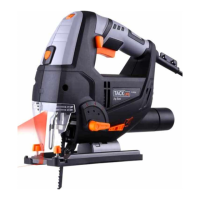
The Tacklife PJS02A Jig Saw is a versatile power tool primarily used for making intricate cuts and curves in various materials. It features a motor that drives a reciprocating saw blade, allowing for precise and controlled cutting. The tool is equipped with a speed adjustment knob, offering six different speed settings to match the material and desired cut. This allows users to select the optimal speed for soft materials, medium-hard materials, or hard materials, ensuring efficient and clean cuts.
A key feature of this jig saw is its pendulum adjustment button, which controls the oscillation of the saw blade. The pendulum action can be set to different positions (0, 1, 2, or 3) to optimize cutting performance. For instance, positions 2 or 3 are recommended for soft materials like wood and plastic, while position 0 or 1 is suitable for sharp-edged cuts or thin workpieces. For hard materials like steel, position 0 is advised to prevent damage and ensure a smooth cut.
The jig saw also includes a parallel guide, which aids in making straight cuts parallel to the edge of a workpiece. This guide can be adjusted and locked into position using finger screws, allowing users to set the desired cutting width accurately.
For enhanced visibility during operation, the tool is fitted with an LED light that illuminates the cutting area when the on/off trigger is pressed. This feature is particularly useful in dimly lit environments, ensuring greater accuracy and safety.
The jig saw incorporates a blow button with "off↔on" markings. When in the "on" position, the blow function activates, clearing sawdust from the cutting line as the power switch is pressed. Conversely, when the blow button is in the "off" position, the dust extraction function is activated. The tool is equipped with a dust extractor socket at the rear, allowing connection to a vacuum cleaner for efficient dust collection, which helps maintain a clean work area and reduces dust-related hazards.
Operating the Tacklife PJS02A Jig Saw involves several user-friendly features. The tool can be started in two modes: instant response and continuous operation. For instant response, users simply press and release the on/off switch. For continuous operation, the on/off switch is pressed and held down while simultaneously depressing the locking button. To switch off continuous operation, the on/off switch is pressed and released. An indicator light illuminates when the tool is connected to power, signaling that it is ready for use.
Mounting and removing saw blades is designed for quick and easy execution. A special handle allows the user to open the blade holder, insert the saw blade until it touches the guide roller, and then release the handle to secure it. A slight pull on the blade confirms a firm fit. When removing, the handle is pushed to open the holder, and the blade is pulled out. Users are advised to wear protective gloves when handling hot blades due to friction during cutting.
The adjustable base of the jig saw allows for miter and bevel cuts up to 45 degrees in either direction. Two screws underneath the base can be loosened to swivel the base to the desired angle, with marked angles at 15°, 30°, and 45°. The base can also be pushed backward by loosening the same screws, enabling cuts right up to an edge.
When cutting holes, the manual specifies that this is only possible in chipboard and wood unless a pilot hole is drilled first. The jig saw should be pressed firmly against the support and moved slowly in the cutting direction. For cutting veneered chipboard, a fine saw blade is recommended, and the base should be positioned on the uncovered area. The manual emphasizes advancing the saw with little force to ensure optimal cutting performance.
Proper maintenance is crucial for the longevity and safe operation of the Tacklife PJS02A Jig Saw. Before performing any maintenance or adjustments, it is imperative to disconnect the tool from the power source to prevent accidental starting.
The manual advises keeping the machine and ventilation slots clean to ensure safe and proper working. Dust and debris should be regularly cleared from the vents. The tool handles should be kept clean and free of oil or grease. For cleaning, only mild soap and a damp cloth should be used, as certain cleaning agents and solvents can be harmful to plastics and other insulated parts. Flammable or combustible solvents should never be used around the tool.
In case of equipment failure, the manual recommends having the tool repaired by an authorized electrician using only identical replacement parts. If the carbon brushes need replacement, this should be done by a qualified repair person, ensuring both brushes are replaced simultaneously. If the supply cord is damaged, it must be replaced by the manufacturer or its service agent to avoid hazards, and the tool should be disconnected from the power supply immediately if the cord is damaged.
The manual also highlights the importance of using only accessories and spare parts recommended by the manufacturer. Regularly checking for misalignment or binding of moving parts, breakage, or any other condition that might affect the tool's operation is essential. Keeping cutting tools sharp and clean is also emphasized, as properly maintained cutting tools are less likely to bind and are easier to control.
 General
| Power Source | Corded Electric |
|---|---|
| Voltage | 120V |
| Cutting Capacity (Metal) | 10mm |
| Variable Speed | Yes |
| Orbital Action | 4-Position |
| Dust Extraction/Port | Yes |
| Blade Change | Tool-Free |
| Type | Jigsaw |
| Blade Type | T-shank |
| No Load Speed | 3000 SPM |
| Bevel Capacity | 45 degrees |
| Cord Length | 2m |

 To Next Page