Registration of a design into the machine memory
45
Chapter 4
1
2
3
4
5
6
7
8
9
10
11
XL08
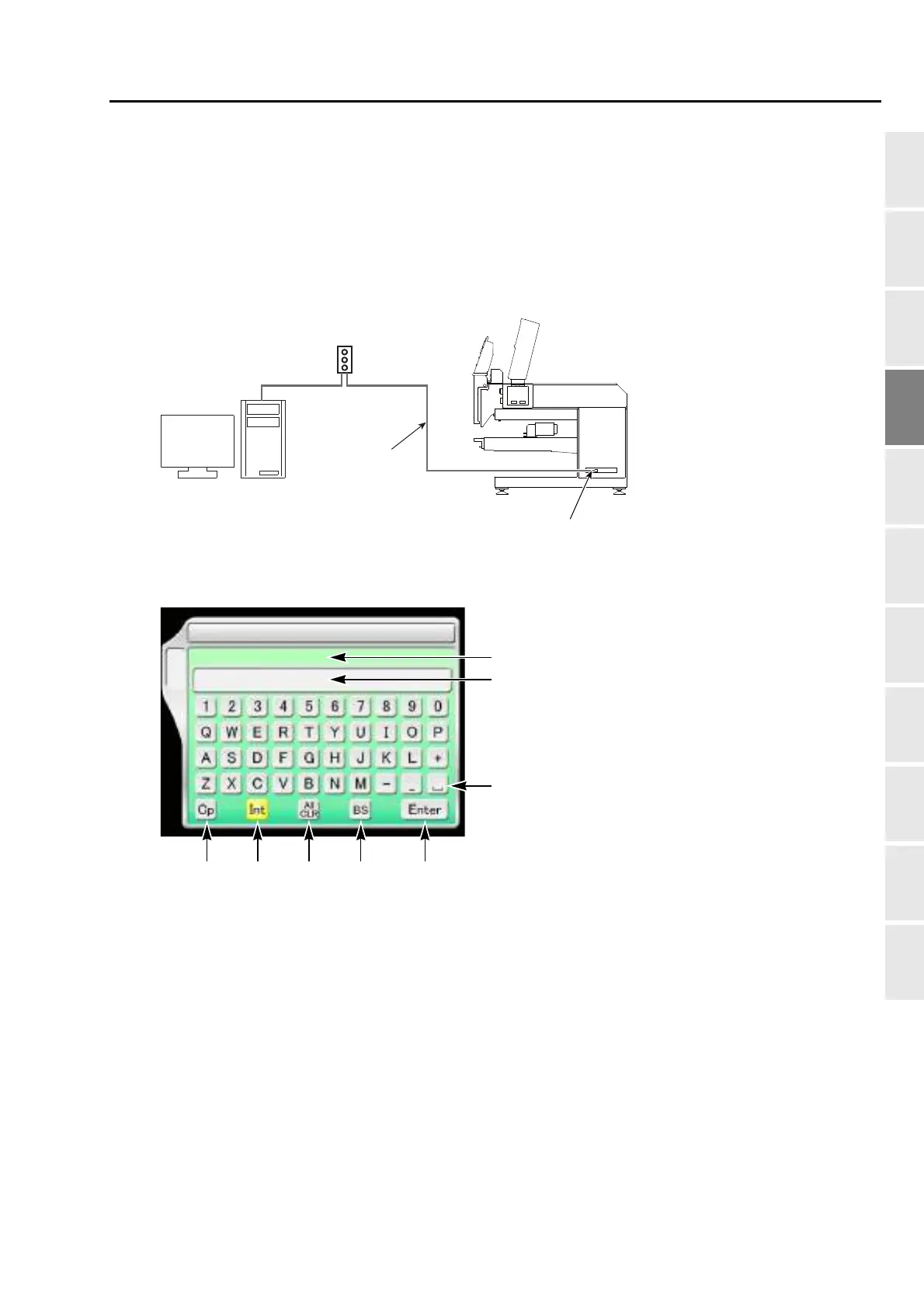
3-3. To use personal computer (Data input "name")
Enter the design file name saved on the personal computer and register the design file in the machine
memory.
Software sold separately (DG/ML by Pulse) and setting of IP address are necessary to perform this
operation. For details, consult the distributor.
3-3-1. Explanation on the screen
[a] File name of the design of which data was set immediately before
[b] File name (up to 40 characters)
[c] Space
[d] Decision
[e] Delete single character
[f] Delete the entire file name being input
[g] Cancel the name being input and return to the file name of the design of which data was set
immediately before.
[h] Switch between uppercase and lowercase
[Example of connection]
(DHCP server)
Router
LAN cable
LAN port
10 Data Input (name)
A
[h] [g
]
[
f]
[
e]
[
d]
[
c]
[
b]
TAJIMA_WORLD
TAJIMA_WORLD
[
a]



 To Next Page