English – 17 | MP-288
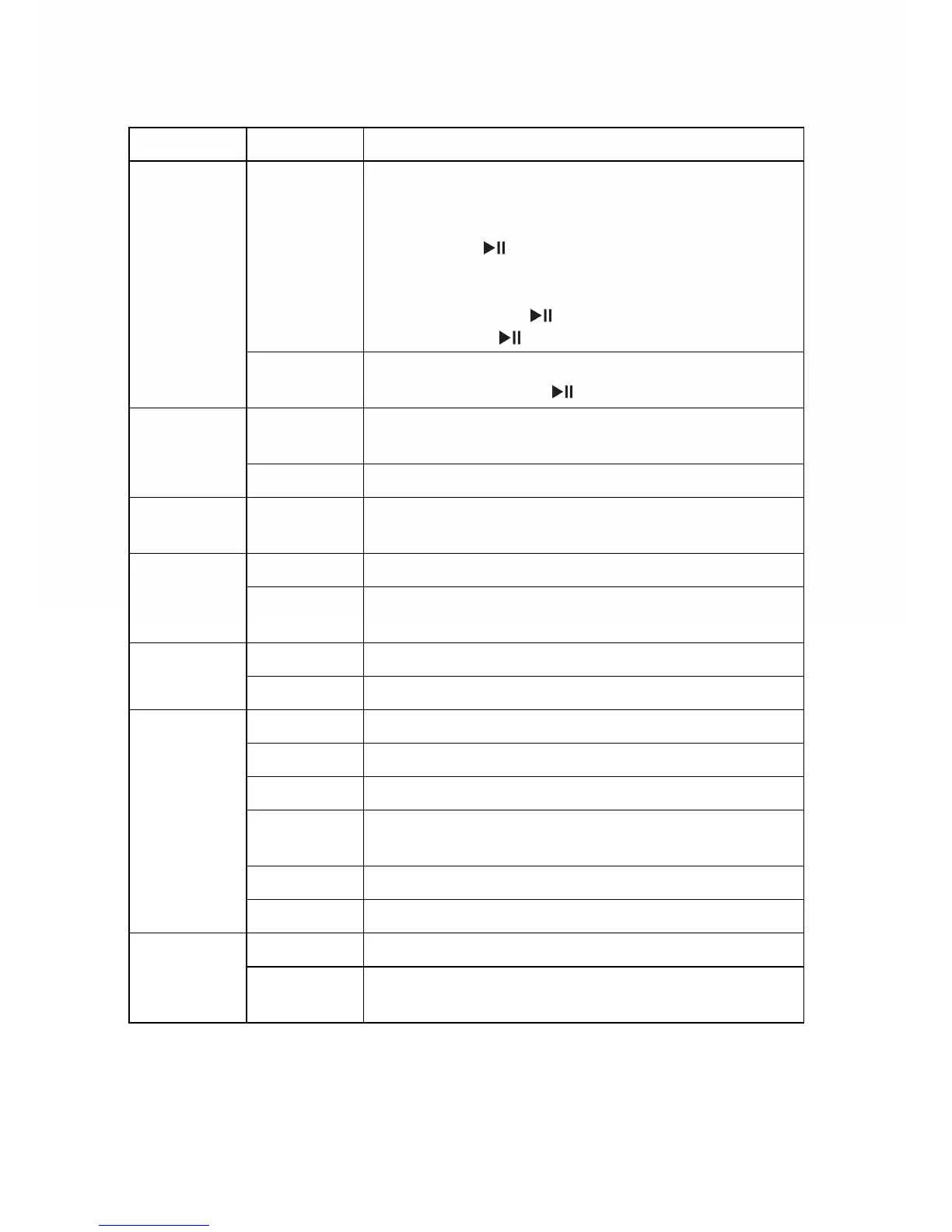
Menu Submenu Description
Adjust Set date & time:
1. Press / button to move between year,
month, day, hour, min., Second.
2. Press the button to locate the cursor on
the item that you want to set.
3. Press / button to adjust value and
then press the
button to confirm.
4. Short press
to exit the mode.
Time
Time Zone
Set time zone: Press the
/ button to set
and then press the
button to confirm.
Auto Off
Set time length before the player shut down
automatically.
Power
Always on The player never shut down automatically.
Language
Set the language in which on-screen text is
displayed
Brightness Set brightness of the screen Display
BackLight
Set backlight last time upon every button
press
Source Set recording source (Microphone) Record
Quality Set recording quality
Delete Delete file
Format Format the device
Reset Restore to default setting
Sys Info
Display firmware version and capacity
information
Refresh Refresh data stored on the player
SysTool
File Sort Sort all files
Internal Set the internal flash as active storage Storage
Memory
card
Set the MicroSD card as active storage


 To Next Page