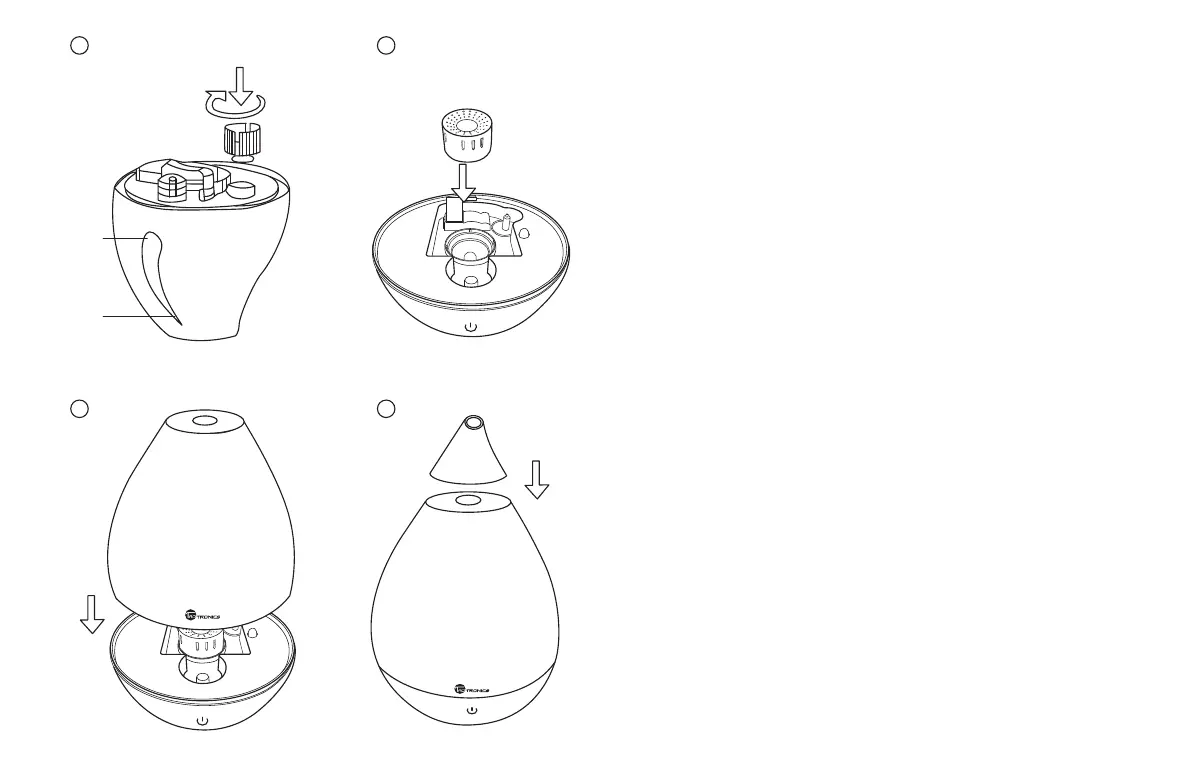
• Put the tank plug back on by turning it clockwise. Wipe off water drops
around the water tank, turn the water tank upright again, and carefully
place it back on the base.
05/06
Changing Mist Output
• Connect the unit to an AC power outlet and a short “beep”will be heard.
•
Tap the Power Button to turn the humidier on (set to low mist mode by default).
Both the power light and low mist indicator will light up.
• Press the Power Button again to switch to high mist mode. The power light
will stay on and high mist indicator will light up. Tap the Power Button again
to turn off the humidier and all lights will be turned off.
Sleep Mode
• Tap and hold the Power Button for 3 seconds to enter Sleep Mode – the
indicator lights will turn off but the humidier will still be on.
• Tap and hold the Power Button for 3 seconds to exit Sleep Mode and return
to the previous mode.
Low Water Warning
• When the water level is lower than the min level, or the water tank is
removed during use, the built-in safety circuit will kick in to protect the
unit and a red warning light will come on. In this case, please immediately
disconnect the humidier from power and rell water as described above.
Note: Make sure there is always enough water in the tank before turning on.
Important
- Do not turn on the unit with no water in the tank, it will cause serious damage.
- Do not touch the water tank or any component while the unit is working.
- Do not exceed the max level when adding water.
- Stop using when the water level is low.
Min
Max
3
4
Power
5
6
Power




 To Next Page