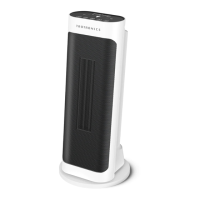
This document outlines the features, operation, and maintenance of the TaoTronics PTC Fan Heater (Model: TT-HE009), a device designed for heating well-insulated spaces or for occasional use.
Function Description
The TaoTronics PTC Fan Heater is an electrical appliance primarily used for heating indoor spaces. It utilizes PTC (Positive Temperature Coefficient) heating technology, which is known for its efficiency and safety. The heater is equipped with a fan to distribute the warmth effectively throughout the room. It offers multiple operating modes, including a standard heating mode with adjustable heat levels (High and Low) and an ECO mode designed for energy efficiency. In ECO mode, the heater automatically adjusts its working mode based on the ambient temperature to maintain a comfortable environment while conserving energy. The device also features a temperature adjustment function, allowing users to set a desired room temperature. Once the set temperature is reached, the heater will stop working and will resume operation when the room temperature drops below the set point.
Usage Features
The heater can be controlled via both an on-device control panel and a remote control, offering convenience and flexibility. The remote control duplicates the functionality of the on-device buttons, enabling operation from a distance.
Power ON/OFF: The heater can be turned ON or OFF by pressing the power button on either the device or the remote control. Upon activation, it defaults to a temperature of 85°F and a high heat level. If no operation is performed for 60 seconds, the LED display will automatically turn off to save energy.
Mode / Heat Level Setting: Users can cycle through different heat levels: High, Low, and ECO mode. This allows for customization based on heating needs and energy preferences.
ECO Mode: When ECO mode is selected, the heater intelligently adjusts its heating output (High or Low) based on the ambient temperature, aiming to maintain a default temperature of 75°F. This feature helps in optimizing energy consumption.
Temperature Adjustment: The heater allows for precise temperature control, with settings ranging from 65°F to 85°F. This ensures that users can set their preferred comfort level.
Oscillation Function: The heater includes an oscillation feature, which can be activated or deactivated to distribute warm air more widely across a room. This helps in achieving more uniform heating.
Timer Setting: The device offers both an Auto Stop Timer and an Auto Start Timer. The Auto Stop Timer allows users to set a duration (0-7 hours) after which the heater will automatically turn off. Conversely, the Auto Start Timer enables users to schedule when the heater should turn on, also with a duration setting of 0-7 hours. This is particularly useful for pre-heating a room or for ensuring the heater turns off after a certain period of use.
Auto LED Display OFF: For an undisturbed environment, especially during nighttime, the LED display can be turned on or off. By default, this feature is active when the unit is first powered on.
Memory Function: The heater is designed with a memory function. If the power supply is not disconnected, the device will remember the last used temperature and working mode settings when it is turned on again, eliminating the need to reconfigure settings each time.
Safety Features:
- 12-Hour Auto Shut Off: For enhanced safety and energy saving, the heater will automatically shut off after 12 hours of continuous operation without any user input.
- Tip-Over Protection: In the event the heater is accidentally tipped over, it will automatically shut off and emit 10 beeps as an alert. It will resume normal operation once placed back on a flat, stable, and upright surface.
- Overheat Protection: The heater is equipped with an overheat protection mechanism. If the ambient temperature exceeds 122°F, the heater will stop heating, and an alarm will be triggered, indicated by flashing timer indicators (1h, 2h, 4h) and 10 beeps. Users are advised to unplug the heater and plug it back in once the ambient temperature drops below 122°F.
- Temperature Sensor Open / Short Circuit Protection: The device also includes protection against temperature sensor malfunctions, indicated by flashing timer indicators and beeps. In such cases, users should unplug the device and contact customer support.
Maintenance Features
Proper maintenance is crucial for the optimal performance and longevity of the TaoTronics PTC Fan Heater.
Cleaning: It is recommended to clean the heater at least once per operating season and before storing it for the off-season.
- Always ensure the heater is turned OFF, unplugged from the electrical outlet, and completely cooled down before cleaning.
- Use a soft cloth to gently wipe the outer surfaces of the heater.
- Avoid using any cleaning agents or detergents, as these can damage the unit.
- Crucially, never immerse the heater in water or allow water to drip into the motor housing. Special care should be taken to prevent the heating element and switches from getting wet, as this poses a risk of fire or electric shock.
Storage: When storing the heater, especially during the off-season, it is advisable to cover it to protect it from dust. Store the unit in a cool, dry location. Ensure the power cable is neatly arranged and kept away from traffic areas to prevent it from being tripped over or damaged.
Battery Replacement (Remote Control): The remote control requires two #7 (AAA 1.5V) dry batteries.
- To replace, slide off the battery box cover in the direction indicated by the arrow.
- Insert new batteries, ensuring the correct polarity ("+" and "-" poles).
- Reinstall the battery box cover.
- Caution: Always replace with new batteries of the same type. Remove batteries if the remote control will not be used for an extended period. Do not attempt to dismantle batteries, and never dispose of them in fire, as they may explode or leak.
Servicing: Any servicing beyond routine cleaning should be performed by an authorized service representative to ensure safety and maintain the product warranty. Do not attempt to modify or repair the product yourself, as this could void the warranty and cause damage or personal injury. If the machine is not working as expected, has been damaged, or exposed to water, discontinue use and contact customer support.


 To Next Page
 General