10
Rear Panel
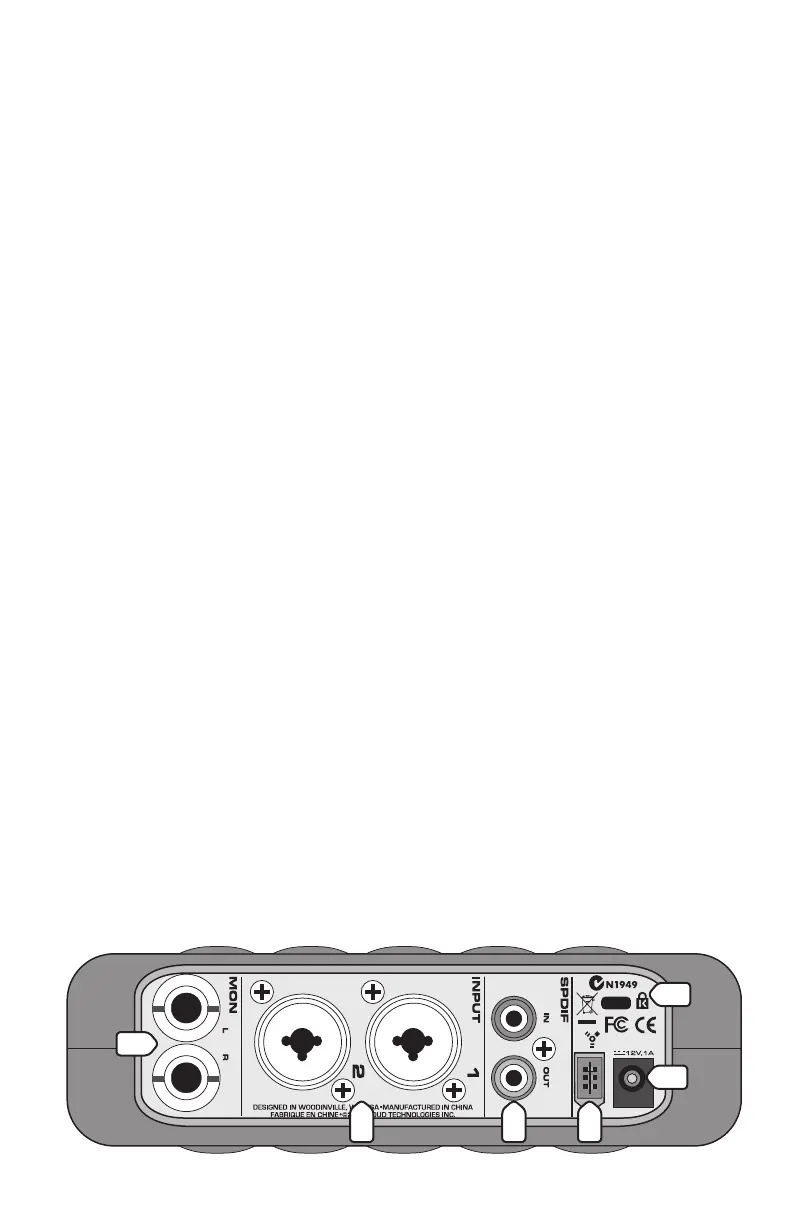
10. INPUT
These are Neutrik combo connectors, which accept balanced
microphone inputs from an XLR connector, or balanced or unbalanced
line-level or instrument-level inputs from a 1/4" TRS connector.
Refer to “Appendix B: Connections” on page 14 for wiring information.
11. LEFT/RIGHT MONITOR Out
These 1/4" TRS connectors provide a balanced stereo line-level output
of the monitor mix. Connect these outputs to a pair of active monitor
speakers, or to an amplifier connected to passive speakers. The signal
level is controlled by the MONITOR LEVEL control [6] on the front panel.
12. S/PDIF IN and OUT Connectors
These are RCA connectors that send and receive two channels of
digital audio in the S/PDIF (
Sony/Philips Digital Interface) format.
You select the S/PDIF IN from the Link.FireWire Console (PC only).
When S/PDIF is selected, the analog inputs [10] are disabled.
Note: On a Macintosh, the S/PDIF IN is automatically selected and
overrides the analog inputs whenever an active device is connected to
the S/PDIF IN.
The
S/PDIF OUT transmits two-channels of digital audio from the
DAW software application. These are the same audio streams that
appear at the PHONES [8] out and the MONITOR [11] out.
Note: Transferring digital audio over a cable generates EMI
(electromagnetic interference) around the cable.
Use high-quality
75-
ohm
coaxial cable for the S/PDIF connections
to minimize the EMI noise
radiated around the cable.
Tip: A 75-ohm composite video cable can be used for a S/PDIF connection.
In general, the shorter the cable length, the less effect it has on the
quality of the signal. The maximum recommended length for a S/PDIF
cable is limited to 10
meters (about 32 feet).
11
14
10 12
15
13


 To Next Page