11
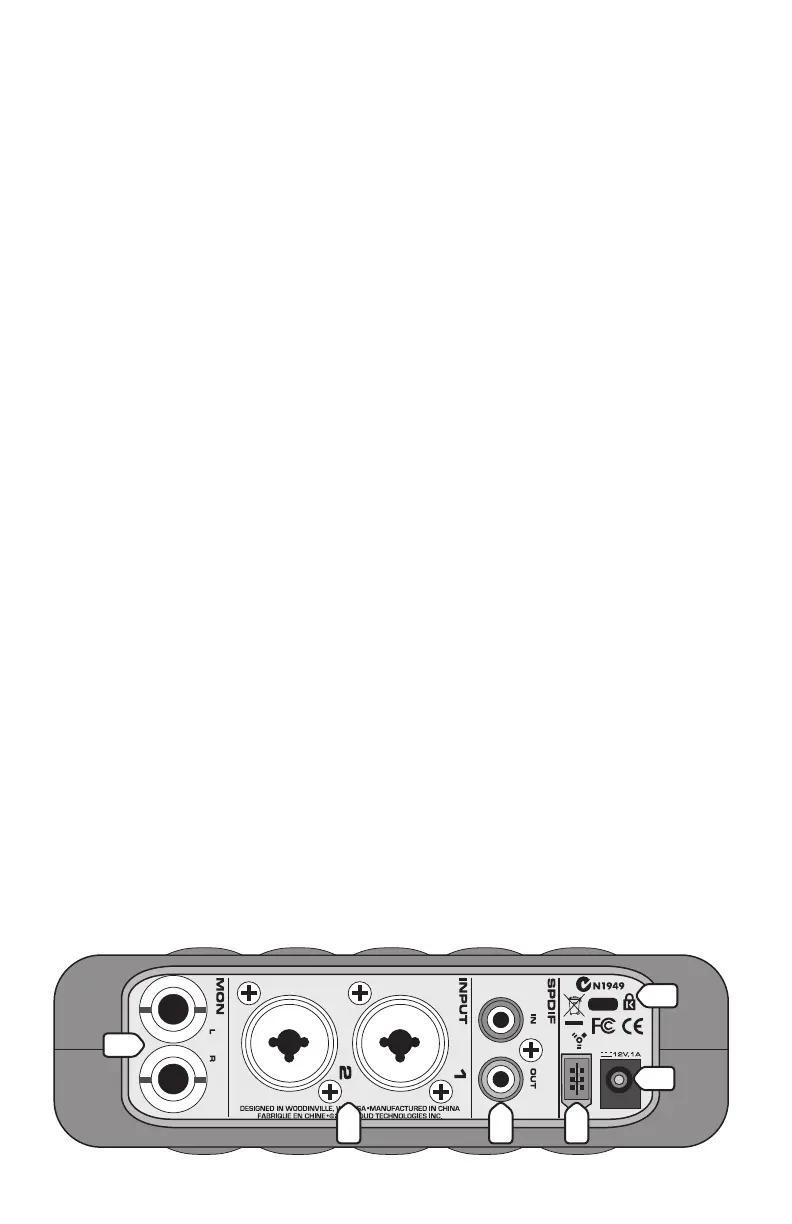
13. FireWire Connector
This is the main connection between the Link.FireWire and the host
computer. Use the FireWire cable provided to connect this port to a
FireWire port on your computer. The FireWire interface works with both
PC and Mac.
FireWire (a.k.a. IEEE 1394) is a high-speed serial I/O interface for
connecting digital devices, with more than 30 times the bandwidth of
USB 1.1.
Tip: If your laptop or desktop computer does not have a FireWire
connection, you can purchase a PCI or PCMCIA FireWire card and
install it in your computer easily and inexpensively.
Note: If your computer has a 4-pin FireWire connection, you will need
to purchase a 6-pin to 4-pin adapter (available at most computer supply
stores), and use the external AC-to-DC power supply (included) since the
4-pin connector does not supply power to the Link.FireWire.
14. POWER IN
This connection is where you connect the external AC-to-DC power
supply to provide power to the Link.FireWire. Use the external power
supply when using a 6-pin to 4-pin FireWire adapter, or if the FireWire
connector on your computer doesn’t supply enough power to the Link.
FireWire (some PCMCIA cards do not).
WARNING: Make sure you use the correct external
power supply
capable of providing 12 VDC at 1 amp.
15. Kensington Security Slot
To help prevent theft, the Link.FireWire has a security slot designed to
fit the popular Kensington security locks. A variety of models are available
from their website at www.kensington.com.
11
14
10 12
15
13


 To Next Page