Wireless Mouse
6
Wireless Mouse
7
GB – Introduction
Congratulations on your purchase of the Targus Wireless
Mouse. This wireless mouse uses 2.4GHz RF technology which
provides a seamless connection up to 33 ft (10 m) away.
System Requirements
Hardware
• USB interface
Operating System
• Microsoft Windows
®
XP
• Microsoft Windows Vista
®
• Microsoft Windows
®
7
• Mac OS
®
X 10.4 or later
Contents
• Targus Wireless Mouse
• User Guide
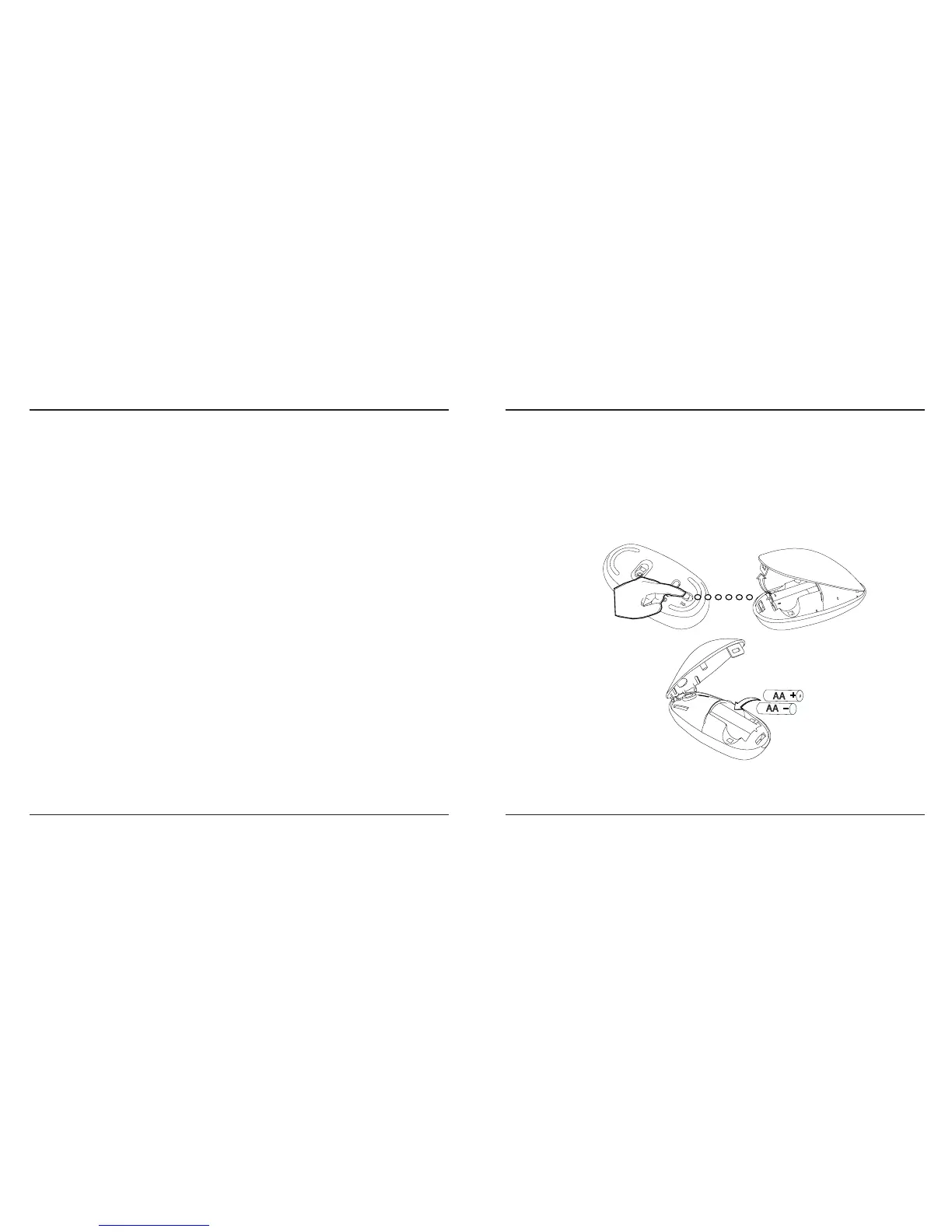
Installing the Batteries
• Please use the two AA batteries that are included.
• Remove the battery cover by sliding the release button on the
bottom of the mouse. Once the battery cover releases, simply
lift it up from the back of the mouse.
• Insert the batteries, making sure that the positive (+) and
negative (-) ends of each battery match the polarity indicators
inside the battery compartment.


 To Next Page