EasyManua.ls Logo

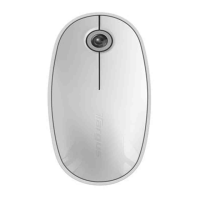
Targus AMW43EU - User Manual

Targus AMW43EU
141 pages
Print Icon
To Next Page IconTo Next Page
Loading...
N2953
USER GUIDE
©2010 Manufactured or imported by Targus Europe
Ltd., Hounslow, Middlesex, TW4 5DZ, UK. All rights
reserved. Targus is either a registered trademark or
trademark of Targus Group International, Inc. in the
United States and/or other countries. Features and
specifications are subject to change without notice. All
trademarks and registered trademarks are the property
of their respective owners.
BEU0562C - UserGuide
Wireless
Mouse
N2953
Question and Answer IconNeed help?

Do you have a question about the Targus AMW43EU and is the answer not in the manual?

Summary

Introduction

System Requirements

Details the hardware and operating system requirements for the wireless mouse.

Installing the Batteries

Removing the Battery Cover

Instructions on how to remove the battery cover by sliding the release button.

Inserting Batteries

How to insert batteries, ensuring positive and negative ends match indicators.

Low Battery Power Indicator

Using the Mouse

Touch Scroll Function

Details the use of the touch scroll sensing area for scrolling.

Establishing the Connection

Removing the USB Receiver

Instructions on how to remove the mini USB receiver from the mouse cover.

Connecting to Computer

Steps to plug the USB receiver into a computer's USB port.

Using the Touch Scroll

Protective Film Removal

Note to remove the protective plastic film on the touch scroll before use.

Installing Software for Programmable Buttons

Software Download

Provides download links for the latest software for Windows and Mac.

Installation Process

Instructions on how to install the software, including restarting the computer.

Programming the Buttons (Windows)

Driver Software Operation

Steps to open the driver software and select button settings after installation.

Programming the Buttons (Mac)

Launching Device Application

Instructions to launch the Targus device application from the logo.

Configuring Buttons

How to use drop-down lists to configure each button's action.

Setup Device

Pressing 'Setup Device' to launch the configuration software for the device.

Troubleshooting

Mouse Not Working

Steps to resolve issues when the mouse is not functioning.

Summary

Introduction

System Requirements

Details the hardware and operating system requirements for the wireless mouse.

Installing the Batteries

Removing the Battery Cover

Instructions on how to remove the battery cover by sliding the release button.

Inserting Batteries

How to insert batteries, ensuring positive and negative ends match indicators.

Low Battery Power Indicator

Using the Mouse

Touch Scroll Function

Details the use of the touch scroll sensing area for scrolling.

Establishing the Connection

Removing the USB Receiver

Instructions on how to remove the mini USB receiver from the mouse cover.

Connecting to Computer

Steps to plug the USB receiver into a computer's USB port.

Using the Touch Scroll

Protective Film Removal

Note to remove the protective plastic film on the touch scroll before use.

Installing Software for Programmable Buttons

Software Download

Provides download links for the latest software for Windows and Mac.

Installation Process

Instructions on how to install the software, including restarting the computer.

Programming the Buttons (Windows)

Driver Software Operation

Steps to open the driver software and select button settings after installation.

Programming the Buttons (Mac)

Launching Device Application

Instructions to launch the Targus device application from the logo.

Configuring Buttons

How to use drop-down lists to configure each button's action.

Setup Device

Pressing 'Setup Device' to launch the configuration software for the device.

Troubleshooting

Mouse Not Working

Steps to resolve issues when the mouse is not functioning.

Targus AMW43EU Specifications

General IconGeneral
ModelAMW43EU
CategoryMouse
TypeWireless
ConnectivityWireless
InterfaceUSB
Wireless Technology2.4 GHz
Tracking MethodOptical
DPI1000
Buttons3
Scroll WheelYes
Battery TypeAA
Battery Life12 months
ColorBlack
Operating System CompatibilityWindows, Mac

Related product manuals