64
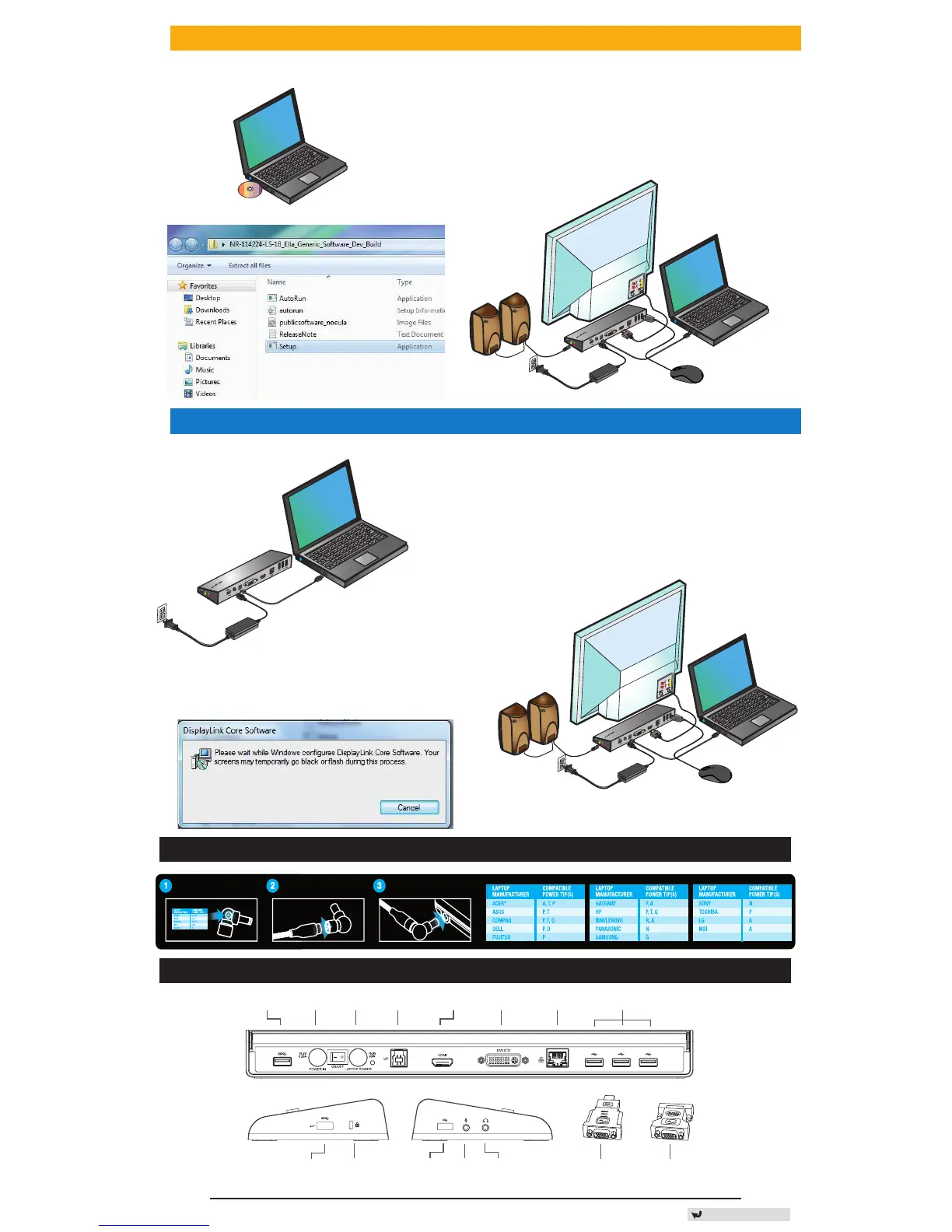
Congurare Windows XP/Vista
®
®
OBSERVAIE: NU CONECTAI STAIA DE ANDOCARE ÎNAINTE DE A INSTALA DRIVERUL DISPLAYLINK.
1) Instala i driverul inclus de pe CD.
2) Da i dublu clic pe Setup.exe.
3) Urma i instruc iunile de pe ecran
pân la nalizarea instal rii.
4) Conecta i sta ia de andocare i
perifericele.
Congurare Windows 7 / Windows 8
® ®
1) Conecta i sta ia de andocare la laptop.
2) Windows va începe instalarea driverului
DisplayLink automat.
3) Urma i instruc iunile de pe ecran
pân la nalizarea instal rii.
4) Conecta i toate dispozitivele periferice.
D
C
5
V
U
P
D
V
I
H
D
M
I
OBSERVA IE: Dac instalarea driverului nu începe automat,
deconecta i sta ia de andocare de la laptop, introduce i
CD-ul driverului i da i clic pe ierul Setup.exe.
DC 5V
UP
DVI
HDMI
DC 5V
UP
DVI
HDMI
Adaptor DVI - VGAAdaptor HDMI - DVI-DIntrare audio
Port USB 3.0 Port USB - Laptop DVI-I Port USB 2.0
INTRARE
alimentare cc
Ieşire
alimentare cc
HDMI Gigabti Ethernet
Port USB 2.0 Ieșire audioSlot blocarePort USB 3.0 w/BC
1.2 (1.5A)
Instalare alimentare
Diagrama stației de andocare
Locate the correct power tip
(Test t inlaptop if needed)
Connect to the power cord Connect to your laptop
Back to Content







 To Next Page