EasyManua.ls Logo

Targus W571 - User Manual

Targus W571
9 pages
Print Icon
To Next Page IconTo Next Page
Loading...
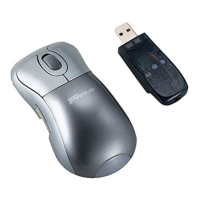
W571
WIRELESS OPTICAL
MOUSE
SOURIS OPTIQUE
SANS FIL
User Guide
Guide de l’utilisateur
410-3592-001A / AMW571BT
folding line
2 staples here (saddle stitching)
folding line
2 staples here (saddle stitching)
Open size: 9”W x 4.5”H Folded Size: 4.5”W x 4.5”H Material: 80gsm woodfree paper Color: Grayscale
Diecut
Model: AMW571A/ AMW572BR
1 YEAR LIMITED WARRANTY: We pride ourselves on the
quality of our products. For complete warranty details and a list

product warranty does not cover any device or product that
         




        

          

  

      



        
  



États-Unis et dans certains autres pays. Windows est une marque
        
  
  



Question and Answer IconNeed help?

Do you have a question about the Targus W571 and is the answer not in the manual?

Summary

Using the Mouse and System Requirements

Using the Mouse

Connect the USB receiver to your computer to automatically operate the plug-and-play mouse.

System Requirements

Lists hardware (USB port) and operating system compatibility for the mouse.

Mouse Operation and Indicators

Power Management

Instructions for powering the mouse on/off and its automatic power saving mode.

Safety Measures

Warning against pointing the optical sensor towards eyes to prevent injury.

Battery Life Indicator

Low power light flashes when battery is below 5%; replace batteries promptly.

Support, Registration, and Warranty

Technical Support

Provides contact information and website for technical assistance.

Product Registration

Encourages users to register their Targus accessory for updates and support.

One Year Warranty

Details the limited one-year warranty and exclusions for Targus products.

Regulatory Compliance

FCC Interference Statement

States compliance with FCC Part 15 rules for Class B digital devices.

Industry Canada Statement

Confirms compliance with Industry Canada's licence-exempt RSS standards.

Declaration of Conformity

Declares compliance with essential requirements of Directive 1999/5/EC.

Targus W571 Specifications

General IconGeneral
ModelW571
CategoryMouse
TypeWireless
Connectivity TechnologyWireless
Wireless RangeUp to 10 meters
DPI1600
Number of Buttons3
Hand OrientationAmbidextrous
Power SourceBattery
Tracking MethodOptical
Scroll WheelYes
Battery TypeAA
Battery LifeUp to 12 months
Operating System CompatibilityWindows, MacOS, Chrome OS
ColorBlack
Dimensions100 x 60 x 35 mm

Related product manuals