EasyManua.ls Logo

Targus PAWM10 - User Manual

Targus PAWM10
15 pages
To Next Page IconTo Next Page
Loading...
BRUSSELS HANNOVER BARCELONA TOKYO MILANO AMSTERDAM SINGAPORE LONDON PARIS NEW YORK LOS ANGELES TORONTO HONG KONG SYDNEY
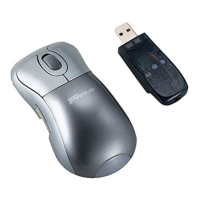
Targus Wireless
RF Mouse
USER’S GUIDE
Making Your Mobile Life Easier.
Visit our Web site at: www.targus.com
Features and specifications are subject to change without notice. © 2003 Targus Corp.
400-0110-001A
Question and Answer IconNeed help?

Do you have a question about the Targus PAWM10 and is the answer not in the manual?

Targus PAWM10 Specifications

General IconGeneral
ModelPAWM10
TypeWireless Mouse
ConnectivityWireless
Wireless Technology2.4 GHz
Buttons3
Scroll WheelYes
Tracking MethodOptical
Movement Detection TechnologyOptical
DPI1600
Battery Life12 months
ColorBlack
Battery1 AA
CompatibilityWindows, Mac

Summary

System Requirements

Connecting the Mouse Receiver

Using the RF Mouse

Establishing a Communications Link

Operating Hints

Specifications

Troubleshooting

RF Mouse Not Working

Common issues and solutions when the mouse fails to operate.

Wireless Interference

Advice on reducing interference with other wireless devices.

Troubleshooting Response Issues

Slow Response or Intermittent Stops

Solutions for sluggish performance or connection drops.

Related product manuals