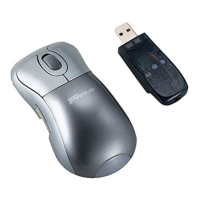
Need help?
Do you have a question about the Targus PAWM10U and is the answer not in the manual?
Details the necessary hardware and operating systems for the RF mouse.
Step-by-step guide on how to insert batteries into the mouse.
Key points regarding battery usage and maintenance for the mouse.
Provides solutions for common issues when the RF mouse fails to operate.
Addresses interference issues between the RF mouse and other wireless devices.
Offers solutions for slow response times or intermittent functionality of the RF mouse.
Explains how to resolve conflicts when using multiple RF mice.
Details the FCC compliance statement and testing results for the device.
 General
| Model | PAWM10U |
|---|---|
| Category | Mouse |
| Connectivity Technology | Wireless |
| Wireless Technology | RF |
| Interface | USB |
| Connectivity | Wireless |
| Tracking Method | Optical |
| Movement Detection Technology | Optical |
| Number of Buttons | 3 |
| Scrolling Device Type | Scroll Wheel |
| Scroll Wheel | Yes |
| Battery Type | AA |
| Battery Life | 12 months |
| Color | Black |
| Type | Wireless |
| DPI | 1600 |
| Operating System Compatibility | Windows, Mac OS |
| Compatibility | PC, Mac |
| Buttons | Left, right, scroll wheel with button |


 To Next Page