4
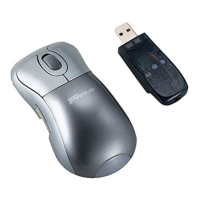
Targus Wireless RF Mouse
Operating System
•Windows
®
98/Me/2000/XP
NOTE: The third button and the scrolling wheel only work
with the operating systems listed above. If you use the RF
mouse with a different operating system, it will lose its
enhanced features and function as a standard, two-
button mouse.
Connecting the Mouse Receiver
To connect the mouse receiver:
1 Plug the USB receiver into an available USB port on
your computer.
2 Your computer’s operating system identifies the receiver
and begins installing the default driver.
Follow any on-screen procedures to complete the
default driver installation.
Using the RF Mouse
Installing the Batteries
1 If the mouse is on, slide the on/off switch on the bottom
of the mouse to the “off” position.
2 Remove the battery cover from the top of the mouse by
pressing the battery cover hinge located on the bottom
of the mouse and sliding it off.
NOTE: The battery cover is also the top cover of the
mouse.


 To Next Page
 Loading...