EasyManua.ls Logo

Tascam DA-30 - Page 11

Tascam DA-30
63 pages
Print Icon
To Next Page IconTo Next Page
To Previous Page IconTo Previous Page
Loading...
man
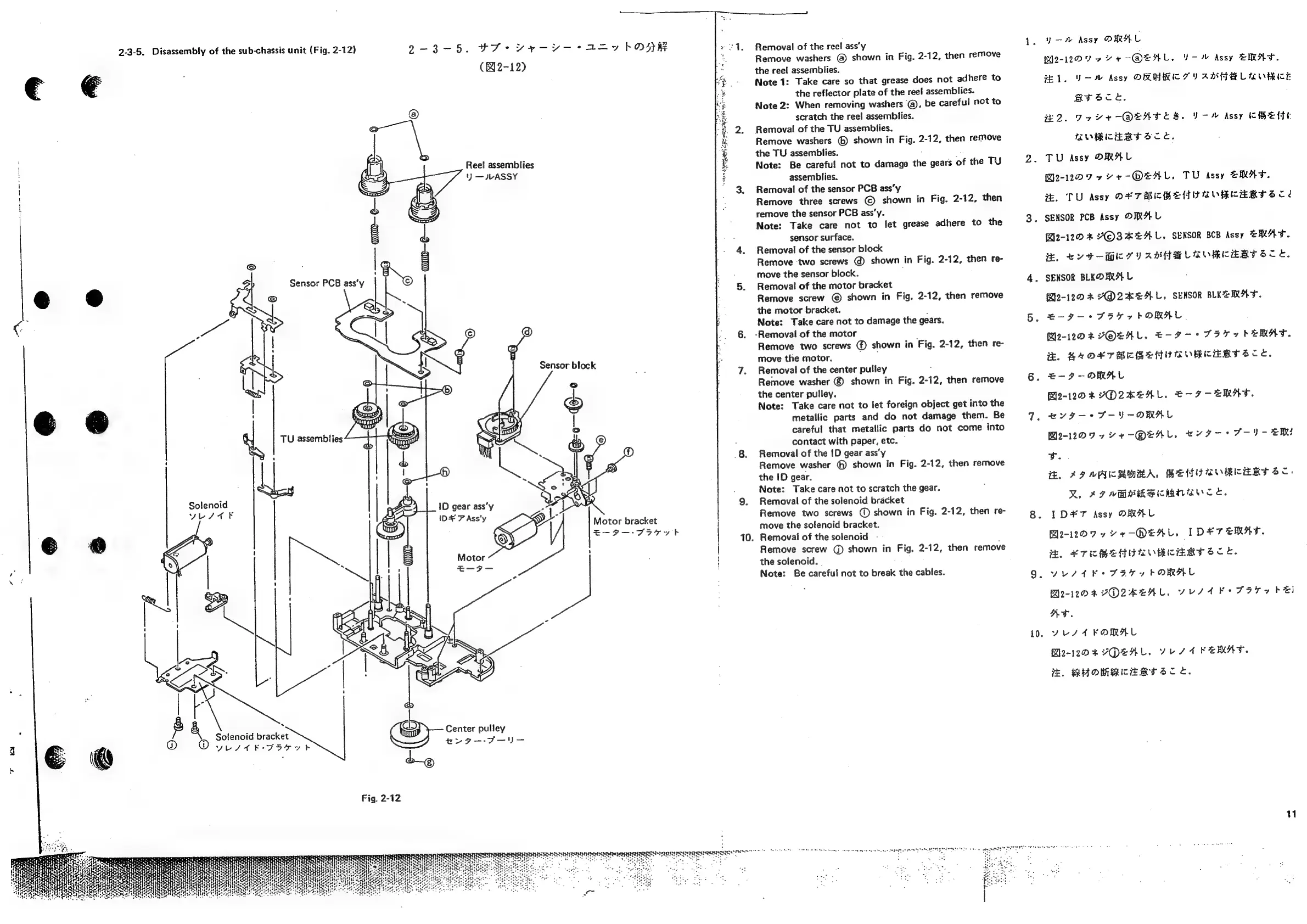
2-3-5.
Disassembly
of
the
sub-chassis
unit
(Fig.
2-12)
i
e
YESTE
TU
assemblies
.
é
Solenoid
bracket
O
yest
K-7574t
2-3-5.
Fe
vey
aay
hORR
(82-12)
Reel
assemblies
')
JLASSY
ID
gear
ass’y
ID+
?
Ass'y
Center
pulley
ev
g—-F—
Sensor
block
Motor
bracket
E-9--F577t
vege"
wet
f
a
eo
seh
pp
Ne
sshan
dSMe
oT
tel
SRS
aA
AS
10.
CER
RUEEEEDEET
TE
SEEDS
ot
ree
mannan
ces
tese
ate
agate
geet
apt
ct
dete
ET
ESET
E
EIDE
one
Removal
of
the
reel
ass’y
Remove
washers
@
shown
in
Fig.
2-12,
then
remove
the
reel
assemblies.
Note
1:
Take
care
so
that
grease
does
not
adhere
to
the
reflector
plate
of
the
reel
assemblies.
Note
2:
When
removing
washers
@,
be
careful
not
to
scratch
the
reel
assemblies.
Removal
of
the
TU
assemblies.
Remove
washers
©
shown
in
Fig.
2-12,
then
remove
the
TU
assemblies.
*
Note:
Be
careful
not
to
damage
the
gears
of
the
TU
assemblies.
Removal
of
the
sensor
PCB
ass’y
Remove
three
screws
©
shown
in
Fig.
2-12,
then
remove
the
sensor
PCB
ass’y.
Note:
Take
care
not
to
let
grease
adhere
to
the
sensor
surface.
Removal
of
the
sensor
block
Remove
‘two
screws
@)
shown
in
Fig.
2-12,
then
re-
move
the
sensor
block.
,
Removal
of
the
motor
bracket
Remove
screw
©
shown
in
Fig.
2-12,
then
remove
the
motor
bracket.
;
Note:
Take
care
not
to
damage
the
gears.
-Removal
of
the
motor
Remove
two
screws
@
shown
in
Fig.
2-12,
then
re-
move
the
motor.
,
Removal
of
the
center
pulley
Remove
washer
©
shown
in
Fig.
2-12,
then
remove
the
center
pulley.
Note:
Take
care
not
to
let
foreign
object
get
into
the
metallic
parts
and
do
not
damage
them.
Be
careful
that
metallic
parts
do
not
come
into
contact
with
paper,
etc.
©
Removal
of
the
1D
gear
ass’y
Remove
washer
@
shown
in
Fig.
2-12,
then
remove
the
ID
gear.
Note:
Take
care
not
to
scratch
the
gear.
Removal
of
the
solenoid
bracket
Remove
two
screws
(@
shown
in
Fig.
2-12,
then
re-
move
the
solenoid
bracket.
Removal
of
the
solenoid
Remove
screw
G)
shown
in
Fig.
2-12,
then
remove
the
solenoid.
Note:
Be
careful
not
to
break
the
cables.
10.
y
Assy
ORAL
WMe-12D9
ov
+
-@QEAL,
V-%
Assy
EMAF.
JEL.
Uw
Assy
ORAKIC
TY
AMFALRORKE
myvace.,
,
#2.
Tx
v4-—@QENATESR.
V-M
Assy
KHEMHE
MWRCERT
SCE.
TU
Assy
ORAL
M2-1207
77
+-OEAL,
TU
Assy
ERAT.
xe,
TU
Assy
OF
TRICHEMTRORKERTSCé
SENSOR
PCB
Assy
ORAL
Bl2-12D
&
LPOSALAL.
SENSOR
BCB
Assy
ZRAT.
He.
Ev
d-MI
TY
ABHBMLAORCERTSCY.
SENSOR
BLEOARA
L
62-120
&
ADZAEAL,
SENSOR
BLKEEMRAT.
E-9-—
+
FHT
ye
FORMAL.
M2-12DF
VFOLAL,
E-¥—-
9
FIT
7
bEMAT.
E.
SAOETMICBEHURORCKERTSCY.
=-F-OMAL
Bl2-12D
F
YOLZAEAL,
€-F7-ERAT.
#yvgy—*
S-Y-OMAL
BM2e-120
9
4
Ye
-@OEAL,
HY
I-
+
F-IV-
EM
tv.
i.
AIT
AACRMRA,
BEND
ROREERT
SC:
MX,
APT
VBS
MBlicMNBce,
ID#¥7
Assy
ORAL
Ble-1209
944+
-QEHL,
IDF
TEMAF.
HEL
ETBEADRORCERTSCE.
YUSAE
SFI
7
FORMAL
G2-12DR
VO2KEAL,
VUSA
KO
Fa7y
bE)
A.
yous
4
FORAL
Ble-12D
4
YDENAL.
VEST
FEMA.
7.
BHOMMEAETSCc.
11

Related product manuals