EasyManua.ls Logo

Tascam DA-30 - Page 9

Tascam DA-30
63 pages
Print Icon
To Next Page IconTo Next Page
To Previous Page IconTo Previous Page
Loading...
c
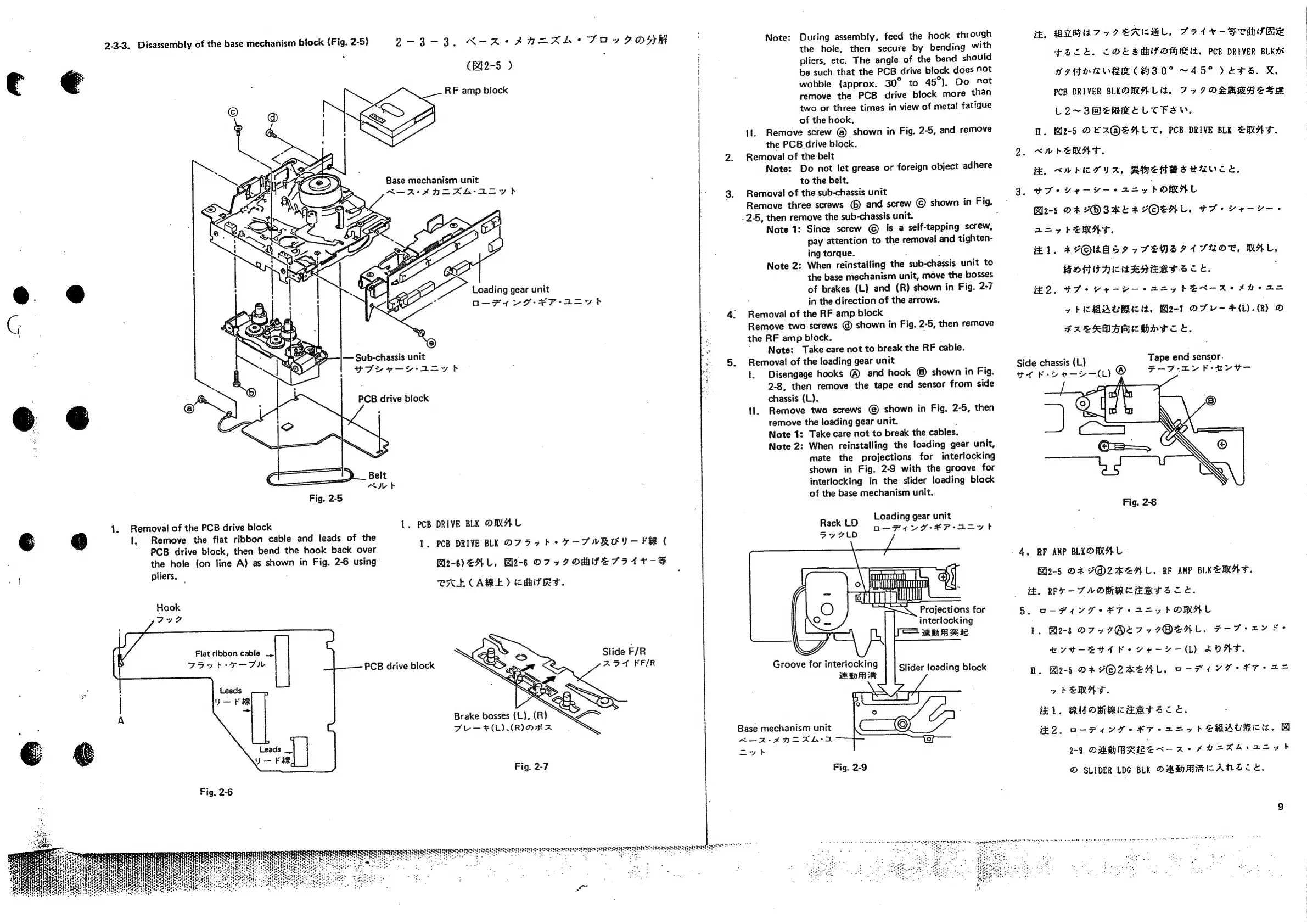
2-3-3.
Disassembly
of
the
base
mechanism
block
(Fig.
2-5)
9-3-3.
N-R-kHAAzAKL*+
FAUVIDOSK
(842-5
)
RF
amp
block
Base
mechanism
unit
A—-As*AHIAL-A=yth
Loading
gear
unit
a—Fe4
Vv
A7-¥F-Ap=yvt
Sub-chassis
unit
PPoer—Y-aioyt
PCB
drive
block
Fig.
2-5
PCB
DRIVE
BLK
ORAL
1.
PCB
DRIVE
BKK
D7
57h
+
7-FUROY—
FR
(
1.
Removal
of
the
PCB
drive
block
1.
1.
Remove
the
flat
ribbon
cable
and
leads
of
the
PCB
drive
block,
then
bend
the
hook
back
over
the
hole
(on
line
A)
as
shown
in
Fig.
2-6
using
Bos)
FAL,
Bl2-8§
D7»
IOMITES
IAV-F
pliers.
CAL
CARE)
CHYRYT.
Hook
JF
Slide
F/R
ABT
KF/R
Flat
ribbon
cable
_.
Doyb-7-TW
PCB
drive
block
Brake
bosses
(L),
(R)
FEL-#H(LI(RINKA
!
!
i
i
Note:
During
assembly,
feed
the
hook
through
the
hole,
then
secure
by
bending
with
pliers,
etc.
The
angle
of
the
bend
should
be
such
that
the
PCB
drive
block
does
not
wobble
(approx.
30°
to
45°).
Do
not
remove
the
PCB
drive
block
more
than
two
or
three
times
in
view
of
metal
fatigue
of
the
hook.
11.
Remove
screw
@
shown
in
Fig.
2-5,
and
remove
the
PCB.
drive
block.
Removal
of
the
belt
Note:
Do
not
let
grease
or
foreign
object
adhere
to
the
belt.
Removal
of
the
sub-chassis
unit
Remove
three
screws
©
and
screw
©
shown
in
Fig.
-
.2-5,
then
remove
the
sub-chassis
unit.
:
Note
1:
Since
screw
©
is
a
self-tapping
screw,
pay
attention
to
the
removal
and
tighten-
ing
torque.
.
:
Note
2:
When
reinstalling
the
sub-chassis
unit
to
the
base
mechanism
unit,
move
the
bosses
of
brakes
(L)
and
(R)
shown
in
Fig.
2-7
in
the
direction
of
the
arrows.
Removal
of
the
RF
amp
block
Remove
two
screws
@)
shown
in
Fig.
2-5,
then
remove
the
RF
amp
block.
Note:
Take
care
not
to
break
the
RF
cable.
Removal
of
the
loading
gear
unit
1.
Disengage
hooks
@
and
hook
shown
in
Fig.
2-8,
then
remove
the
tape
end
sensor
from
side
chassis
(L).
11.
Remove
two
screws
©
shown
in
Fig.
2-5,
then
remove
the
loading
gear
unit.
.
Note
1:
Take
care
not
to
break
the
cables.
Note
2:
When
reinstalling
the
loading
gear
unit,
mate
the
projections
for
interlocking
shown
in
Fig.
2-9
with
the
groove
for
interlocking
in
the
slider
loading
block
of
the
base
mechanism
unit..
Loading
gear unit
Rack
LD
n—-F4U7-¥P-axzyt
7770
Projections
for
interlocking
Groove
for
interlocking
HAS
Side
chassis
(L}
to
Feo
—>—(L)
®
-
4,
#.
AUT,
PEACML,
FH1¥-SCHMIRE
tHZCk,
COL
SAU
OMMIL,
PCB
DRIVER
BLK
WIMOGMVEE
CHZ0°
~45°
VETS.
&,
PCB
DRIVER
BLKO
MALI,
7x7
OSRRHES
MR
L2~3M=eRMRELTFEW,
1.
2-5
DEA@EALT,
PCB
DRIVE
BLE
ERAT.
<AVbERAT.
HE.
KMS
YA,
RHthHBereeuce,
OTs
ve
ye
aay
KORAL
Bl2-5
DA
YOSKEARYOEAL.
$7
vr-—yv--s
aay
heRMAD.
#1.
AYORAST
~FTEWMSIA
SHOT,
MAL,
BOHTHICAAAERTS
ce.
2.07
vemos
tay
hEeX-Ae
ene
as
y
hi
MAUBRICI,
Bl2-7
DFU
~F(L).(R)
O
HRAEKMAMCHHT
CL.
Tape
end
sensor.
F-F7-EY
Fee
ey
Fig.
2-8
RF
AMP
BLKD
ARAL
Blo-5
DA
V@2ZAEAL,
RF
AMP
BLKEMAT.
HE.
RFF
-~-FAVOMRBCERTSZCOL.
5.
O-P4
YF
SETS
A=
7
FORMAL
1.
Be-8
D7
x7I@ETZ7IOMEAL,
F-Fo
rv
Fe
evt—-Etd
Fe
vey
—(L)
LOAF.
I.
Ble-5
DR
Y@2KEAL,
O-H1YF
FT
=
yhERAT.
£1.
RMOMBCEBTSZCE.
Base
mechanism
unit
er
tee
#2.
O-
F477
-#¥T-
27
PEMACHER,
A
a
1-9
DHMMRBWEX-
2+
AUHKA+a=7t
Fig.
2-7
@
SLIDER
LDG
BLK
OMMBAMMCANScCE.
Fig.
2-6
SERIO
dN
TREES
INT
BAILII
EDULE
TE
«

Related product manuals