1312
The scale turns off automatically after a few seconds if no buttons are
pressed or nothing is weighed.
How to Delete a User Profile
Care & Maintinance
How to Turn Off the Scale
1. The platform will be slippery when it is wet. Keep it dry! However, do not expose
to direct sunlight, extreme hot/cold temperatures or humidity.
2. This scale is designed to read weights between 11 and 400 lbs / 5 and 180 kgs
/ 11 and 28 st 8 lbs. To prevent damage, do not place more than 400 lbs / 180
kgs / 28 st 8 lbs on it.
3. DO NOT strike, shock, or drop the scale.
4. Treat the scale with care as it is a precise instrument.
5. Clean the scale with a damp cloth and avoid water getting inside the scale.
6. DO NOT use chemical/abrasive cleaning agents.
7. Always keep your scale in horizontal position.
8. If your scale fails to turn on, check whether battery is installed, or battery
power is low. Insert or replace with new batteries.
9. When replacing batteries do not mix old and new batteries. DO NOT mix alkaline,
standard (carbon-zinc), or rechargeable (ni-cad,ni-mh,etc) batteries.
10. Do not use for commercial purpose and follow all instructions provided in this
manual.
1. If the scale does not turn on or no weight is displayed?
Check if the scale is powered up and started up. If not, please refer to the Section
“Preparation Before Use”.
2. If the scale is inaccurate or weight varies?
Place feet in center of platform and stand still. Allow weight to lock in before looking
down at display. Flooring may a be reason for fluctuation. Use the scale on the hardest
floor available for accuracy. Do not move the scale unnecessarily.
3. I have tried all corrective actions, but still can’t solve the problem …
Please contact the Taylor Customer Service Department at 1-866-843-3905 (f
rom
8:00 am to 5:00 pm, Mountain Standard Time, Monday through Friday
) or by email to
taylorusa@lifetimebrands.com.
4. Why do I get a different body fat reading when I use a different brand of body fat scale?
Different body composition scales take estimations around different parts of the body
and use different mathematic algorithm to estimate the percentage of body fat. The
best advice is not to make comparisons from one device to another, but to use the same
device each time to monitor any change.
Problem Solving & Questions
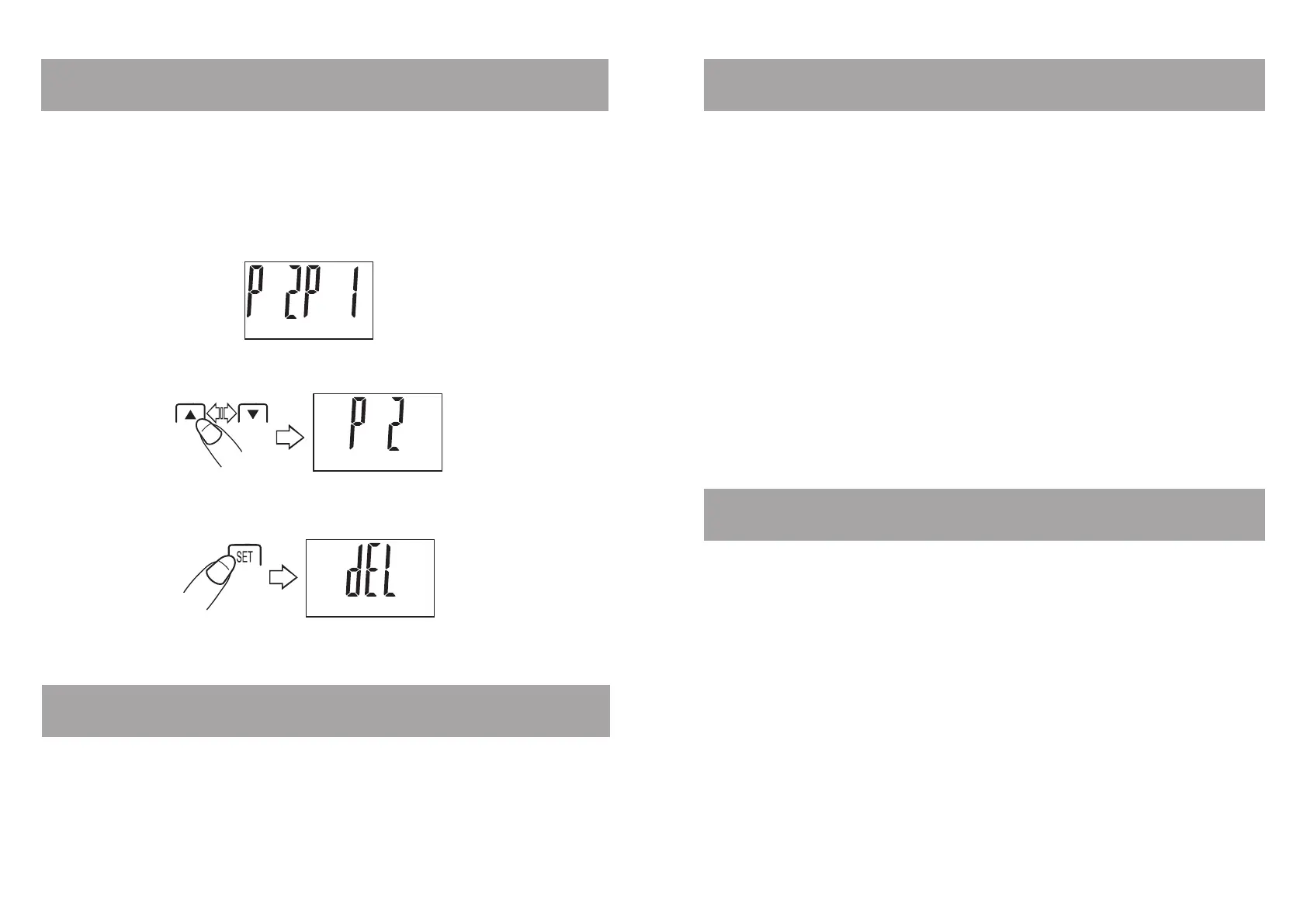
In the event that two profiles conflict (within +- 6.6 lbs of each other) it is
possible to delete one of the profiles by doing the following.
1. Step on the scale. Your weight will appear.
2. The scale will try to pull up a user profile. If there are two or more
conflicting profiles the screen will display the conflicting numbers.
3. Press the “
s
” button to select P1 or press the “
t
” button to select
P2.
4. Press and hold the “ SET ” button for 3 seconds and the display will show
“dEL”.
5. The next time the scale is turned on, all information pertaining to the
deleted user will be cleared.


 To Next Page