TX / TXH / TXB 180S - 400L (Rev. 4/23/07)TX / TXH / TXB 180S - 400L (Rev. 4/23/07)
6-166-16
TICS ModuleTICS Module
TICS Module.TICS Module. The TICS Module stThe TICS Module status is indicated by atus is indicated by the following LEDs:the following LEDs:
1.1. Green LED Green LED - When thi- When this LED is ils LED is illuminluminated, it ated, it indicaindicates thates that the modt the module is poule is powered onwered on..
2.2. YYellow / Red LED - Wheellow / Red LED - When this LED is blinn this LED is blinking the yelking the yellow cololow colorr, the status of the mod, the status of the module is normalule is normal..
When this LED is blinking the red color, there is an error and the TICS Display Module will display anWhen this LED is blinking the red color, there is an error and the TICS Display Module will display an
error message.error message.
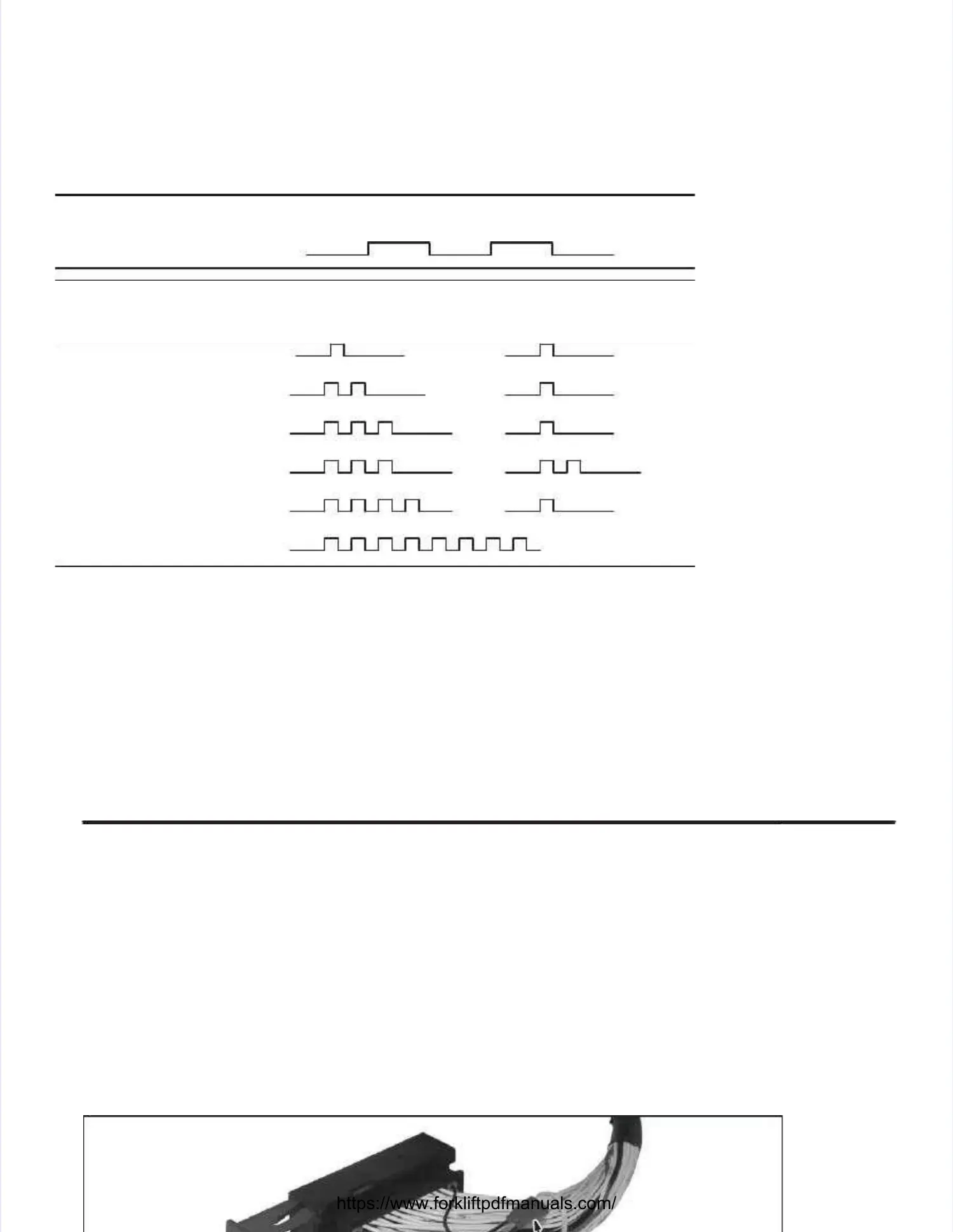
LED Indicator Showing Different XS2 and XA2 ModesLED Indicator Showing Different XS2 and XA2 Modes
Memory errorMemory error
bb
SSttaattuuss FFllaasshh
Normal operation (yellow)Normal operation (yellow)
ErrorError
codecode
EErrrroorr PPrriimmaarry y FFllaassh h ((rreedd))
Error categoryError category
Secondary Flash (yellow)Secondary Flash (yellow)
Error descriptionError description
11::nn SSeee e nnoottee
aa
22::nn SSeee e nnoottee
aa
33::11 CCAAN N eerrrroorr
33::22 AAddddrreesss s eerrrroorr
4:14:1
Fatal errorFatal errorFEFE
a.a. Error gError groups 1:n anroups 1:n and 2:n are controd 2:n are controlled by the malled by the masterster..
b.b. FRAFRAM meM memormory ery errorror..
Suggested Actions For Specific Fault CodesSuggested Actions For Specific Fault Codes
1:n / 2:n - Check 1:n / 2:n - Check the TICS main display the TICS main display for proper operation or any displayfor proper operation or any displayed error messages. ed error messages. ConsultConsult
factory.factory.
3:1 - Check CAN communication wiring for continuity between module and TICS main display3:1 - Check CAN communication wiring for continuity between module and TICS main display. . ConsultConsult
maintenance manual for wire schematics.maintenance manual for wire schematics.
3:2 - Check address tag at module to make sure it is in place (refer to photo below).3:2 - Check address tag at module to make sure it is in place (refer to photo below).
4:1 and FE - Check 4:1 and FE - Check the TICS main display the TICS main display for displayed error messages. for displayed error messages. Replace modules as required.Replace modules as required.
Consult factory.Consult factory.


 To Next Page
 Loading...