TX / TXH / TXB 180S - 400L (Rev. 4/23/07)TX / TXH / TXB 180S - 400L (Rev. 4/23/07)
6-446-44
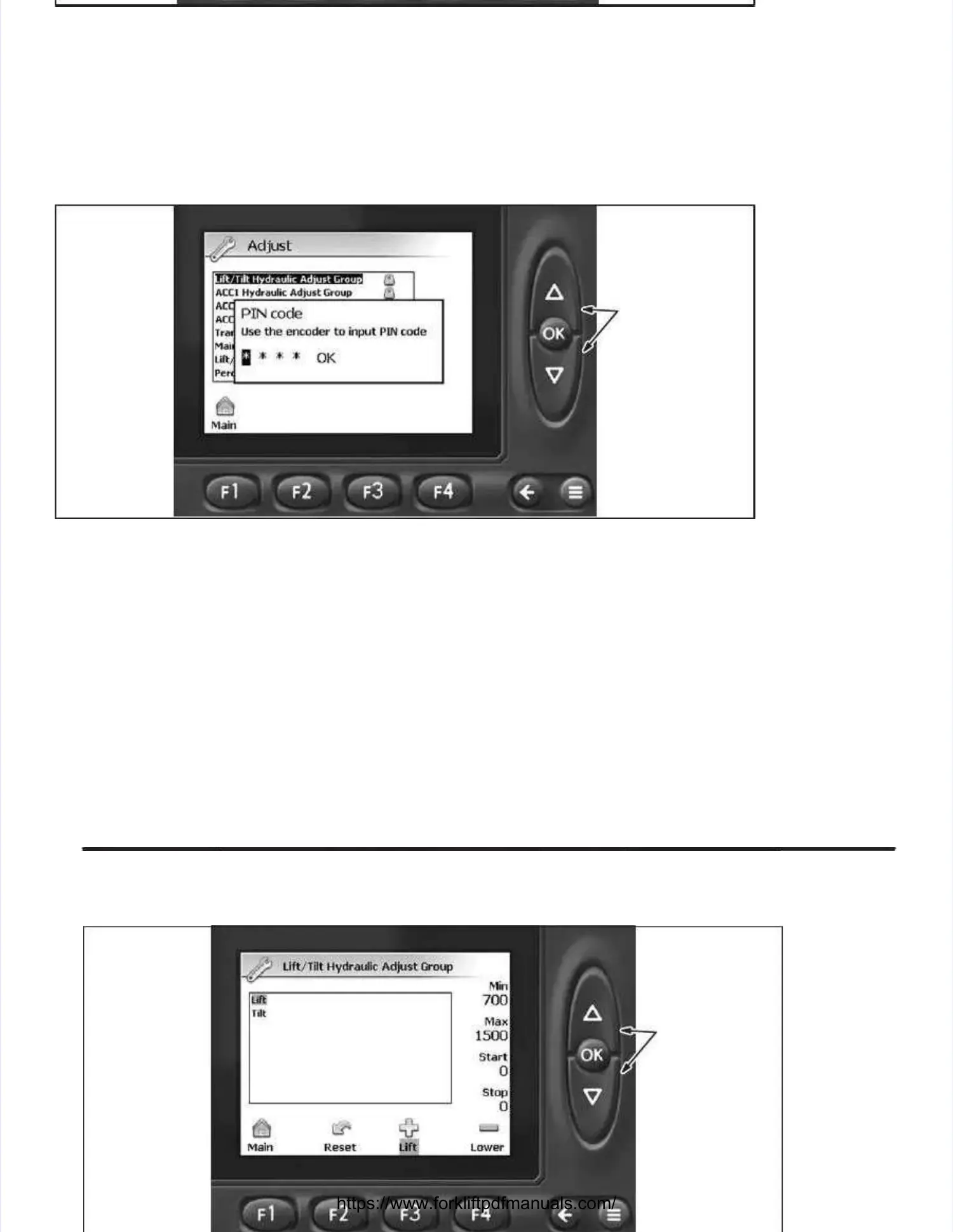
Adjust Groups Adjust Groups ScreenScreen
3.3. DepresDepress the UP or Ds the UP or DOWN butOWN button to higton to highlight thlight the desirhe desired adjused adjust group and dt group and depress tepress the OKhe OK
button to make button to make setting adjustments setting adjustments to the selected to the selected group. group. The PIN code The PIN code screen will appearscreen will appear. . The cor-The cor-
rect PIN code must be entered before the software will allow any adjustments to be made.rect PIN code must be entered before the software will allow any adjustments to be made. NOTE:NOTE:
Taylor personnel will provide qualified maintenance personnel with the Pin Code necessary to makeTaylor personnel will provide qualified maintenance personnel with the Pin Code necessary to make
adjustments within adjust groups.adjustments within adjust groups.
DEPRESS UP ORDEPRESS UP OR
DOWN BUTTONDOWN BUTTON
TO CHANGE DIGIT.TO CHANGE DIGIT.
DEPRESS OK BUT-DEPRESS OK BUT-
TON TO ENTERTON TO ENTER
DIGIT.DIGIT.
PIN Code ScreenPIN Code Screen
4.4. From the PIFrom the PIN code scrN code screen, depreen, depress the UP or DOess the UP or DOWN buttWN button until thon until the first nume first numeric digieric digit appears it appears in then the
first field. first field. Depress the OK Depress the OK button to enter button to enter the numeric digit the numeric digit and advance to and advance to the next field. the next field. Repeat thisRepeat this
procedure until all four numeric digits havprocedure until all four numeric digits have been entered. e been entered. After the code has been entered, After the code has been entered, OK will beOK will be
highlighted; depress the OK button to enter PIN code.highlighted; depress the OK button to enter PIN code.
DEPRESS UP ORDEPRESS UP OR
DOWN BUTTON TODOWN BUTTON TO
SELECT FUNCTION;SELECT FUNCTION;
DEPRESS OK BUT-DEPRESS OK BUT-
TON TO ENTERTON TO ENTER
FUNCTION ADJUSTFUNCTION ADJUST
GROUP SCREEN.GROUP SCREEN.


 To Next Page
 Loading...