6-456-45TX / TXH / TXB 180S - 400L (Rev. 4/23/07)TX / TXH / TXB 180S - 400L (Rev. 4/23/07)
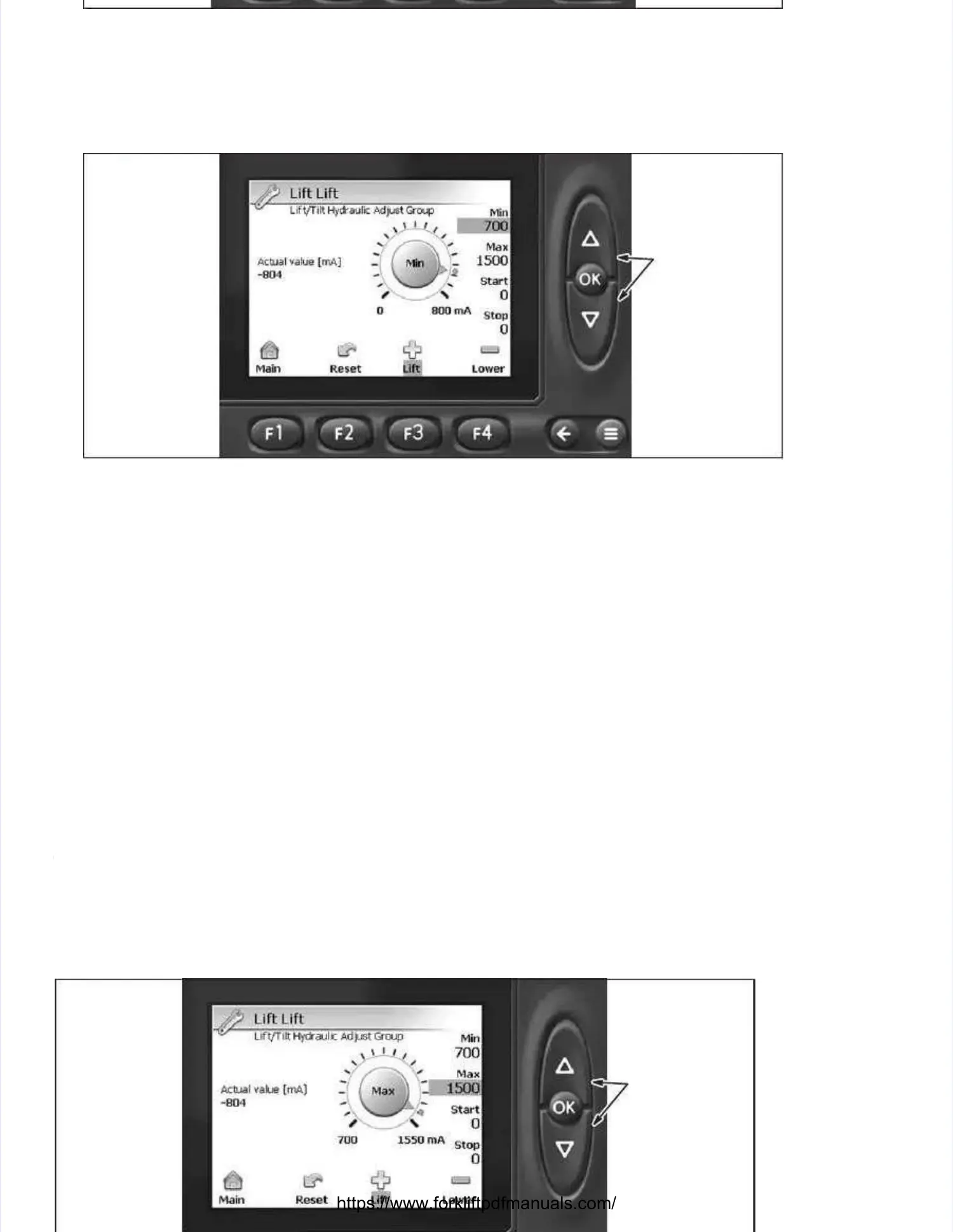
Lift / Tilt Adjust Group ScreenLift / Tilt Adjust Group Screen
5.5. DepresDepress the UP or DOWN buts the UP or DOWN button to seleton to select the funcct the function in whiction in which settinh setting adjustmg adjustments are to be madents are to be made.e.
With the function selected, With the function selected, depress the OK button to access depress the OK button to access the settings. the settings. Ensure that Lift is high-Ensure that Lift is high-
lighted and depress the OK button.lighted and depress the OK button.
DEPRESS UP ORDEPRESS UP OR
DOWN BUTTON TODOWN BUTTON TO
ADJUSTADJUST; DEPRESS; DEPRESS
OK BUTTON TOOK BUTTON TO
STORE ADJUST-STORE ADJUST-
MENT.MENT.
Lift (Min Setting) ScreenLift (Min Setting) Screen
6.6. This parThis parameter is uameter is used to calised to calibrate the mbrate the minimum aminimum amount of curount of current sent trent sent to the lift vao the lift valve when liflve when lifting.ting.
With the engine running, fully actuate the joystick tWith the engine running, fully actuate the joystick to the lift position. o the lift position. Slowly depress the UP or DOWNSlowly depress the UP or DOWN
button until the mast just button until the mast just begins to lift the carriage. begins to lift the carriage. Observe the value underneath the Min vObserve the value underneath the Min valuealue
parameter (upper right–hand of display). parameter (upper right–hand of display). Add 50 counts to the value Add 50 counts to the value at which the mast just at which the mast just began tobegan to
creep upward (depress the UP button until the Min value is 50 counts higher than the count at whichcreep upward (depress the UP button until the Min value is 50 counts higher than the count at which
the mast began to creep upward). the mast began to creep upward). Depress the OK button to stDepress the OK button to store the value into the processor ore the value into the processor andand
advance to the Max )parameter of this screen by depressing the OK button again.advance to the Max )parameter of this screen by depressing the OK button again. NOTE:NOTE: The The PlusPlus
funct
function ion ((, F3 button) extends the cylinder while the Minus function (, F3 button) extends the cylinder while the Minus function (, F, F4 b4 bututtoton)n) reretrtracacts ts ththee
cylinder.cylinder.
DEPRESS UP ORDEPRESS UP OR
DOWN BUTTON TODOWN BUTTON TO
ADJUSTADJUST; DEPRESS; DEPRESS
OK BUTTON TOOK BUTTON TO
STORE ADJUST-STORE ADJUST-
MENT.MENT.


 To Next Page
 Loading...