9C-39C-3TX / TXH / TXB 180S - 400L (Rev. 4/23/07)TX / TXH / TXB 180S - 400L (Rev. 4/23/07)
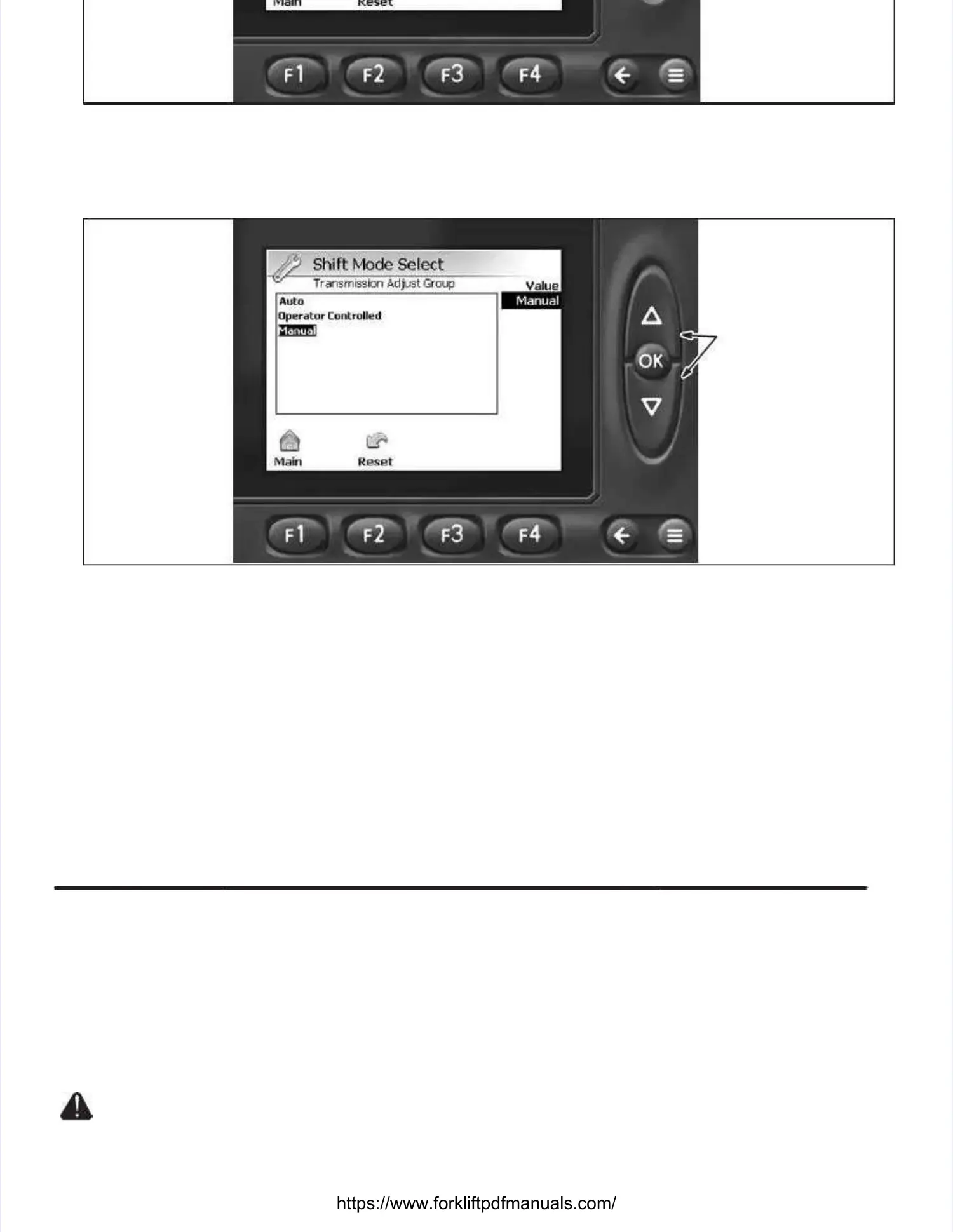
Illustration 9C-5. Illustration 9C-5. TransmisTransmission Adjust Group sion Adjust Group ScreenScreen
5.5. At the TrAt the Transmiansmission Adjussion Adjust Group screest Group screen, select Shifn, select Shift Mode Select (Illut Mode Select (Illustratstration 9C-5) by depression 9C-5) by depressinging
the UP or DOWN button to highlight selection and depress the OK button to access the Shift Modethe UP or DOWN button to highlight selection and depress the OK button to access the Shift Mode
Select screen.Select screen.
DEPRESS UP ORDEPRESS UP OR
DOWN BUTTON TODOWN BUTTON TO
SELECT GROUP;SELECT GROUP;
DEPRESS OK BUT-DEPRESS OK BUT-
TON TO ENTERTON TO ENTER
INTO DESIREDINTO DESIRED
GROUP.GROUP.
Illustration 9C-6. Illustration 9C-6. Shift Shift Mode Select Mode Select ScreenScreen
6.6. At the ShifAt the Shift Mode Select Mode Select screen (It screen (Illustllustration 9Cration 9C-6), depr-6), depress the UP or DOWess the UP or DOWN button to seN button to select the slect the shifthift
mode of transmission mode of transmission operation. operation. Selecting Locked / Auto Selecting Locked / Auto activates the APC activates the APC module to automaticallymodule to automatically
select the speed range (Locked / Auto Modeselect the speed range (Locked / Auto Mode– operator – operator cannot manually select cannot manually select speed range speed range at theat the
electric shifter). electric shifter). Selecting Operator Controlled allows Selecting Operator Controlled allows the operator choose whether the operator choose whether the speedthe speed
range of the transmission is manually shifted or automatically shifted (Operator Controlled Mode, referrange of the transmission is manually shifted or automatically shifted (Operator Controlled Mode, refer
toto Operator Controlled Auto / Manual SelectionOperator Controlled Auto / Manual Selectionin this in this section). section). Selecting Locked / Selecting Locked / Manual allowsManual allows
the speed range to be manually selected by tthe speed range to be manually selected by the operator at the electric shifterhe operator at the electric shifter. . Once the desiredOnce the desired
mode has been selected, depress the OK button once.mode has been selected, depress the OK button once.
7.7. DepDepresress ths the Meae Measursure / Ade / Adjusjust Grt Groups oups ((≡≡) button to return to the Main Display screen and turn the igni-) button to return to the Main Display screen and turn the igni-
tion switch to its Off position.tion switch to its Off position.
The ignition switch should be turned to The ignition switch should be turned to its Off position after its Off position after maintenancemaintenance
personnel have made setting personnel have made setting adjustments within the TIadjustments within the TICS system. CS system. Failure to do so, giFailure to do so, givesves
Unauthorized personnel access to change settings within the TICS system.Unauthorized personnel access to change settings within the TICS system.
Operator Controlled Auto / Manual SelectionOperator Controlled Auto / Manual Selection (Illustration 9C-7)(Illustration 9C-7).. To select whether the speed range isTo select whether the speed range is
automatically (Auto) or manually (Manual) selected while the Operator Controlled mode is enabled,automatically (Auto) or manually (Manual) selected while the Operator Controlled mode is enabled,
https://www.forkliftpdfmanuals.com/



 To Next Page
 Loading...