TX / TXH / TXB 180S - 400L (Rev. 4/23/07)TX / TXH / TXB 180S - 400L (Rev. 4/23/07)
9C-29C-2
Illustration 9CIllustration 9C-3. -3. Adjust Adjust ScreenScreen
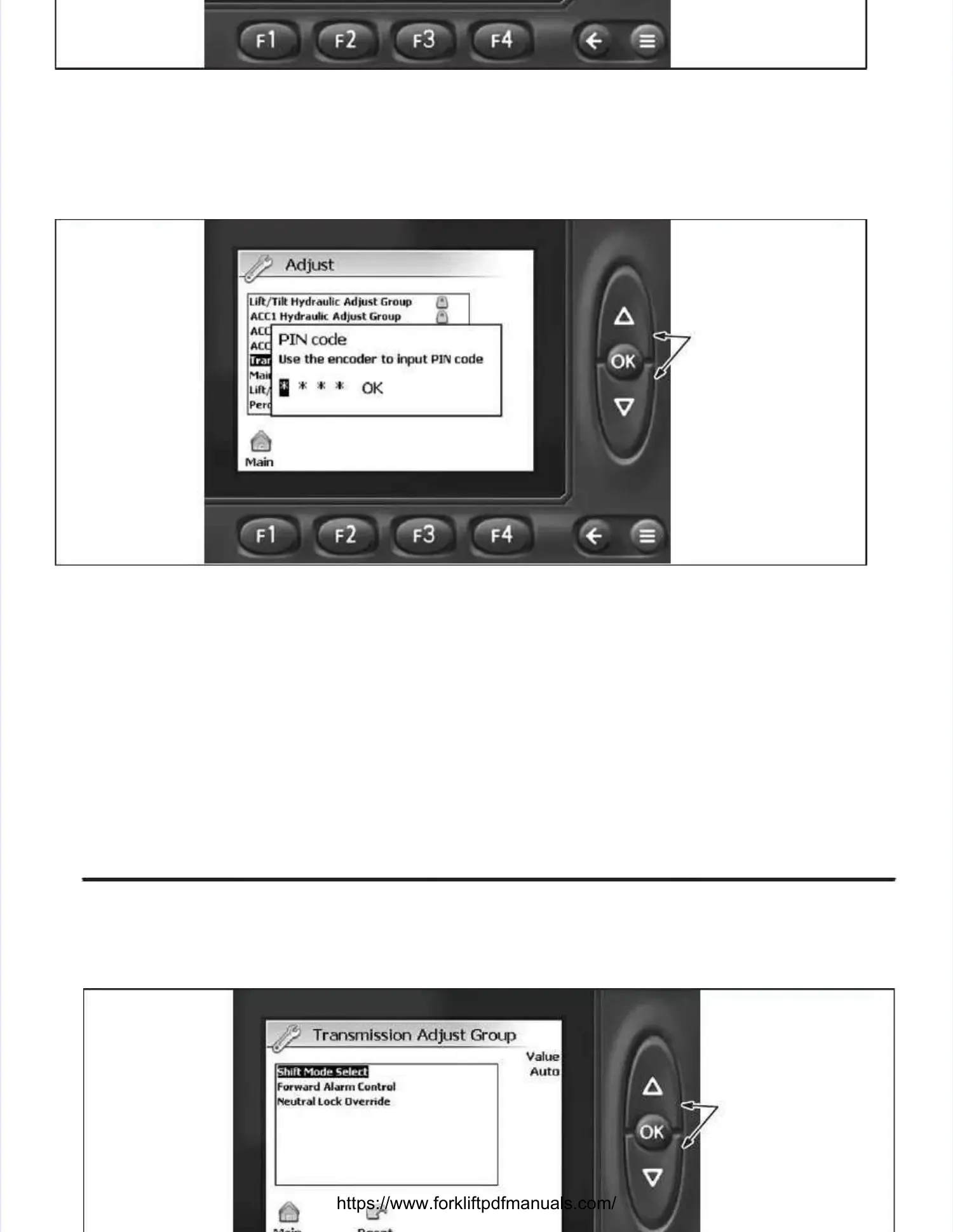
3.3. At the Adjust scrAt the Adjust screen (Illuseen (Illustratitration 9C-3), seleon 9C-3), select Trct Transmiansmission Adjussion Adjust Group by depresst Group by depressing the UP orsing the UP or
DOWN button to highlight the selection (if the selection is not already highlighted).DOWN button to highlight the selection (if the selection is not already highlighted). NOTE:NOTE: The The cate-cate-
gory is highlighted when a black box appears behind the selection (category text will be white).gory is highlighted when a black box appears behind the selection (category text will be white).
Depress the OK button to access the TDepress the OK button to access the Transmission Adjust Group screen. ransmission Adjust Group screen. The PIN code screen willThe PIN code screen will
appear. appear. The Pin Code must be The Pin Code must be entered before the software entered before the software will allow any adjustments will allow any adjustments to be made.to be made.
DEPRESS UP ORDEPRESS UP OR
DOWN BUTTONDOWN BUTTON
TO SELECT THETO SELECT THE
NUMERIC DIGITSNUMERIC DIGITS
OF THE PIN CODE.OF THE PIN CODE.
DEPRESS OK BUT-DEPRESS OK BUT-
TON AFTER EACHTON AFTER EACH
DIGIT IS ENTERED.DIGIT IS ENTERED.
Illustration 9C-4. Illustration 9C-4. Pin Pin Code Code ScreenScreen
4.4. From the PIFrom the PIN code scrN code screen (Illeen (Illustratustration 9C-4)ion 9C-4), depres, depress the UP or DOWN bs the UP or DOWN button untutton until the firsil the first numerit numericc
digit appears in the first fdigit appears in the first field. ield. Depress the OK button to Depress the OK button to enter the numeric digit and adventer the numeric digit and advance to theance to the
second field. second field. Repeat this Repeat this procedure until procedure until all four numeric all four numeric digits have digits have been entered. been entered. After the After the codecode
has been entered, OK will be highlighted; depress the OK button to view the Transmission Adjusthas been entered, OK will be highlighted; depress the OK button to view the Transmission Adjust
Group screen.Group screen.
DEPRESS UP ORDEPRESS UP OR
DOWN BUTTON TODOWN BUTTON TO
SELECT GROUP;SELECT GROUP;
DEPRESS OK BUT-DEPRESS OK BUT-
TON TO ENTERTON TO ENTER
INTO DESIREDINTO DESIRED
GROUP.GROUP.


 To Next Page
 Loading...