9C-59C-5TX / TXH / TXB 180S - 400L (Rev. 4/23/07)TX / TXH / TXB 180S - 400L (Rev. 4/23/07)
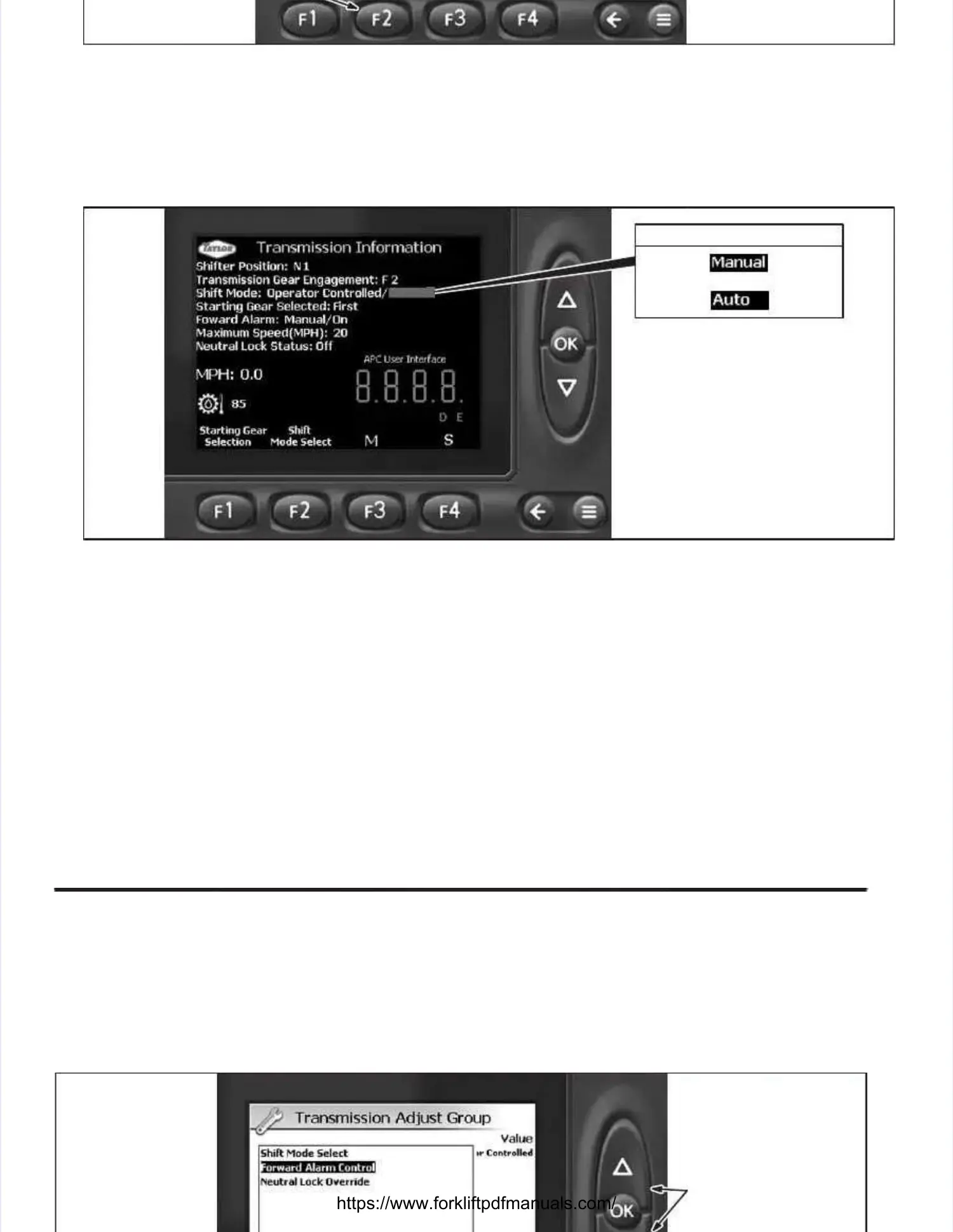
Illustration 9C-8. Illustration 9C-8. Diagnostics Diagnostics Select Select ScreenScreen
3.3. At the TrAt the Transmiansmission Infssion Informatiormation screen (Illon screen (Illustratustration 9C-9), deprion 9C-9), depress the Shift Mode Selecess the Shift Mode Select button (F2)t button (F2)
to select the shift to select the shift mode (Operator Controlled / Manual or Operator mode (Operator Controlled / Manual or Operator Controlled / Auto). Controlled / Auto). Selecting Oper-Selecting Oper-
ator Controlled / Auto activates the APC ator Controlled / Auto activates the APC module to automatically select the smodule to automatically select the speed range. peed range. SelectingSelecting
Operator Controlled / Manual allows the speed range to be manually selected by the operator at theOperator Controlled / Manual allows the speed range to be manually selected by the operator at the
electric electric shiftershifter..
OPERATOR CONTROLLED MODEOPERATOR CONTROLLED MODE
OROR
Illustration 9C-9. Illustration 9C-9. TransmissTransmission Information Screenion Information Screen
4.4. Once tOnce the deshe desired mired mode haode has bees been selen selected, cted, depresdepress thes the ←←button once to return to the Main Displaybutton once to return to the Main Display
screen.screen.
Forward Alarm Mode SelectionForward Alarm Mode Selection (Illustrations 9C-2 thru 9C-4, 9C-10 and(Illustrations 9C-2 thru 9C-4, 9C-10 and9C-11)9C-11).. Refer to theRefer to the ForwardForward
Alarm SystemAlarm Systemin the Operator’s Guide (OG160) for information on selecting the operating mode of thein the Operator’s Guide (OG160) for information on selecting the operating mode of the
forward alarm. forward alarm. TTo o select theselect theAutomatic orAutomatic orOperator Controlled modeOperator Controlled mode of forward alarm operation, performof forward alarm operation, perform
the following steps:the following steps:
1.1. FolFollow low stesteps 1ps 1. t. thru hru 4. o4. of tf thehe TrTransmission Shift Mode ansmission Shift Mode SelectionSelectionfound earlier in this section.found earlier in this section.
DEPRESS UP ORDEPRESS UP OR
DOWN BUTTON TODOWN BUTTON TO
SELECT GROUP;SELECT GROUP;
DEPRESS OK BUT-DEPRESS OK BUT-
TON TO ENTERTON TO ENTER
INTO DESIREDINTO DESIRED
GROUPGROUP


 To Next Page
 Loading...