TX / TXH / TXB 180S - 400L (Rev. 4/23/07)TX / TXH / TXB 180S - 400L (Rev. 4/23/07)
9C-69C-6
GROUP.GROUP.
Illustration 9C-10. Illustration 9C-10. TransmissTransmission Adjust Group ion Adjust Group ScreenScreen
2.2. At the TrAt the Transmiansmission Adjussion Adjust Group screst Group screen, selecen, select Forward Alat Forward Alarm Controrm Control (Illustl (Illustration 9Cration 9C-10) by-10) by
depressing the UP or DOWN button to highlight selection and depress the OK button to access thedepressing the UP or DOWN button to highlight selection and depress the OK button to access the
Forward Alarm Control screen.Forward Alarm Control screen.
DEPRESS UP ORDEPRESS UP OR
DOWN BUTTON TODOWN BUTTON TO
SELECT GROUP;SELECT GROUP;
DEPRESS OK BUT-DEPRESS OK BUT-
TON TO ENTERTON TO ENTER
INTO DESIREDINTO DESIRED
GROUP.GROUP.
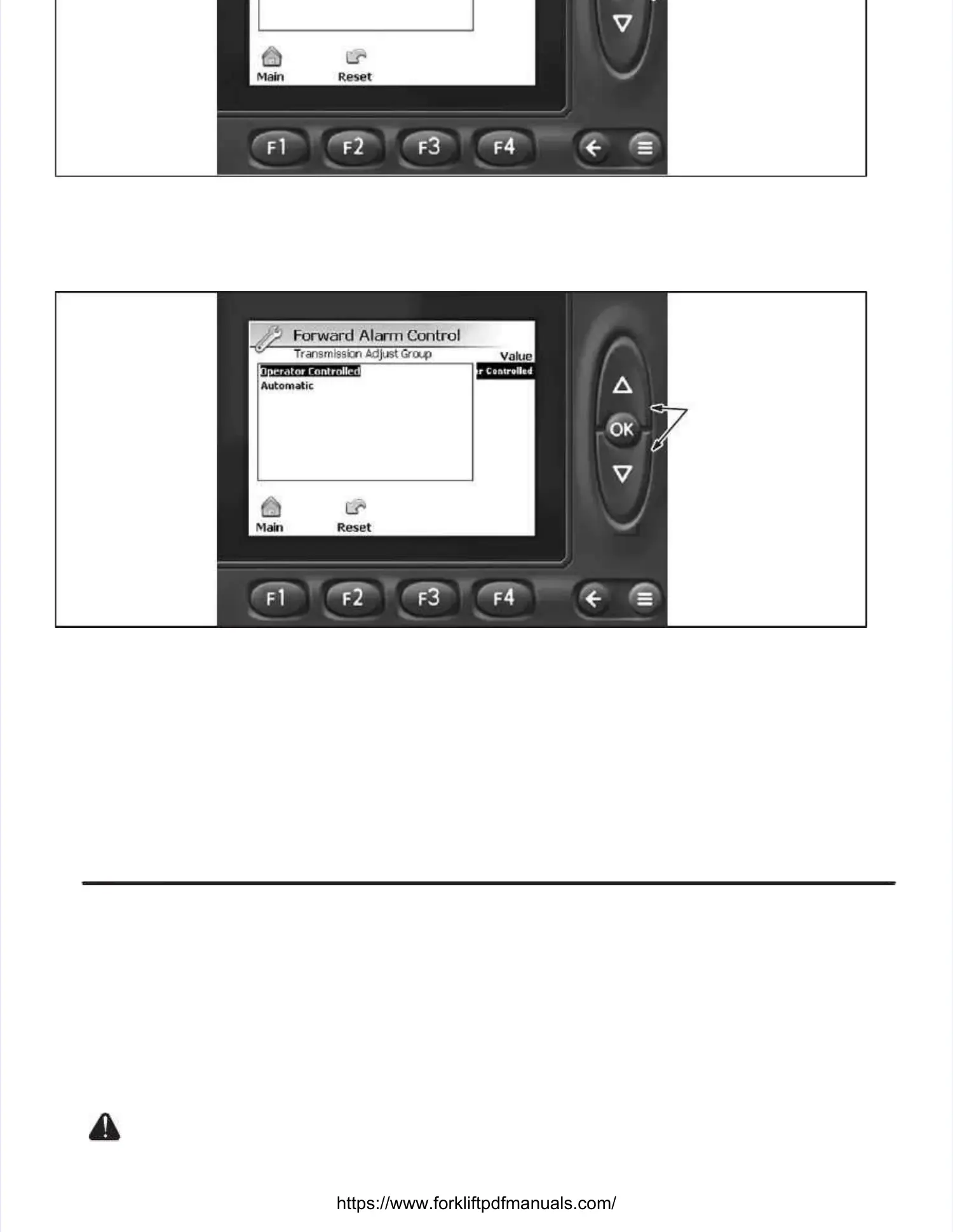
Illustration 9C-1Illustration 9C-11. 1. Forward Alarm Forward Alarm Control ScreenControl Screen
3.3. At the ForwarAt the Forward Alarm Contrd Alarm Control screen (Ilol screen (Illustrlustration 9C-ation 9C-111), depres1), depress the UP or DOWN button to sels the UP or DOWN button to selectect
the mode of foward alarm operation. the mode of foward alarm operation. Selecting Automatic activatSelecting Automatic activates the forward alarm every es the forward alarm every time thetime the
truck is operated for forward travel (truck is operated for forward travel (Automatic ModeAutomatic Mode– operator – operator cannot choose when cannot choose when to use forwardto use forward
alarm). alarm). Selecting Operator Controlled Selecting Operator Controlled activates the forwactivates the forward alarm only when ard alarm only when the operator chooses tthe operator chooses too
turn the forward alarm On (turn the forward alarm On (
Operator Controlled Mode,Operator Controlled Mode,
refer torefer to Forward Alarm On / Off SelectionForward Alarm On / Off Selectioninin
this section). this section). Once the desired mode Once the desired mode has been selected, depress has been selected, depress the OK button once.the OK button once.
4.4. DepDepresress the s the MeaMeasursure / Adje / Adjust ust GroGroups (ups (≡≡) button to return to the Main Display screen and turn the igni-) button to return to the Main Display screen and turn the igni-
tion switch to its Off position.tion switch to its Off position.
The ignition switch should be turned to its Off position after maintenanceThe ignition switch should be turned to its Off position after maintenance
personnel have made setting adpersonnel have made setting adjustments within the TICS systemjustments within the TICS system. . Failure to do so, givesFailure to do so, gives
Unauthorized personnel access to change settings within the TICS system.Unauthorized personnel access to change settings within the TICS system.
Forward Alarm On / Off SelectionForward Alarm On / Off Selection (Illustration 9C-12)(Illustration 9C-12).. To turn the forward alarm On or Off while operat-To turn the forward alarm On or Off while operat-


 To Next Page
 Loading...