TX / TXH / TXB 180S - 400L (Rev. 4/23/07)TX / TXH / TXB 180S - 400L (Rev. 4/23/07)
9C-89C-8
APC ModuleAPC Module
APCAPC
SPICER OFF–HIGHWAYSPICER OFF–HIGHWAY
EE
DD
FF
MM
SS
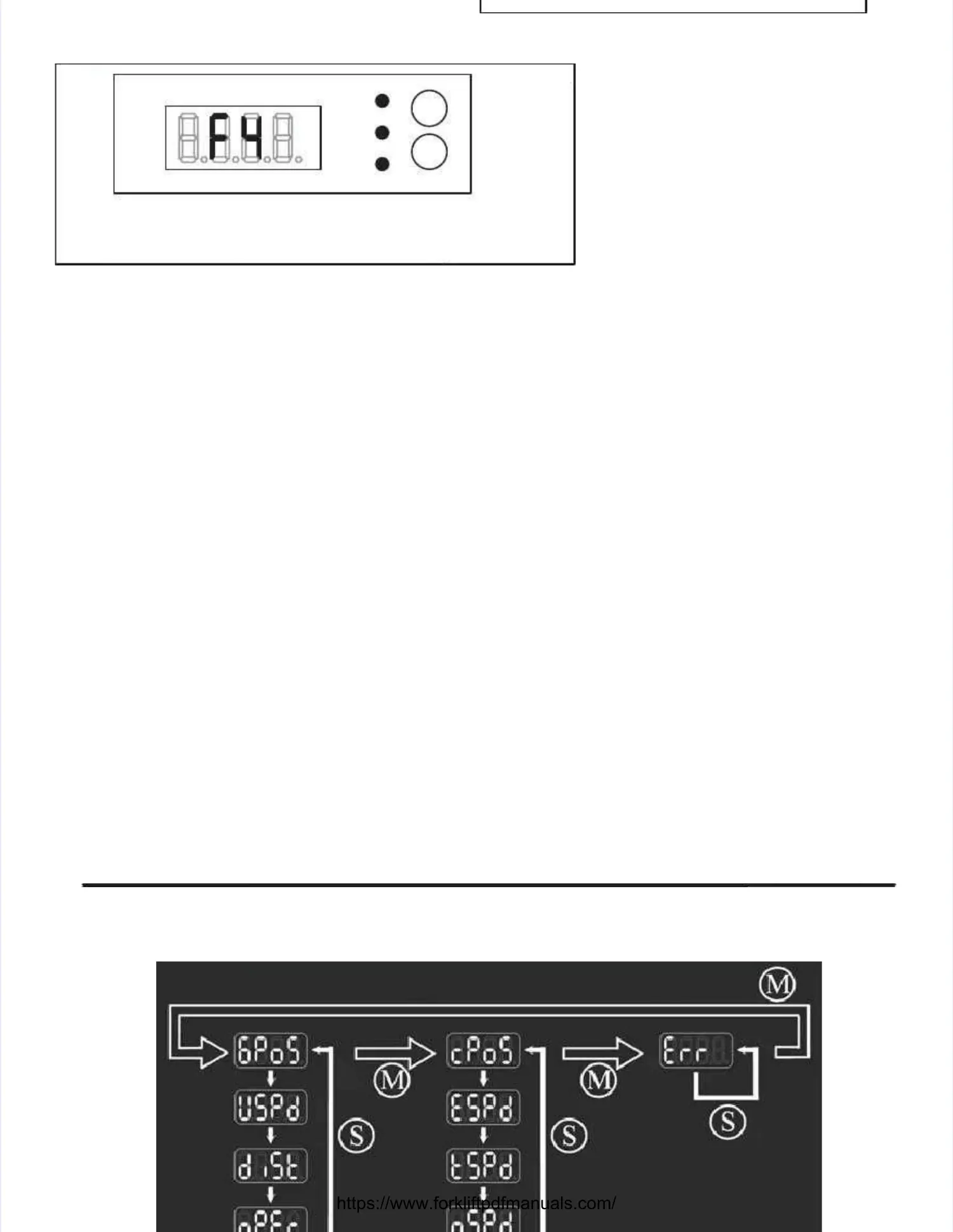
4 red 7–segment LED digits4 red 7–segment LED digits
3 status LED lamps (”D”,”E”,”F”)3 status LED lamps (”D”,”E”,”F”)
2 push buttons ’M’ and ’S’ for display mode selection.2 push buttons ’M’ and ’S’ for display mode selection.
APC Front DisplayAPC Front Display
The display is located on the APC front panel (or the Transmission Information screen displayed on theThe display is located on the APC front panel (or the Transmission Information screen displayed on the
TICS Display Module) and consists of:TICS Display Module) and consists of:
The LED lamp labelledThe LED lamp labelled ’D’’D’is yellow and is used to indicateis yellow and is used to indicate DDiagnostic modes.iagnostic modes.
The LED lamp labelledThe LED lamp labelled ’E’’E’is yellow and is used to indicateis yellow and is used to indicate EErrors.rrors.
The LED lamp labelledThe LED lamp labelled ’F’’F’ is red and is switched on when the APC is in the reset condition due to theis red and is switched on when the APC is in the reset condition due to the
bootstrap orbootstrap or FFault mode.ault mode.
After power up, the After power up, the display defaults to the display defaults to the last display mode (if last display mode (if the display mode was the display mode was not the error not the error display)display)
selected when the controller was last powered down.selected when the controller was last powered down.
Typically, this will be theTypically, this will be the gear position mode.gear position mode. In this mode, the center left digit shows the actuallyIn this mode, the center left digit shows the actually
engaged direction and the center right digit shows the currently engaged range (gear).engaged direction and the center right digit shows the currently engaged range (gear).
Pressing the ’M’ switch (F3) changes the displayed information group while pressing the ’S’ switch (F4)Pressing the ’M’ switch (F3) changes the displayed information group while pressing the ’S’ switch (F4)
selects the item within the group.selects the item within the group.
While pushing the switch (about 0.5 seconds after it is released), the display shows which information isWhile pushing the switch (about 0.5 seconds after it is released), the display shows which information is
about to be displayed.about to be displayed.


 To Next Page
 Loading...