1-5
1-5TX / TXH / TXB 180S - 400L (Rev. 4/23/07)TX / TXH / TXB 180S - 400L (Rev. 4/23/07)
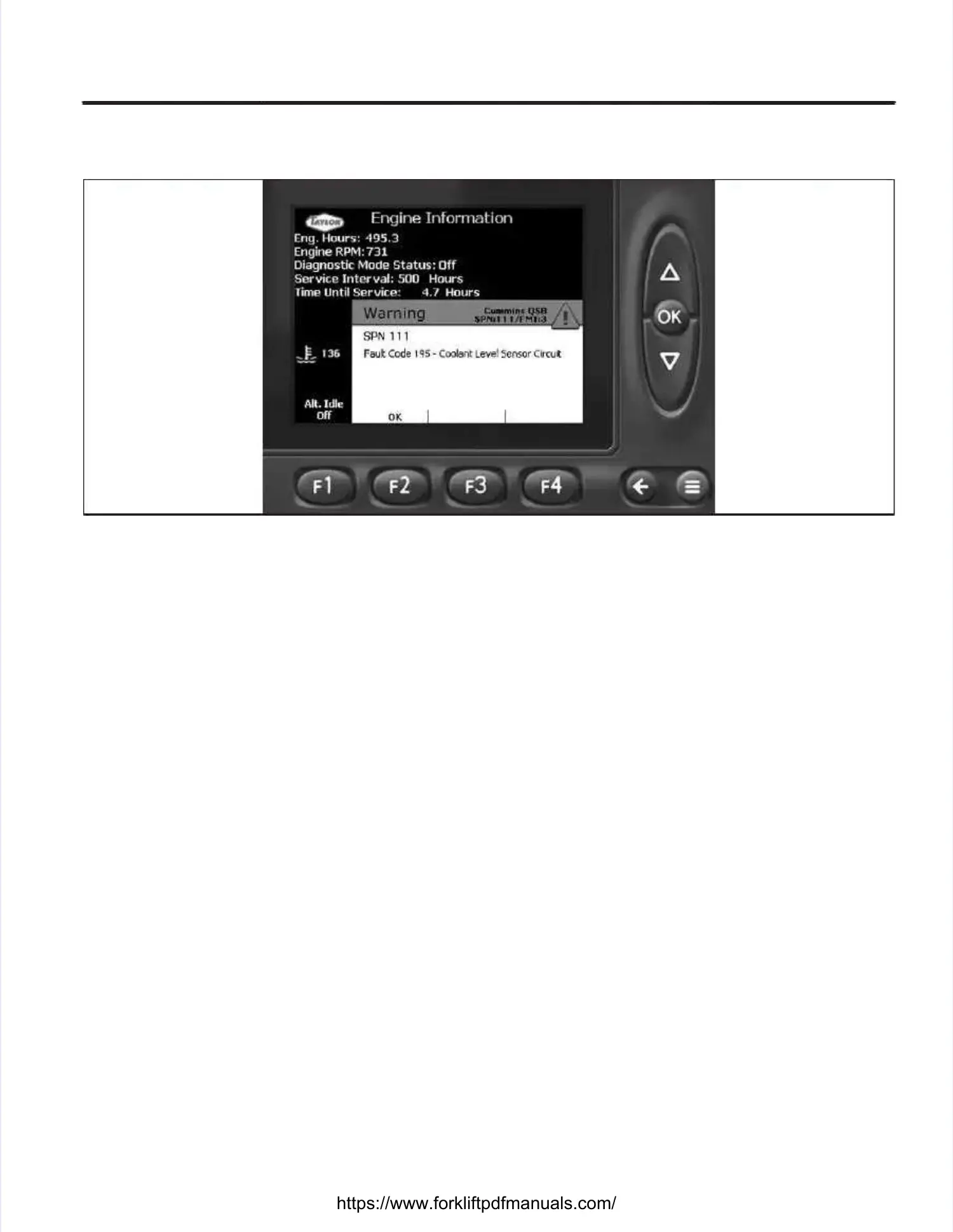
Illustration 1-5. Illustration 1-5. Engine Fault Engine Fault Code Dialog Code Dialog ScreenScreen
Diagnostic Fault CodesDiagnostic Fault Codes(Illustration 1-4)(Illustration 1-4).. If theIf the
red iconred icon(Engine Shutting Down) or(Engine Shutting Down) or yellow iconyellow icon
(System Fault) is displayed on the Engine Infor-(System Fault) is displayed on the Engine Infor-
mation Screen of the TICS Display Module whenmation Screen of the TICS Display Module when
the engine is running, it means a fault code hasthe engine is running, it means a fault code has
been recorded. been recorded. The icon wThe icon will remain on ill remain on as long asas long as
the fault exists. the fault exists. The severity of The severity of the fault will deter-the fault will deter-
mine the icon mine the icon that will that will be displayed. be displayed. Only activeOnly active
fault codes can be viewed by use of the diagnosticfault codes can be viewed by use of the diagnostic
icons. icons. TTo view inactive fault o view inactive fault codes, a laptop com-codes, a laptop com-
puter equipped with Cummins Insite software isputer equipped with Cummins Insite software is
required.required.
To view active fault codes, perform the follow-To view active fault codes, perform the follow-
ing:ing:
1.1. LeaLeave thve the enge engine ruine runninning or hang or have thve the ignie ignitiotionn
key in its accessory position to view the TICSkey in its accessory position to view the TICS
display module screen.display module screen.
2.2. At thAt the maie main scrn screen oeen of the Tf the TICS dICS dispisplay mlay mod-od-
ule, depress the F1 button (Diagnostics) toule, depress the F1 button (Diagnostics) to
view the Diagnostics Select screen.view the Diagnostics Select screen.
NOTE:NOTE: If a If a diagnostics selectdiagnostics selection button ion button is notis not
depressed within 5 seconds while the Diagnosticsdepressed within 5 seconds while the Diagnostics
Select screen is displayed, the TICS display willSelect screen is displayed, the TICS display will
automatically return to automatically return to the Main Display the Main Display screen.screen.
3.3. At tAt the Dhe Diagnosiagnostics tics SelecSelect sct screen, reen, depresdepress ts thehe
F1 button (Engine) to view the Engine Infor-F1 button (Engine) to view the Engine Infor-
mation screen.mation screen.
4.4. At the EAt the Enginngine Infe Informormatiation scon screereen, depn, depresress thes the
F2 button (Diagnostic Mode Select) to changeF2 button (Diagnostic Mode Select) to change
the Diagnostic Mode Status to the On position.the Diagnostic Mode Status to the On position.
5.5. If no aIf no actictive fave fault cult codeodes are rs are recoecorderded, thd, thee
yellow icon (System Fault) and red iconyellow icon (System Fault) and red icon
(Engine Shutting Down) will illuminate and(Engine Shutting Down) will illuminate and
stay on. stay on. If active fIf active fault codes are ault codes are recorded, therecorded, the
yellow icon and red icon will illuminate momen-yellow icon and red icon will illuminate momen-
tarily, and then the red icon will begin to flashtarily, and then the red icon will begin to flash
the three-digit code of the recorded fault(s).the three-digit code of the recorded fault(s).
6.6. The fThe faulault codt code wile will flal flash in tsh in the fohe follollowinwingg
sequence:sequence:
a.a. FirFirst, tst, the yelhe yellow iclow icon wilon will flal flash begsh beginninninging
the sequence. the sequence. There will be There will be a short a short 1 or 21 or 2
second pause after which the red icon willsecond pause after which the red icon will
flash the first, second, and third digits offlash the first, second, and third digits of
the recorded fthe recorded fault code. ault code. There will be There will be a 1a 1
or 2 second pause between each numberor 2 second pause between each number
of the cof the code. ode. When all three When all three digits of thedigits of the
fault code have flashed, the yellow icon willfault code have flashed, the yellow icon will
illuminate again and repeat the sequenceilluminate again and repeat the sequence
until the fault is cleared or the Diagnosticuntil the fault is cleared or the Diagnostic
Mode Status is toggled to the OFF posi-Mode Status is toggled to the OFF posi-
tion.tion.
Example:Example:
Fault Code 432Fault Code 432
4 flashes, pause4 flashes, pause
3 flashes, pause3 flashes, pause
2 flashes2 flashes
b.b. If mIf multultipliple faue fault colt codes hdes have bave been seen stortored,ed,
the first fault code must be cleared beforethe first fault code must be cleared before
the second fault code can be displayed.the second fault code can be displayed.


 To Next Page
 Loading...