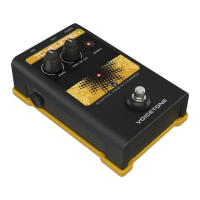
The VoiceTone T1 is a vocal effects pedal designed to enhance live vocal sound with studio-grade dynamics and EQ processors. It aims to provide a "personal sound engineer" experience, automatically reacting to your voice and applying dynamics and EQ to optimize vocal tone. The device is designed for super-simple operation, allowing users to achieve a polished vocal sound quickly without complex setup or adjustments.
Function Description:
The core function of the VoiceTone T1 is to provide adaptive tone and dynamics for live vocals. It features three main controls: Shape, Comp/De-ess, and Warmth.
- Shape: This control manages multiple bands of EQ (equalization or tone). It adds brightness to the vocal sound while simultaneously removing bass frequencies that can contribute to a muddy sound, specifically tailored to your voice. Turning the Shape control past its center notch setting increases brightness further.
- Comp / De-ess: This single control combines two professional dynamics effects: compression and de-essing.
- Compression: Reduces vocal peaks, which can be uncomfortable for listeners, especially at high PA volumes. The VoiceTone T1 automatically applies a gentle amount of compression, whether you are singing close to the microphone or further away.
- De-ess: Reduces sibilant sounds (like "Sss," "T," and "D") in your singing, adding a polished, studio-like quality to the vocal.
The center notches for both Shape and Comp/De-ess controls are designed as "set and forget" points, representing the most common effect settings, eliminating the need for extensive searching for the right sound.
- Warmth: This control allows you to restore a narrow bass frequency band, adding fullness to your voice without making it sound muddy.
The VoiceTone T1 constantly adjusts to the tone of your voice as you sing, aiming to make your voice sound pleasantly brighter and smoother.
Usage Features:
- Simple Operation: The pedal is designed for ease of use, with intuitive controls that allow for quick adjustments to achieve a desired vocal sound.
- Adaptive Processing: The device automatically adapts its processing to your voice, providing consistent and optimized sound quality.
- Mic Control Feature: The VoiceTone T1 supports an optional TC-Helicon MP-75 microphone, which enables "on-mic" effect switching. This allows users to turn effects on and off directly from the microphone. To enable or disable this feature, the effect footswitch and the switch on the mic must be held for 3 seconds. When using multiple pedals, the control signal pass-through feature needs to be enabled on all but the last pedal in the chain.
- USB Connectivity: A USB connection allows for easy firmware updates, access to news, and tips via the free VoiceSupport application. This ensures the pedal can stay up-to-date with the latest enhancements.
- Balanced XLR I/O: The pedal features balanced XLR input and output, ensuring high-quality audio signal transmission.
- Phantom Power: Phantom power is always on when the product is powered, supporting condenser microphones without the need for an additional switch. Dynamic microphones that do not require phantom power will also operate correctly.
- Input Level Control: A MIC GAIN control allows users to adjust the input level. An input level LED indicates signal presence (green) and clipping (red), helping users set the optimal gain.
- Footswitch: A single footswitch allows for easy toggling of the effect on and off. An LED indicator shows when the effect is active.
- Multiple Pedal Use: The VoiceTone T1 can be used in conjunction with other VoiceTone single pedals. When chaining multiple pedals, only the first pedal in the chain requires adjustment of its MIC GAIN control; subsequent pedals should have their MIC GAIN set to minimum (fully left). The manual provides recommended orders for chaining 2, 3, and 4 pedals to ensure optimal performance.
Maintenance Features:
- Firmware Updates via VoiceSupport: The USB connection and the VoiceSupport application provide a straightforward method for updating the device's firmware. This allows the pedal to receive new features and performance improvements over time, extending its lifespan and capabilities.
- Online Support Resources: The VoiceSupport application also offers access to videos, artist profiles, tips & tricks, and product registration, providing a comprehensive resource for users to get the most out of their device.
- General Care: The manual advises cleaning the apparatus only with a dry cloth and not blocking any ventilation openings. It also recommends against installing the device near heat sources.
- Professional Servicing: In case of damage (e.g., power-supply cord or plug damage, liquid spills, objects falling into the apparatus, exposure to rain or moisture, or if the unit does not operate normally or has been dropped), all servicing should be referred to qualified service personnel.
- Feedback Prevention Tips: The manual provides practical advice for avoiding feedback in live settings, which contributes to maintaining optimal sound quality and preventing potential damage to equipment or discomfort for the audience. These tips include ensuring monitor/PA speakers are not aimed directly at the mic, singing close to the mic, using super-cardioid dynamic mics, setting PA channel EQ and graphic EQ flat, and having the band play quieter on stage.
- Connection Best Practices: Users are advised to turn down their PA's master volume and mute the PA when making all connections, especially when applying power, to prevent audio crackles that could harm equipment. The USB connection does not provide power to the unit, so a separate 12VDC power supply is always required for operation.

 Need help?
 General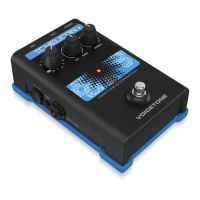

 To Next Page