
 Need help?
Do you have a question about the Tchibo CAFISSIMO MINI and is the answer not in the manual?
Details safety precautions for children and individuals with limited capabilities.
Outlines critical electrical safety measures to prevent shocks and damage.
Emphasizes using only approved capsules to avoid machine damage and voiding warranty.
Details the meaning of the indicator light colors (red for empty water, yellow for descaling).
Explains how to make espresso using the corresponding button and capsule.
Explains how to make caffè crema using the corresponding button and capsule.
Explains how to make tea using the corresponding button and tea capsules.
Explains how to make filter coffee using the corresponding button and capsule.
Ensures correct insertion of the used capsule container and drip tray.
Instructs on filling the water tank to the MAX mark.
Ensures the lever is in the correct position for operation.
Guides the user to place a cup for the initial rinse.
Instructs on connecting the machine to the power supply.
Details turning on the machine and observing button states.
Initiates the initial rinse cycle with water.
Completes the initial setup by rinsing and preparing the machine.
Positioning a cup to collect rinse water.
Ensuring the lever is correctly positioned for rinsing.
Turning the machine on to begin the rinse.
Initiating the water flow for rinsing.
Turning on the machine and waiting for it to heat up.
Placing a cup under the coffee spout.
Inserting the capsule after lifting the lever.
Lowering the lever to pierce the capsule.
Starting the brewing process by selecting the correct button.
Lifting the lever to eject the used capsule.
Closing the capsule opening after brewing.
Crucial electrical safety precautions before cleaning the machine.
Indicates when the machine requires descaling based on the yellow indicator light.
Warns about machine damage and loss of efficiency from limescale.
Step-by-step guide for descaling using durgol® swiss espresso®.
Refilling the water tank with cold water for the rinsing phase.
Guidance on descaling when the indicator light is permanently yellow.
 General
| Brand | Tchibo |
|---|---|
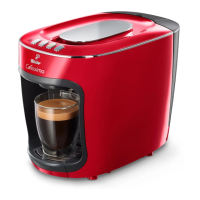
| Model | CAFISSIMO MINI |
| Category | Coffee Maker |
| Language | English |


 To Next Page