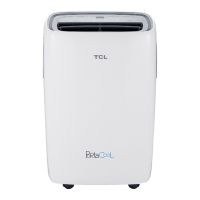
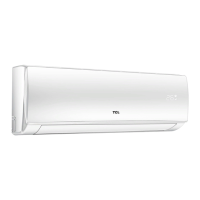
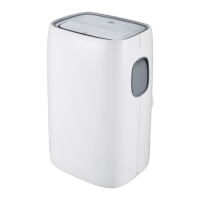
This document is the user manual for the TCL AC12000E 12,000 BTU Portable Air Conditioner with WIFI Smart App. It provides comprehensive information on the device's functions, technical specifications, usage, and maintenance.
Function Description
The TCL AC12000E is a portable air conditioner designed for indoor use, offering three primary functions: cooling, dehumidifying, and fan operation. It features a self-evaporative system, eliminating the need for an external water tank in most cooling scenarios, as excess water is reused to cool the condenser coil and then evaporated. For dehumidifying mode, continuous drainage is recommended due to the significant water production. The unit is equipped with compressor protection technology, which includes a 3-minute delay protection before the compressor starts in cooling or dehumidifying modes, and a 'no refrigerant' compressor protection mode if the temperature difference between the coil and room temperature is too small for an extended period. Anti-freeze protection is also integrated, stopping the compressor and water motor if the copper coil temperature drops too low. Water-full protection alerts the user when the internal water tank is full, displaying "Ft" on the LED screen and stopping operation until the water is drained.
A key feature of this model is its WIFI Smart App connectivity, allowing users to control the air conditioner from anywhere at any time using a smartphone (Android or iOS). The louvres automatically close when the unit is shut down, preventing dust and dirt from entering. The unit displays operating functions, temperature, fault diagnostics, and protective functions on an LED screen, complemented by an LCD remote control for comprehensive control.
Important Technical Specifications
- Capacity: 3.35 kWh / 12,000 BTU
- Rated Current: 5.5 A
- Rated Input: 1.28 kW
- Maximum Input Power: 1.4 kW
- Maximum Input Current: 6.7 A
- Air Flow: 330 m³/h
- Noise: 54dB(A)
- EER: 2.6
- Max Noise Level (Sound Pressure): 65 db
- Max Noise Level (Sound Energy): 54 db
- Energy Rating (Cooling/ Heating): A
- Maximum Suction Pressure: 2.1 MPa
- Maximum Allowable Pressure: 4.2 Mpa
- Refrigerant: R410A / 0.5 kg
- Power Supply: 220-240V~/50Hz
- Net Weight: 31 kgs
- Gross Weight: 35 kgs
- Net Dimension (WDH): 445375720mm
- Gross Dimension (WDH): 485405865mm
The unit must be vented outside when in Air Cooling mode. For EU regulation EN12102, this is classified as a local air conditioner producing less than 65dB(A) sound energy.
Usage Features
The air conditioner can be controlled via a control panel on the unit, an LCD remote control, or the TCL "SMART LIFE" WIFI app.
Control Panel and Remote Control Functions:
- ON/OFF Button: Powers the unit on or off.
- MODE Button: Cycles through Cooling, Dehumidifying, or Fan modes. The selected mode is indicated by a corresponding light on the display panel.
- Fan Speed Button: Allows selection of fan speeds. In Cooling mode, there are High, Medium, Low, and Auto speeds. In Fan mode, there are High, Medium, and Low speeds. In Dehumidify mode, the fan speed cannot be manually set.
- Timer Button: Sets the unit to turn on (ON TIMER) or turn off (OFF TIMER) after a specified period (30-minute increments up to 10 hours, then 1-hour increments up to 24 hours).
- Increase/Decrease Temperature Buttons: Adjusts the desired temperature in cooling mode (range 18-32°C) or sets the timer duration.
- °C/°F Temperature Unit Button: Switches the temperature display between Celsius and Fahrenheit.
- Sleep Button: Reduces operation for night use in cooling mode. The fan speed is set to low, and the desired temperature increases by 1°C per hour for two hours (max 2°C above original setting), then maintains this temperature for 6 hours before entering standby.
WIFI Smart App:
The unit connects to a 2.4GHz WIFI network using the TCL "SMART LIFE" app (available via QR codes for Android and iOS). This enables remote control and monitoring of the air conditioner. The manual advises using the specific TCL app for optimized features, though it notes compatibility with other Tuya smart devices via the "Smart Life" app by TUYA, albeit with potentially limited features.
Installation and Venting:
- Before use, the unit should be kept upright for at least 3-4 hours.
- It must be placed on a dry, stable, and level surface, with at least 45cm clearance from walls or objects for optimal airflow.
- The exhaust hose (flexible, 30cm to 150cm) must be extended and connected to the window slider kit or vented through a wall duct. The vent pipe should be kept as straight and short as possible, avoiding bends greater than 30°.
- The window slider kit is designed for standard sash or vertical sliding windows and can be adjusted horizontally or vertically.
- The unit should not be used in laundry or wet rooms where relative humidity exceeds 80%.
- For initial startup, set fan speed to maximum and thermostat 4-5 degrees below current temperature, then adjust to desired settings.
- Avoid using the cooling function when ambient temperature is above 35°C to protect the unit.
- Do not restart the unit within 3 minutes of turning it off to prevent compressor damage.
Water Drainage:
- Manual Drainage: When the internal tank is full, the unit displays "Ft". The unit must be unplugged, a tray placed under the bottom drain port, and the drain cap removed to empty the tank.
- Continuous Drainage: The drain plug can be removed, and a 1/2” (12.7mm) water pipe connected to the drain outlet. This pipe can be plumbed into a system, led outside, or connected to an external water pump. Gravity feeding requires the drain hose to be lower than the drain outlet.
Maintenance Features
Cleaning:
- Always shut off and unplug the unit before cleaning or maintenance.
- Surface Cleaning: Use a duster or a soft wet cloth. Avoid chemical solvents (benzene, alcohol, gasoline) to prevent damage.
- Air Filter Cleaning: Clean filters every 2 weeks, or more frequently depending on air quality.
- Use a vacuum cleaner to remove dust.
- For a deeper clean, immerse the filter in warm (approx. 40°C) water with a neutral detergent, rinse, and dry thoroughly before re-installing.
End of Season Maintenance:
- Drain the internal water tank completely by pulling out the bottom plug or by leaning the unit.
- Switch the unit to Fan mode and select low fan speed.
- Run the unit in this mode for 6-12 hours to dry the internal conduit and prevent mold development.
- Turn off and unplug the unit.
- Coil the power cable and store it in the accessories space.
- Separate and safely store the vent pipe.
- Cover the unit and store it in a dry place.
- Remove batteries from the remote control for safe storage or disposal.
Troubleshooting:
The manual provides a troubleshooting guide for common issues such as no power, "Ft" or "Pf" displayed, unit not performing, loud operation, compressor not working, remote control issues, and water leakage. It advises against self-repair to avoid voiding the warranty and potential bodily harm, recommending contacting service for unresolved problems.


 To Next Page

 General