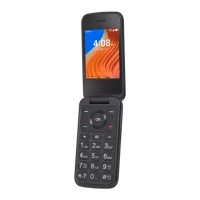
6
⑤
Navigation Key (up, down, left, right)
• Menu selection moves up, down, right, and left
• Press Left: access Email
• Press Right: access Contacts
• Press Up: access Settings
• Press Down: access Recent apps
⑥
Right Soft Key
• Press: access Shortcuts
⑦
Center Soft Key
• From the Home screen, press to access app list
• Press to select an option
⑧
End/Power Key
• Press: End a call, return to the Home screen
• Press and hold: Restart or Power on/off
⑨
Back/Delete Key
• Move backwards through Menus
• Delete entered number or letter
⑩
Text Messages
• Press: Access Text Messages
Letters symbols
• Press then choose a symbol.
Text input
• Repeat press of to change text input method from ABC to Abc, 123 or
Predictive text


 To Next Page