2800 LAURA LANE
l MIDDLETON, WI 53562 l (800) 288-9383 l FAX (608) 836-9044 l www.tcs-basys.com
9
D12 SETPOINT SHIFT
The SZ1009, SZ1022, SZ1031 and SZ1035 allow DI2 to be
set for setpoint shift for energy demand setback. This is
enabled by setting DI2 to the MONITOR mode. A digital con-
tact that closes when setback is needed should be wired into
DI2. You may specify a number of degrees such that, when
the thermostat is operating in the occupied mode, and DI2 is
closed, the heating setpoint will be lowered this number of
degrees, and the cooling setpoint will be raised this number of
degrees. The fan will continue to operate according to its
occupied setting. If you are using DI2 as monitor for another
purpose, make sure to set this value to zero.
STAGE OUTPUT PARAMETERS
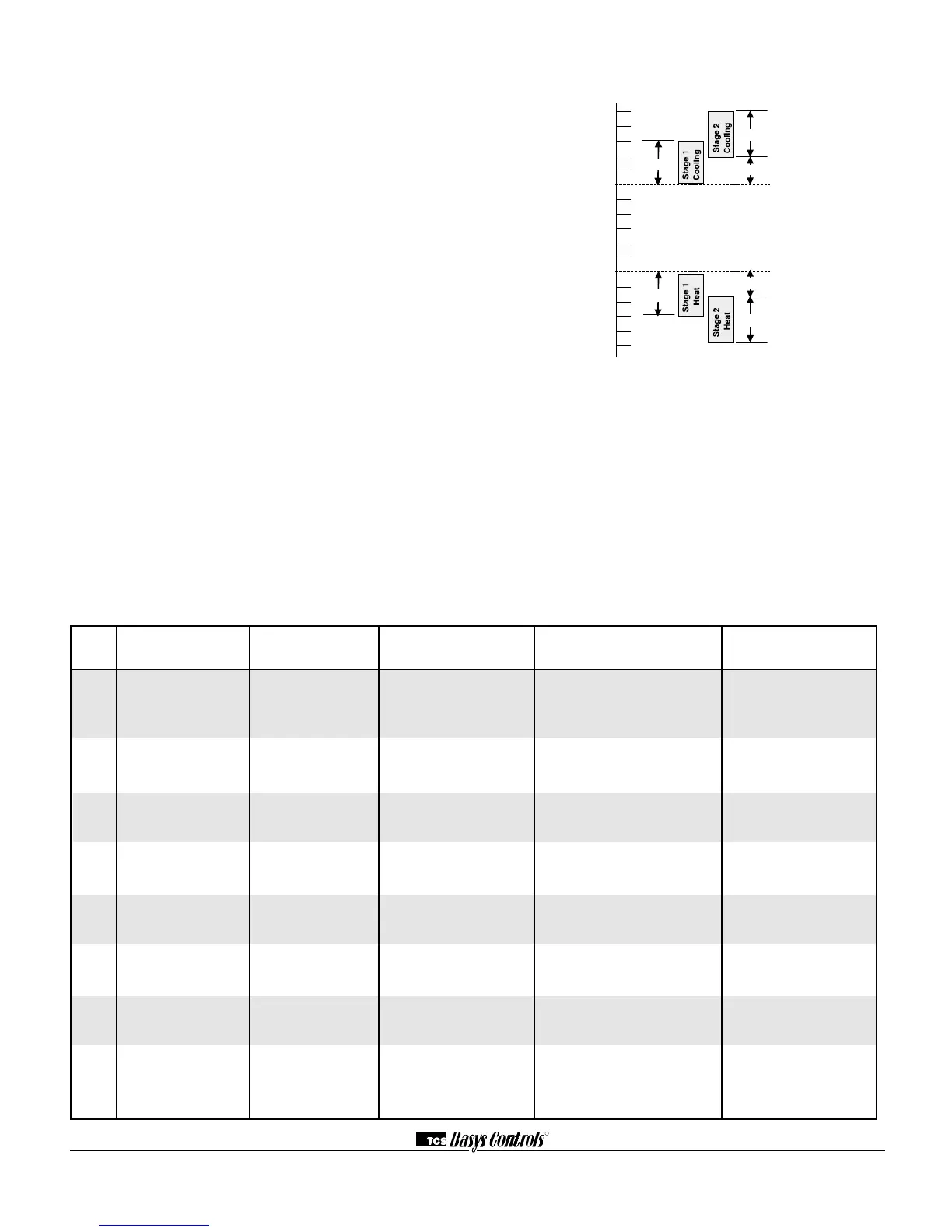
For each stage of heating and cooling, you may specify an off-
set and a differential value. This allows you to adjust the oper-
ation of the thermostat to fit your equipment to the building
load. The offset value is the amount away from the setpoint a
stage will turn off. By assigning a stage a value other than
zero, you “anticipate” that the residual heat or cooling in the
duct or the other stages will bring the temperature back to set-
point. In most cases, the first stage is set to zero. The differen-
tial value is the difference between the on and off points. This
value depends on the load and on the equipment size. If the
equipment is large for the load, you may want to make this
value as high as 5 to prevent equipment cycling. If the equip-
ment is small compared to the load, or if tight control is
desired, you may want to make this value as low as 1.
The fact that the stages are configurable allows unused stages
to be set to activate physical alarms if desired.
In summary, unlike most other multi-stage programmable
thermostats, the Superstat allows independent adjustments of
“offsets” and “differentials” for stages of heating and cooling.
The offset settings can be viewed as setpoints for the second
and third stages and are programmed in the Superstat in the
number of degrees (i.e. 1,2,3 ... ) beyond the heating and
cooling setpoints (temperatures to be maintained).
The differential for each stage can be viewed as the “anticipa-
tor” function used in mechanical thermostats.
DIGITAL APPLICATION LED SERVICE SCREEN CONTROL SENSOR OR
INPUT INDICATION? (DI STATUS SCREEN) PROVIDED DEVICE NEEDED
DI1 Fan Proving YES CHECK FAN, YES - turns system mode to "off" Differential
FAN OK — requires manual re-start pressure or
or FAIL (set system to auto) current switch
DI1 Equipment NO OK NO Dry contact, switch. Any type
Monitoring (DI1 OPEN or CLOSED) for monitoring and indication
DI2 Service Alert YES OK or CHECK DI2 NO Dry contact, switch. Any type
(DI2 SERVICE OFF or ON) for monitoring and indication
DI2 Monitor with NO OK YES - shifts setpoint by Dry contact, switch.
setpoint shift (DI2 OPEN or CLOSED) programmed amount
DI2 Cooling Lockout NO OK YES - locks out 2nd Dry contact, switch.
(COOL LOCKOUT ON or OFF) and 3rd stage cooling
DI3 Filter Service YES OK or CHECK FILTER NO Differential pressure switch
(FILTER OK or CHECK)
DI3 External Occupancy Override NO OK YES - switches to occupied mode Dry contact such as twist
(EXT OVER ON or OFF) as long as contact is made timer, light switch, etc.
DI3 External Time Clock Input NO OK YES -input overrides thermostat Dry contact;
(EXT TIMECLOCK ON or OFF) occupancy program external time clock
(TCS part SL1001a)
Digital Input Summary Table


 To Next Page
 Loading...
