2800 L A URA L ANE l MIDDLETON, WI 53562 l (800) 288-9383 l F AX (608) 836-9044 l www .tcs-basys.com
4
Programming
The SZ1009, SZ1022, SZ1031 and SZ1035 may be pro-
grammed through the keypad on the face, or with a PC.
If programming with a PC, the following must be set via the
display and keypad prior to programming:
Address (step #2)
Baud rate (step #3)
Temperature scale (step #4)
For more information on programming through the PC, con-
sult your TCS software manual.
PROGRAMMING THROUGH THE KEYPAD
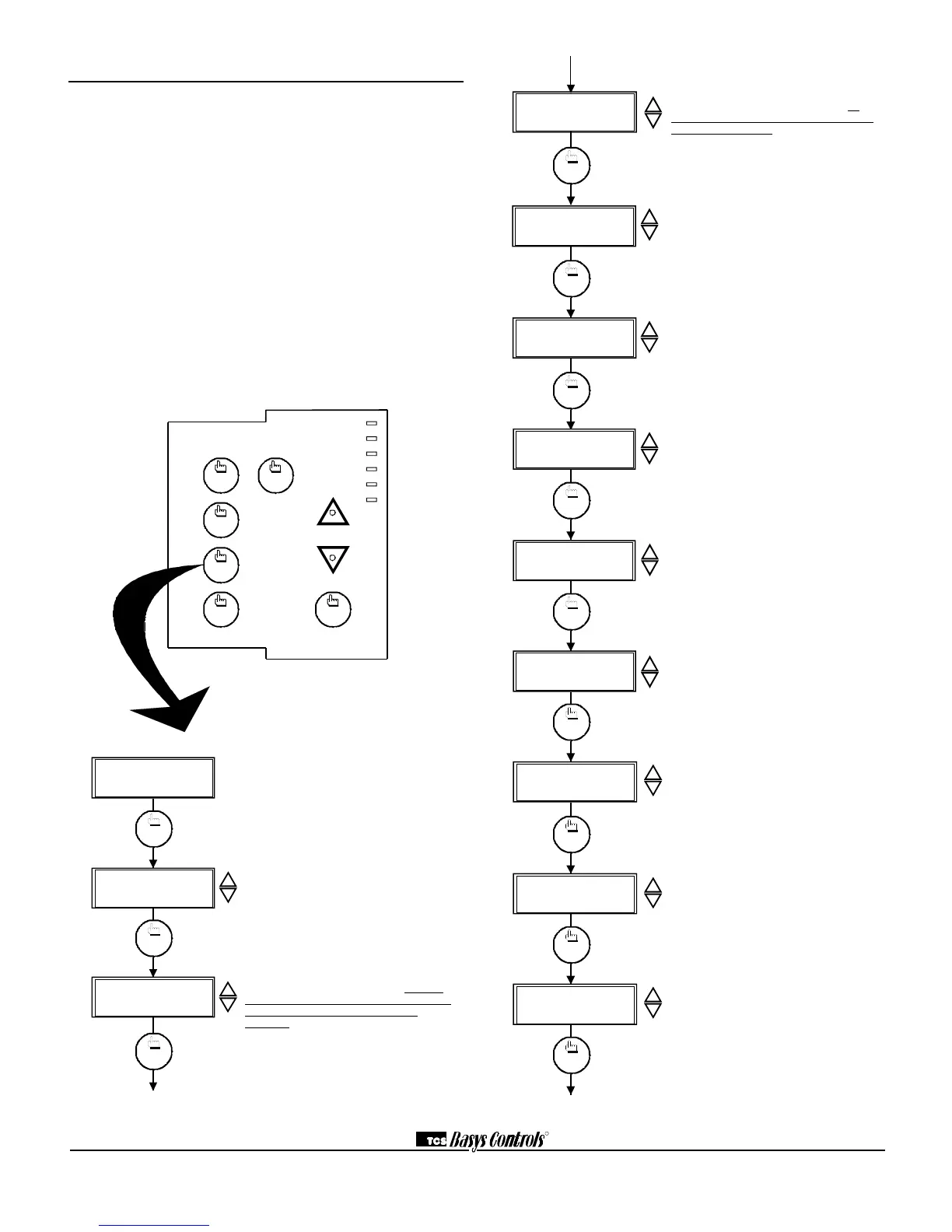
To access the programming screens, press the program setup
button. To make changes, use the warmer and cooler keys.
Access may be locked out with dipswitches, or an access code
may be required.
Main Monitoring Screen. Press the pro-
gram setup button to access the following
screens. (Date not shown on SZ1009 or
SZ1022.)
Access Code Entry Screen. Will
appear if access code is required for pro-
gramming. Use 248 as the default. If the
wrong code is entered, it will revert to the
previous screen.
Controller Address Screen. If using a
PC to program, set a unique address
from 0 to 255, excluding 248. All con-
trollers on a network must have a sepa-
rate and unique communications
address.
Communication Baud Rate Screen.
If using a PC to do programming, all
controllers on a network must be set to
the same baud rate. Choose between
2.4K, 4.8K, 9.6K and 19.2K.
Display Type Screen. Choose between
FAHRENHEIT and CELSIUS for temper-
ature indication.
System Access Screen. Choose
whether or not to enable user’s access
to the system switch to set the system
mode.
System Mode Screen. Choose from
AUTO, HEAT, COOL, or OFF for your
system mode. In the OFF mode, no
contacts shall close.
Fan Access Screen. Choose whether
or not to enable the user’s access to the
fan switch to set the occupied fan mode.
(See page 8.)
Occupied Fan Mode Screen. Choose
between ON (continuous), COOL (gas
heat or no heat), or AUTO for your fan
run times during the occupied modes.
Unoccupied Fan Mode Screen.
Choose from AUTO or COOL for your
fan run times in the unoccupied mode.
Occupied Heat Setpoint Screen. Set
the occupied heat setpoint.
Unoccupied Heat Setpoint Screen.
Set the unoccupied heat setpoint.


 To Next Page