20-4 System 3
ZB1PS - Powered zBus Device Chassis
PowerSupply
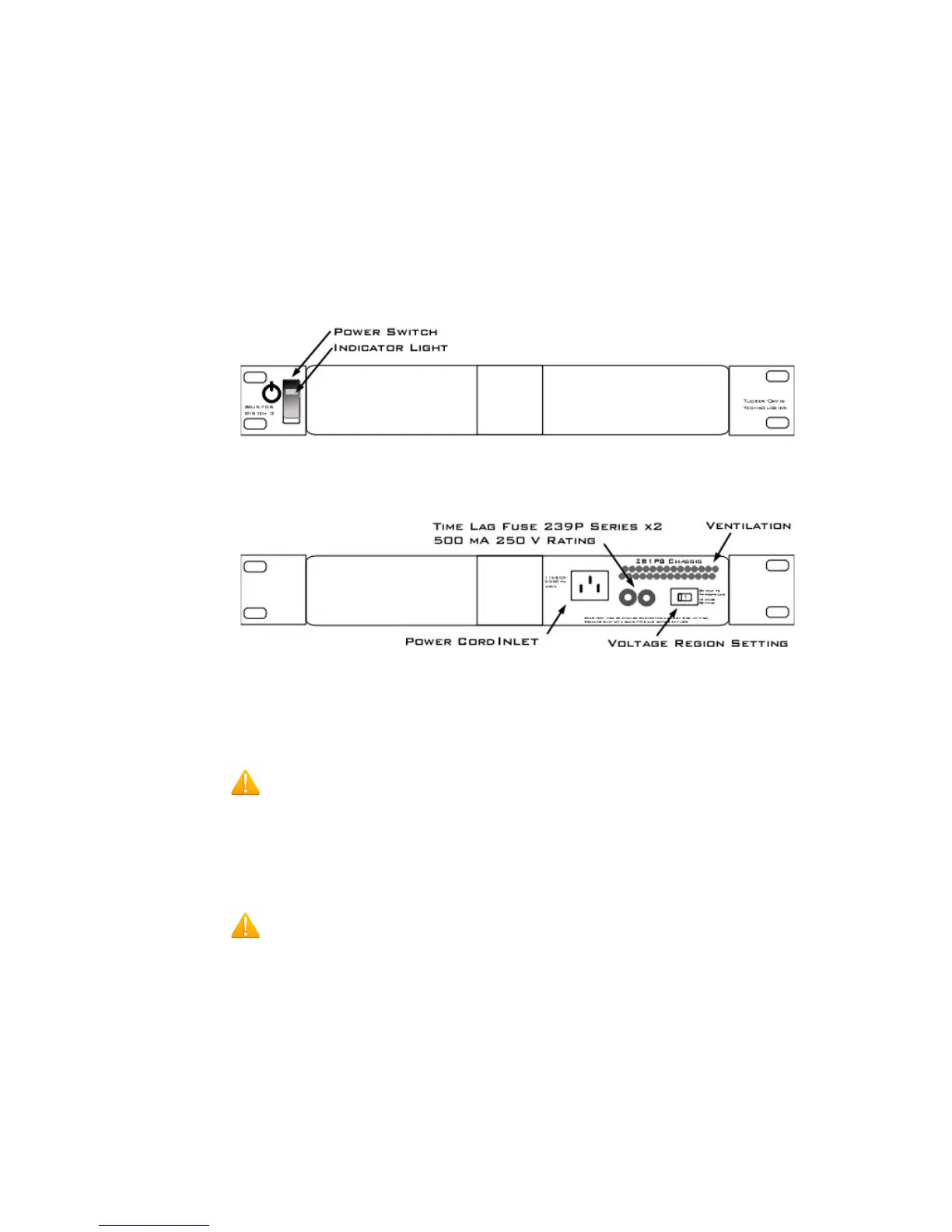
The ZB1PS chassis features an onboard, switchable (115V/220V) power source.
The power supply is integrated into the chassis and cannot be removed. A small fan
is located inside of the power supply and provides cooling while the power supply is
active.
See the
ZBPS1 Operations Manual
for power and safety information.
UsingtheZB1PS
Fron tView
BackView
ApplyingPowertotheChassis
CAUTION! Allow at least 2 cm clearance from each side of the chassis for
proper cooling. A ventilation fan is provided on the right side of the chassis.
Ventilation holes are also provided on the power supply panel and another internal
fan is provided inside the power supply housing. Installation of the chassis with the
ventilation obstructed may cause a malfunction or fire.
CAUTION! Use only the supplied power cord.
To turn the ZB1PS on:
1. Position the chassis so that both the power switch and power cord may be
accessed easily.
2. Ensure that the power switch is off then connect the power cord.
3. Ensure that the voltage region switch is set correctly. For standard outlets in
the United States it should be switched to 115 V.
4. Turn the power switch on. The power switch's green LED should be
illuminated.


 To Next Page