408-1610
9 of 11
Rev M
B. Gaging the Crimping Chamber Using A Solder Slug
and Crimp Height Comparator
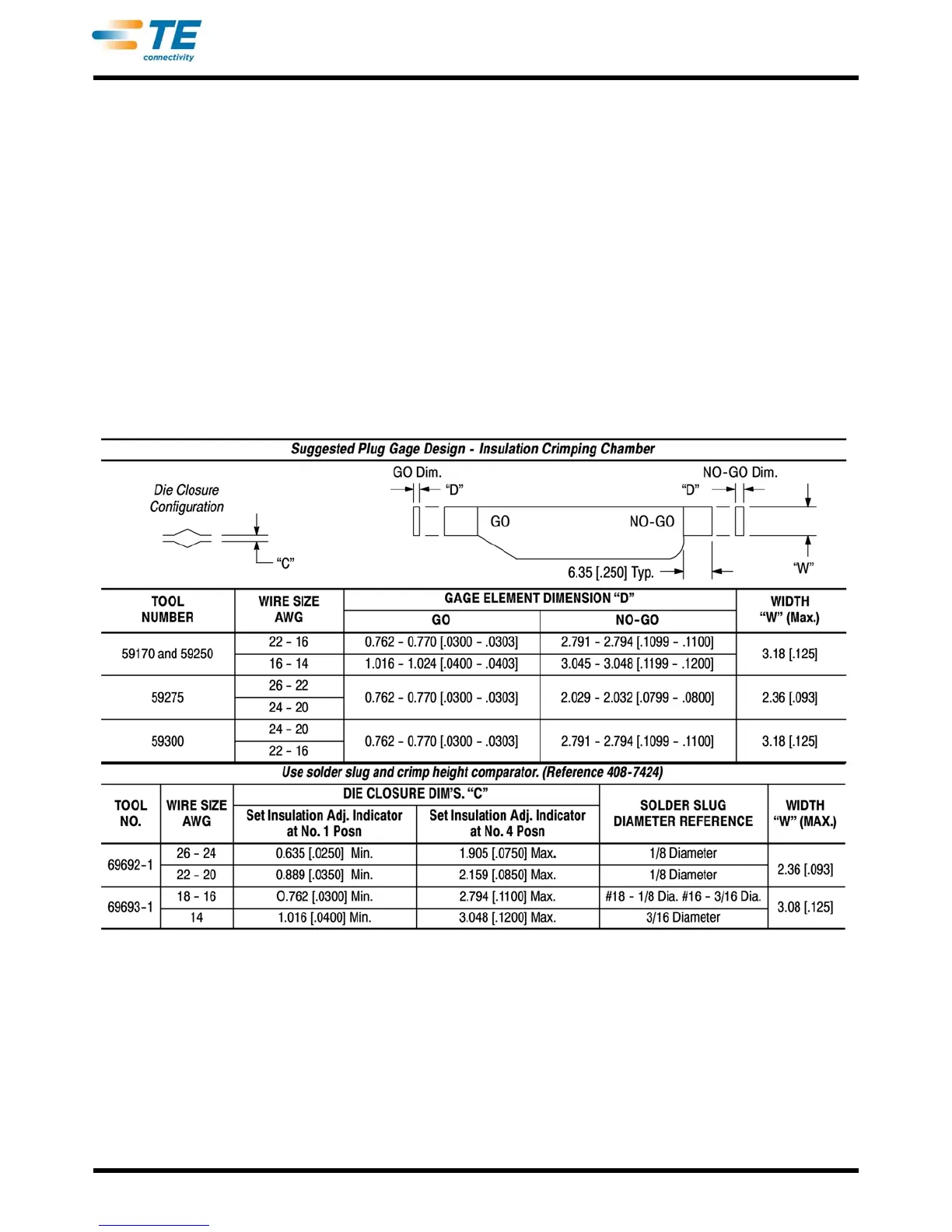
This inspection requires the use of crimp height
comparators, solder slugs, and the dimensions listed
in Figure 10. Tyco Electronics does not manufacture
or market crimp-height comparators. Refer to
408-7424 for information concerning comparators.
To gage the crimping chamber using the solder slug,
p
roceed as follows:
1. Clean oil or dirt from the crimping chamber.
2. Set insulation adjustment to the number 1
po
sition.
3. Insert proper solder slug into one crimp chamber
(
see Figure 9 and Figure 10) and cycle tool.
4. Measure the compressed solder slug for the wire-
ba
rrel crimping chamber and check for compliance
to dimensions in Figure 9.
5. Measure the compressed area for the insulation-
crim
ping chamber and check for compliance to the
GO dimensions in Figure 10.
6. Set the insulation adjust
ment to the number 4
position and insert the appropriate solder slug into
the insulation chamber.
7. Cycle the tool.
8. Measure the compressed area (of the solder) for
the in
sulation-crimping chamber and check for
compliance to the NO-GO dimensions in Figure 10.
9. Repeat the steps above for the second crimp
cha
mber.
Figure 10


 To Next Page