EasyManua.ls Logo

Teac A-1250S - Page 10

Teac A-1250S
24 pages
Print Icon
To Next Page IconTo Next Page
To Previous Page IconTo Previous Page
Loading...
Playback
of
4
Track
Stereo
Basic
Tape
Deck
Operation
Tape
Setting
the
stereo
amplifier
;
.
When
the
Model
A-1250S
is
connected
to.
your
amplifier
BME
rAST
PAUSE
PLAY
(refer
to
page
7)
to
playback
tapes,
fully
retard
the
stereo
ia
yas
amplifier
volume
control
and
preset
the
switches
as
below:
—@
POWER
Mode*
selector:
To
STEREO
(or
to
LEFT
or
RIGHT
for
mono
playback)
Tape
monitor*
switch:
To
TAPE
*
These
designations
apply
to
TEAC
amplifiers.
Read
the
Operating
Manual
of
your
amplifier
or
inquire
of
your
dealer
if
it is
of
other
manufacture.
NOTE
1
For
playback
of
mono
tape,
switch
to
the
LEFT
channel
for
track
|
(1st
playback)
and
4
(2nd
playback),
and
the
RIGHT
Channel
for
track
3
(3rd
playback)
and
2
(4th
playback).
NOTE
2
For
setting
the
output
level,
adjust
the
stereo
amplifier
volume
control.
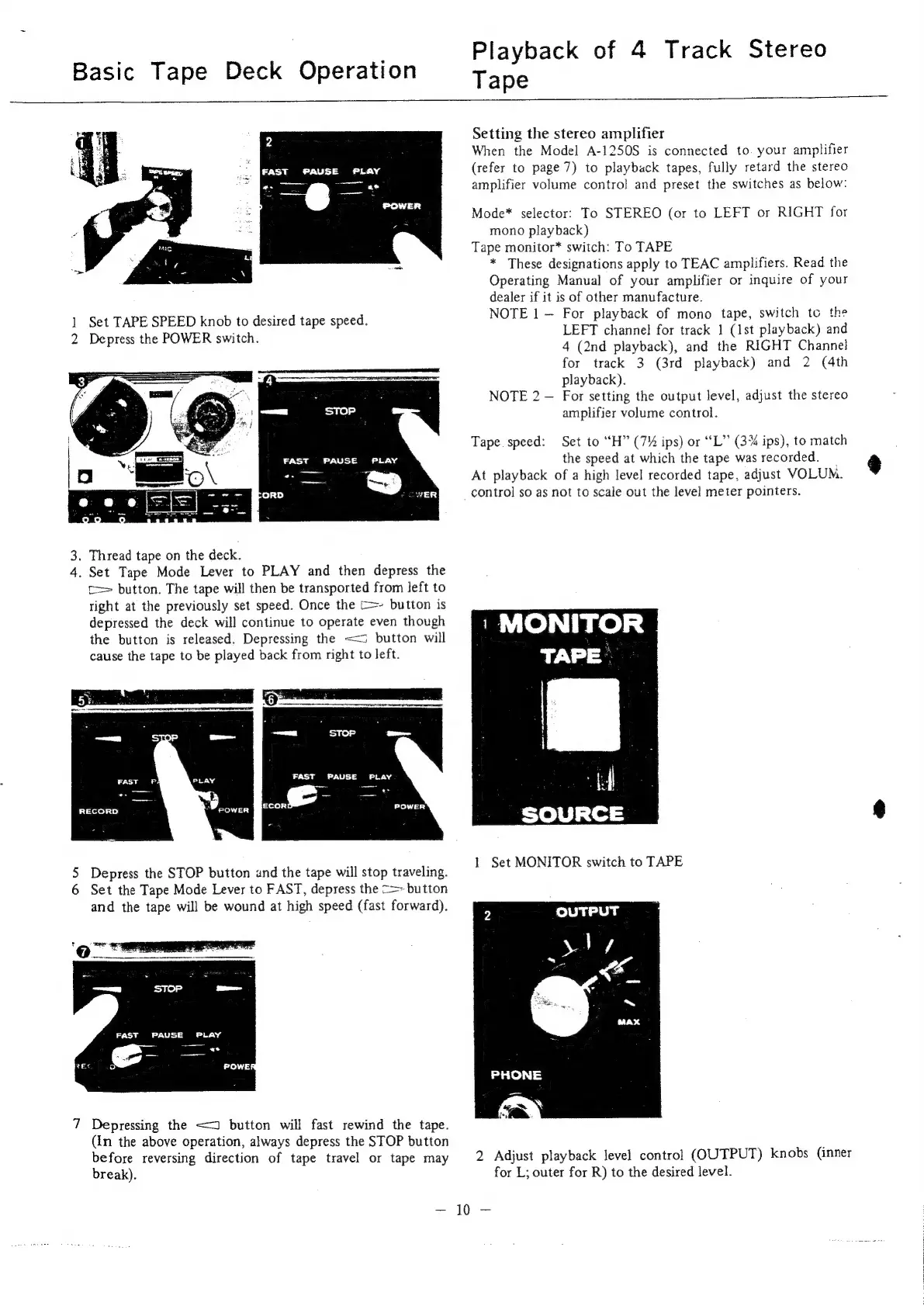
2
1
Set
TAPE
SPEED
knob
to
desired
tape
speed.
2
Depress
the
POWER
switch.
Tape
speed:
Set
to
“H”
(7%
ips)
or
“L”
(3%
ips),
to
match
FAST
PAUSE
PLAY
the
speed
at
which
the
tape
was
recorded.
_
4
oe
i.)
At
playback
of
a
high
level
recorded
tape,
adjust
VOLUM.
cowe
control
so
as
not
to
scale
out
the
level
meter
pointers.
3.
Thread
tape
on
the
deck.
4.
Set
Tape
Mode
Lever
to
PLAY
and
then
depress
the
c=
button.
The
tape
will
then
be
transported
from
left
to
right
at
the
previously
set
speed.
Once
the
C=-
button
is
depressed
the
deck
will
continue
to
operate
even
though
1
1
Teo)
|
ppe)
=]
TAPE)
the
button
is
released.
Depressing
the
<<
button
will
cause
the
tape
to
be
played
back
from
right
to
left.
RECORD
1
5
Depress
the
STOP
button
and
the
tape
will
stop
traveling.
1
Ser
MONO
area
TALE
6
Set
the
Tape
Mode
Lever
to
FAST,
depress
the
<>-
button
and
the
tape
will
be
wound
at
high
speed
(fast
forward).
OUTPUT
7
Depressing
the
<2
button
will fast
rewind
the
tape.
(in
the
above
operation,
always
depress
the
STOP
button
before
reversing
direction
of
tape
travel
or
tape
may
2
Adjust
playback
level
control
(OUTPUT)
knobs
(inner
break).
for
L;
outer
for
R)
to
the
desired
level.

Related product manuals