EasyManua.ls Logo

Teac A-2300SD - Overall Frequency Response; Rec Bias #2 Frequency Response Check; Rec EQ #2 Level Set; Monophonic Recording

Teac A-2300SD
50 pages
Print Icon
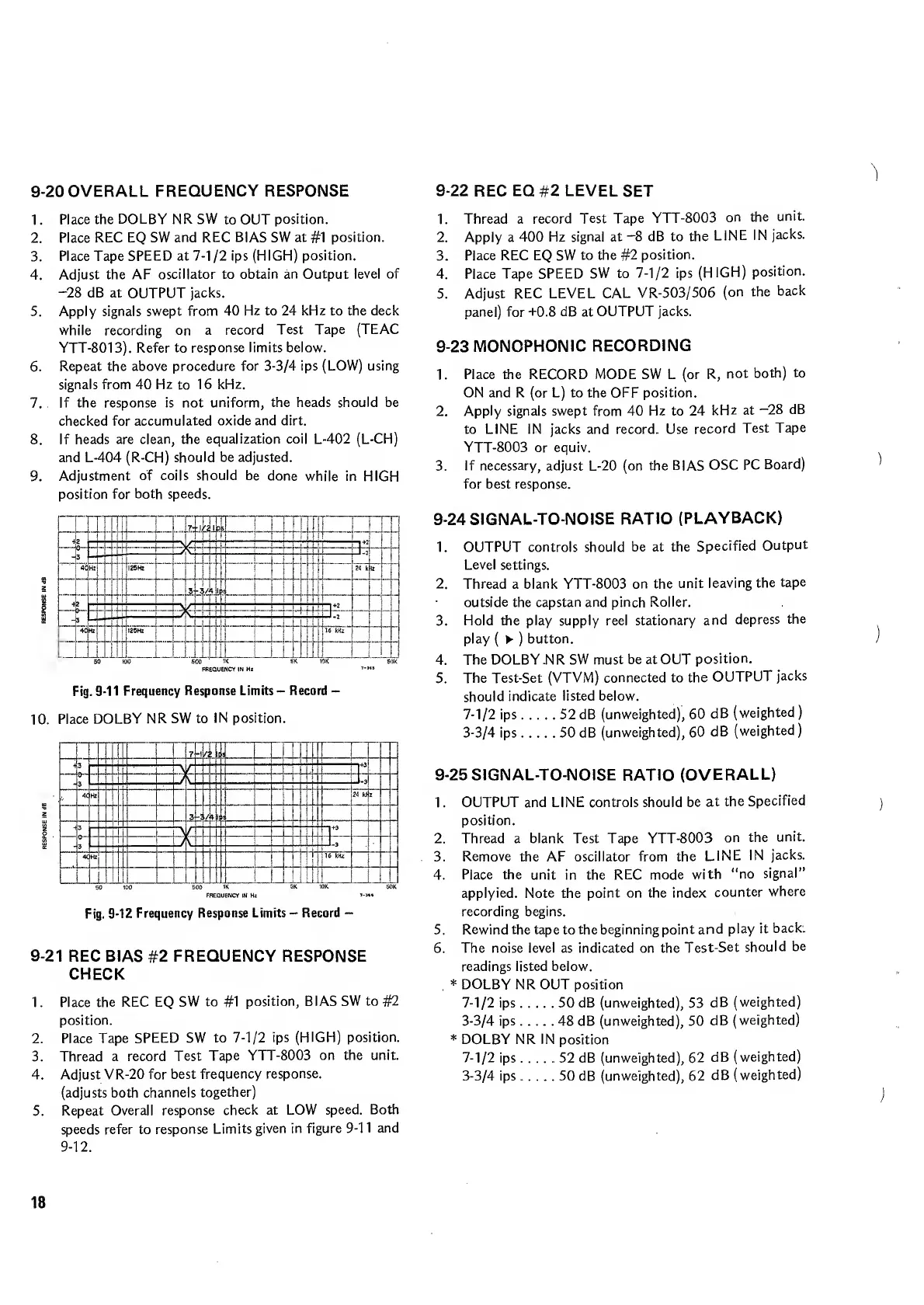
To Next Page IconTo Next Page
To Previous Page IconTo Previous Page
Loading...
9-20
OVERALL
FREQUENCY
RESPONSE
1.
Place
the
DOLBY
NR
SW
to
OUT
position.
2.
Place
REC
EQ
SW
and
REC
BIAS
SW
at
#1
position.
3.
Place
Tape
SPEED
at
7-1/2
ips
(HIGH)
position.
4.
Adjust
the
AF
oscillator
to
obtain
an
Output
level
of
-28
dB
at
OUTPUT
jacks.
5.
Apply
signals
swept
from
40
Hz
to
24
kHz
to
the
deck
while
recording
on
a
record
Test
Tape
(TEAC
YTT-8013).
Refer
to
response
limits
below.
6.
Repeat
the
above
procedure
for
3-3/4
ips
(LOW)
using
signals
from
40
Hz
to
16
kHz.
7.
If
the
response
is
not
uniform,
the
heads
should
be
checked
for
accumulated
oxide
and
dirt.
8.
If
heads
are
clean,
the
equalization
coil
L-402
(L-CH)
and
L-404
(R-CH)
should
be
adjusted.
9.
Adjustment
of
coils
should
be
done
while
in
HIGH
position
for
both
speeds.
i
1
i
|l
7-
1
s.
r
-
3
K.
__
1
4(
Hz
i
I25HZ
i
24
k
It
Ij
3
.
/A
4
-
4.
,
.
>-
3
-
-
-1
3
C
-
-
-
-
3.r--
'
4<
HZ
125Hz
16
kHz
..LL
j
1
60
'
'
KW.SM
'
5K
'
..Sk
'
10K
SOX
FREQUENCY
IN
H*
Fig.
9-11
Frequency
Response
Limits
-
Record
-
10.
P
lace
DOLBY
NR
SW
to
IN
position.
•1
3
-
“"'
“t”
T
1
J\
_
_
J-3
4(
H
iz
24
’kF
z
_
1
_
-*
3
-
'
'
-i-
+3
-
■■
.1-
40H
Iz
16
kHz
50
100
’soo
IK
5K
10K
50K
FREQUENCY
IN
Hz
»->•»
Fig.
9-12
Frequency
Response
Limits
-
Record
-
9-21
REC
BIAS
#2
FREQUENCY
RESPONSE
CHECK
1.
Place
the
REC
EQ
SW
to
#1
position,
BIAS
SW
to
#2
position.
2.
Place
Tape
SPEED
SW
to
7-1/2
ips
(HIGH)
position.
3.
Thread
a
record
Test
Tape
YTT-8003
on
the
unit.
4.
Adjust
VR-20
for
best
frequency
response.
(adjusts
both
channels
together)
5.
Repeat
Overall
response
check
at
LOW
speed.
Both
speeds
refer
to
response
Limits
given
in
figure
9-11
and
9-12.
9-22
REC
EQ
#2
LEVEL
SET
1.
Thread
a
record
Test
Tape
YTT-8003
on
the
unit.
2.
Apply
a
400
Hz
signal
at
-8
dB
to
the
LINE
IN
jacks.
3.
Place
REC
EQ
SW
to
the
#2
position.
4.
Place
Tape
SPEED
SW
to
7-1/2
ips
(HIGH)
position.
5.
Adjust
REC
LEVEL
CAL
VR-503/506
(on
the
back
panel)
for
-1-0.8
dB
at
OUTPUT
jacks.
9-23
MONOPHONIC
RECORDING
1.
Place
the
RECORD
MODE
SW
L
(or
R,
not
both)
to
ON
and
R
(or
L)
to
the
OFF
position.
2.
Apply
signals
swept
from
40
Hz
to
24
kHz
at
—28
dB
to
LINE
IN
jacks
and
record.
Use
record
Test
Tape
YTT-8003
or
equiv.
3.
If
necessary,
adjust
L-20
(on
the
BIAS
OSC
PC
Board)
for
best
response.
9-24SIGNAL-TO-NOISE
RATIO
(PLAYBACK)
1.
OUTPUT
controls
should
be
at
the
Specified
Output
Level
settings.
2.
Thread
a
blank
YTT-8003
on
the
unit
leaving
the
tape
outside
the
capstan
and
pinch
Roller.
3.
Hold
the
play
supply
reel
stationary
and
depress
the
play
(
)
button.
4.
The
DOLBY
.N
R
SW
must
be
at
OUT
position.
5.
The
Test-Set
(VTVM)
connected
to
the
OUTPUT
jacks
should
indicate
listed
below.
7-1/2
ips.52
dB
(unweighted),
60
dB
(weighted)
3-3/4
ips.50
dB
(unweighted),
60
dB
(weighted)
9-25
SIGNAL-TO-NOISE
RATIO
(OVERALL)
1.
OUTPUT
and
LINE
controls
should
be
at
the
Specified
position.
2.
Thread
a
blank
Test
Tape
YTT-8003
on
the
unit.
3.
Remove
the
AF
oscillator
from
the
LINE
IN
jacks.
4.
Place
the
unit
in
the
REC
mode
with
“no
signal"
applyied.
Note
the
point
on
the
index
counter
where
recording
begins.
5.
Rewind
the
tape
to
the
beginning
point
and
play
it
back.
6.
The
noise
level
as
indicated
on
the
Test-Set
should
be
readings
listed
below.
*
DOLBY
NR
OUT
position
7-1/2
ips.50
dB
(unweighted),
53
dB
(weighted)
3-3/4
ips.48
dB
(unweighted),
50
dB
(weighted)
*
DOLBY
NR
IN
position
7-1/2
ips.52
dB
(unweighted),
62
dB
(weighted)
3-3/4
ips.50
dB
(unweighted),
62
dB
(weighted)
)
1
)
18

Related product manuals