EasyManua.ls Logo

Teac A-300 - Recording Performance Adjustments; Bias Trap, Record Bias, and Record Level

Teac A-300
40 pages
Print Icon
To Next Page IconTo Next Page
To Previous Page IconTo Previous Page
Loading...
6-3-2.
RECORD
BIAS
SETTING
CrO2
Tape
1.
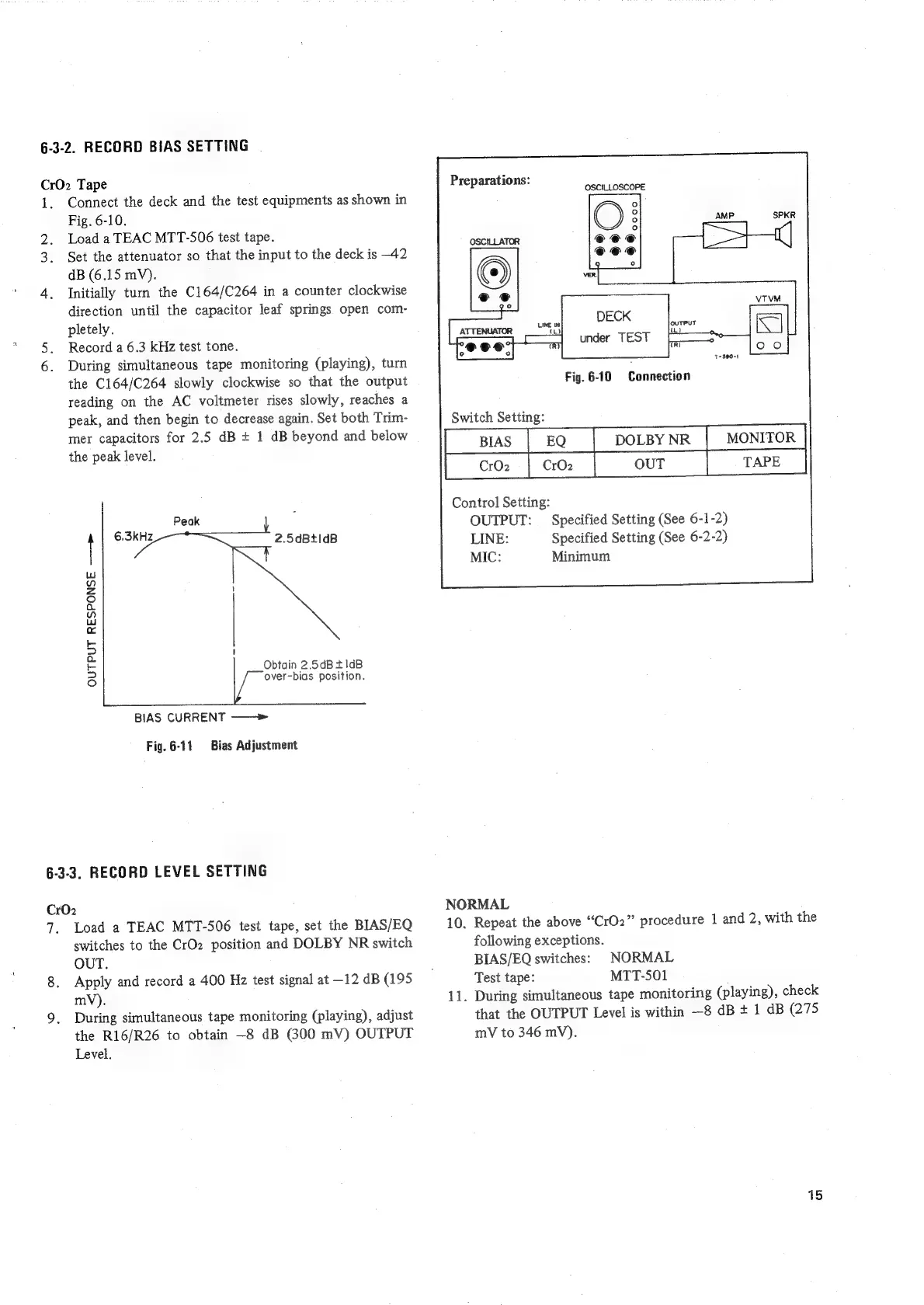
Connect
the
deck
and
the
test
equipments
as
shown
in
Fig.
6-10.
2.
Load
a
TEAC
MTT-506
test
tape.
3.
Set
the
attenuator
so
that
the
input
to
the
deck
is
-42
dB
(6.15
mV).
4.
Initially
turn
the
C164/C264
in
a
counter
clockwise
direction
until
the
capacitor
leaf
springs
open
com-
pletely.
5.
Record
a
6.3
kHz
test
tone.
6.
During
simultaneous
tape
monitoring
(playing),
turn
the
C164/C264
slowly
clockwise
so
that
the
output
reading
on
the
AC
voltmeter
rises
slowly,
reaches
a
peak,
and
then
begin
to
decrease
again.
Set
both
Trim-
mer
capacitors
for
2.5
dB
+
1
dB
beyond
and
below
the
peak
level.
2.5dBtidB
Obtain
2.5dB
+1dB
over-bias
position.
OUTPUT
RESPONSE
——>
BIAS
CURRENT
——»
Fig.
6-11
Bias
Adjustment
6-3-3.
RECORD
LEVEL
SETTING
Cr02
Ts
Load
a
TEAC
MTT-506
test
tape,
set
the
BIAS/EQ
switches
to
the
CrO2
position
and
DOLBY
NR
switch
OUT.
Apply
and
record
a
400
Hz
test
signal
at
-12
dB
(195
mV).
During
simultaneous
tape
monitoring
(playing),
adjust
the
R16/R26
to
obtain
—8
dB
(300
mV)
OUTPUT
Level.
Preparations:
OSCILLOSCOPE
Fig.
6-10
Connection
Switch
Setting:
MONITOR
Specified
Setting
(See
6-1-2)
Specified
Setting
(See
6-2-2)
Minimum
CrO2
OUT
Control
Setting:
OUTPUT:
LINE:
MIC:
NORMAL
10,
Repeat
the
above
“CrO2”
procedure
1
and
2,
with
the
following
exceptions.
BIAS/EQ
switches:
NORMAL
Test
tape:
MTT-501
11.
During
simultaneous
tape
monitoring
(playing),
check
that
the
OUTPUT
Level
is
within
—8
dB
+
1
dB
(275
mV
to
346
mV).
15

Related product manuals