ENGLISH
Basic Operation
_
7
_
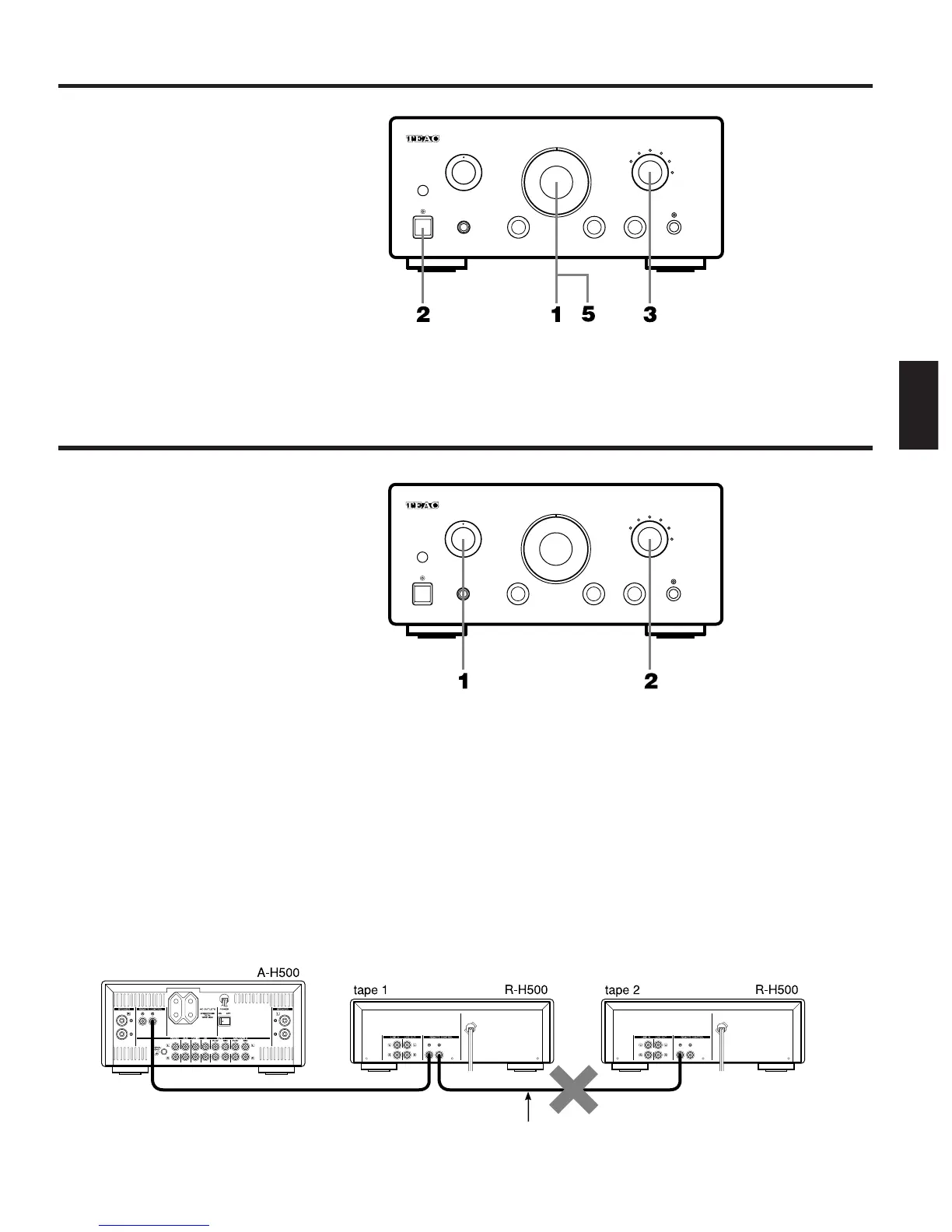
1 Set the volume control to ∞ position
before beginning.
2 POWER
Turn the system on by pressing the
power button.
3 Select the source you want to listen to
by rotating the input selector knob.
4 Operate the source unit to be played.
(Refer to the operating instructions of
each unit.)
5 Adjust the volume level.
Recording
1 Set the rec selector to source.
2 Select a source to be recorded using
the input selector.
3 Play the source.
4 Set the tape deck to the recording
mode.
ORecording is possible using both tape 1
and tape 2 decks.
∑Dubbing (Recording from tape 1
to MD/tape 2 or vice versa)
1.Set the rec selector to tape 1 > 2/MD (or
MD/tape 2 > 1).
2. Play tape 1 (or MD/tape 2) deck.
3.Set MD/tape 2 (or tape 1) to the
recording mode.
Notes:
OWhen dubbing is attempted using two R-
H500s, be sure not to connect the
remote cable to the tape 2 deck. If it is
connected, dubbing is not possible.
OWhen a second deck such as another R-
H500 is connected to the MD/TAPE 2 REC
terminal on the amplifier, dubbing from
deck 1 to deck 2 is possible. However,
remote-controlled operation of deck 2 is
not possible. Therefore, do not connect
the remote cable from deck 1 to deck 2.
OWhen dubbing from deck 1 to deck 2 (or
MD recorder), set the rec selector on
the amplifier to tape 1 > 2/MD, then start
deck 2 (or MD recorder) for recording
and press the play button of deck 1.
(Do not connect the remote cable.)



 To Next Page