ENGLISH FRANÇAIS
18
Radio Reception (1) R
éce
ption de la radio (1)
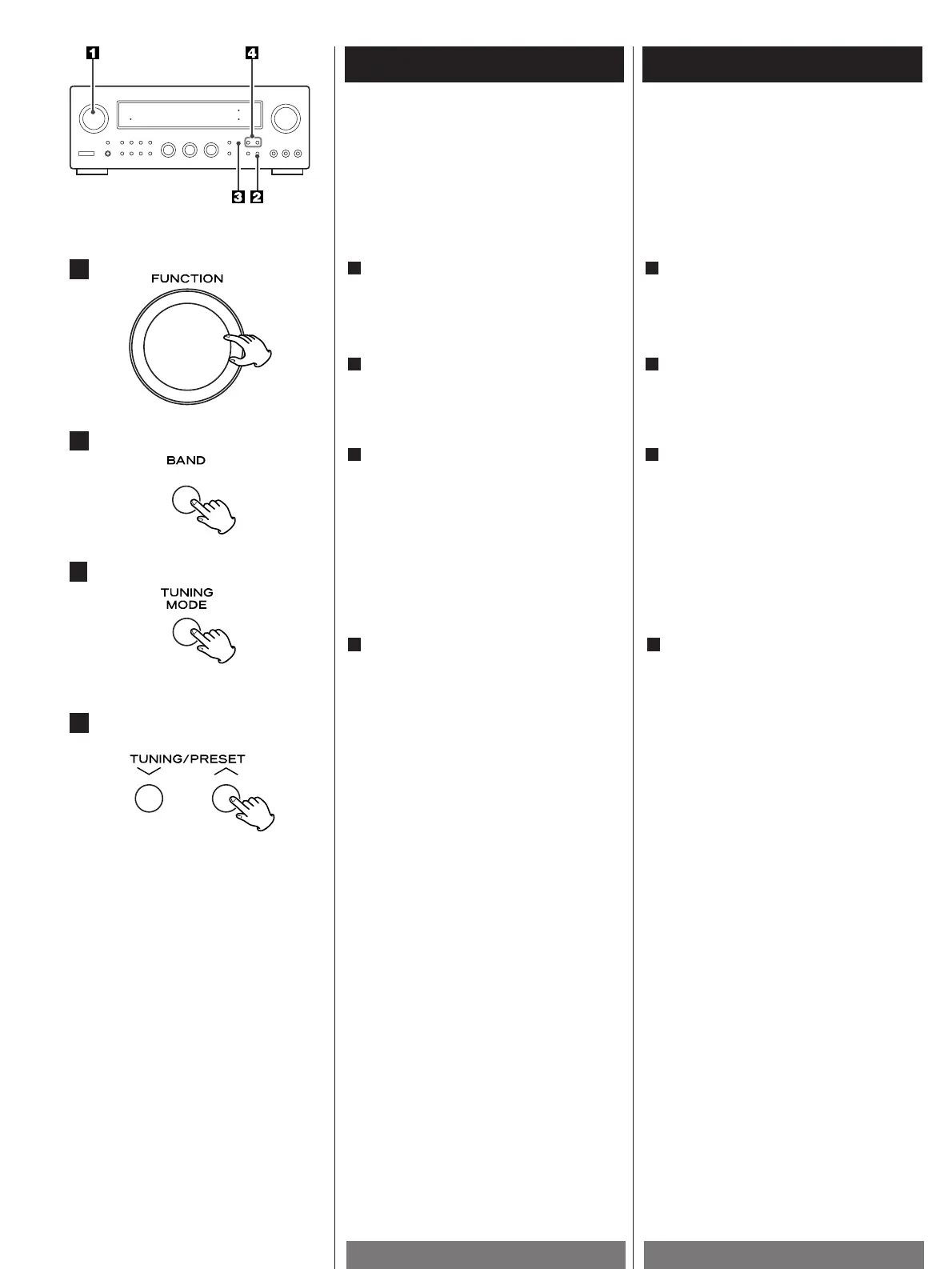
Select the TUNER mode by turning the
FUNCTION selector.
1
Sélectionner le mode TUNER en tournant
le sélecteur FUNCTION.
1
1
2
3
4
Sélectionnez la station que vous voulez
écouter (auto sélection).
4
Maintenez enfoncé le bouton TUNING
entre 0,5 et 2 secondes. Quand une station
est captée, le processus de réglage
s’arrête automatiquement
Appuyez sur le bouton TUNING pour
arrêter la sélection automatique.
< Sélection des stations impossibles à
régler automatiquement (réglage manuel)
Appuyez sur le bouton de façon continue
ou maintenez enfoncé le bouton TUNING
et relâchez-le quand la station recherchée
est trouvée.
Lorsque la touche TUNING est pressée
momentanément, (0,5 seconde ou moins)
la fréquence est changée d'un palier fixe.
<
"STEREO" apparaît dans l'affichage quand
la émission stéréo FM est reçues.
<
"TUNED" apparaît dans l'affichage quand
une émission est correctement
syntonisée.
Select the station you want to listen to
(auto selection).
4
Hold down the TUNING button for 0.5 to 2
seconds.
When a station is tuned in, the tuning
process will stop automatically.
Press the TUNING button to stop the auto
selection.
< Selecting stations which cannot be tuned
automatically (manual selection)
Press the TUNING button repeatedly or
hold down it, and release it when the
station you want to listen to is found.
When the TUNING button is pressed
momentarily (0.5 second or less), the
frequency changes by a fixed step.
<
"STEREO" is displayed when a stereo
broadcast is tuned in.
<
"TUNED" is displayed when a broadcast is
correctly tuned in.
FM : 100 kHz steps, AM : 10 kHz steps
(U.S.A./Canada model)
FM : 50 kHz steps, AM : 9 kHz steps
(
General Export
model
/
European
model
)
FM : paliers de 100 kHz, AM : paliers de
10 kHz
(Modèle Etats-Unis/Canada)
FM : paliers de 50 kHz, AM : paliers de 9
kHz
(Modèle Exportation générale/Modèle
européen)
Press the TUNING MODE button to
change to TUNING mode.
The "PRESET CH." indicator disappears
from the display.
<
This button is used to select Tuning or
Preset scan mode.
3
Appuyer sur la touche TUNING MODE
pour passer en mode TUNING.
L'indicateur "PRESET CH." disparaît de
l'affichage.
<
Cette touche est utilisée pour sélectionner
le mode de syntonisation ou de balayage
des préréglages.
3
Select the AM or FM by pressing the
BAND button.
2
Sélectionner AM ou FM en appuyant sur
la toucheBAND.
2


 To Next Page