Remote Control Operation
When operating the remote control unit,
point it towards the remote sensor on the
front panel of the unit.
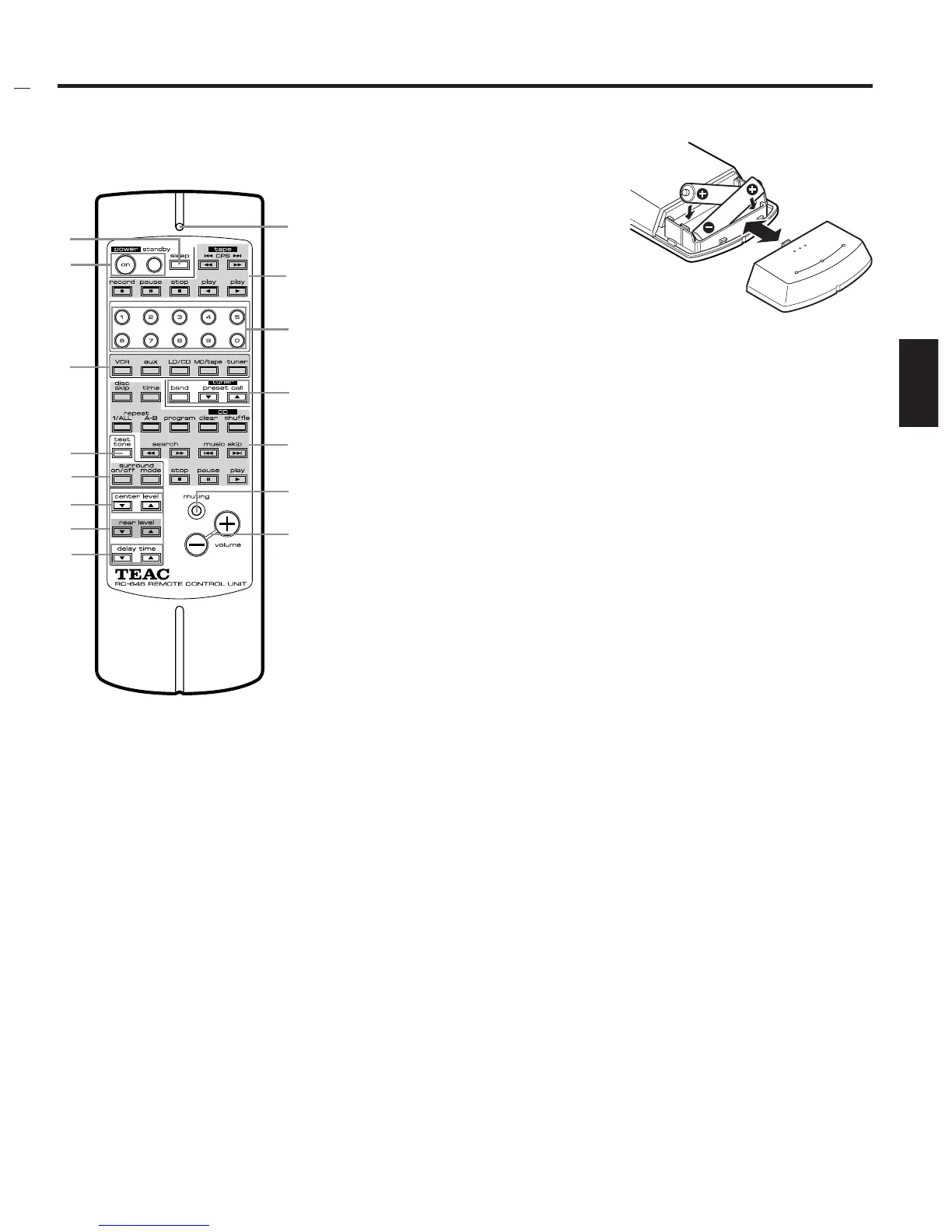
1sleep button
This button is used for engaging the sleep
timer in the tuner.
2power standby buttons
on: Press to turn the system on.
standby: Press to set the system to standby
mode.
3Indicator
This indicator will blink when a remote
control signal is transmitted by pressing a
button.
Note:
The indicator has two colors:
One is green in the CD mode; the other is
red in other mode.
4tape deck operation buttons
5Numeric buttons
These buttons are used for selecting the
preset channel in tuner mode, or the track
number in CD mode.
OUsing the input selector buttons, select
CD or tuner before operating the numeric
buttons.
When entering a single-digit number, enter
0 for the 10's digit followed by the desired
1's digit.
When entering a double-digit number, first
enter the 10's digit then the 1's digit.
For example:
To enter 15:
(1) Press "1", and "1" starts blinking.
(2) While it is blinking, press "5".
6Input selector buttons
7tuner operation buttons
band:
Selects between FM and AM broadcasts.
preset call:
Allows you to tune to preset channels in
sequence.
8CD player operation buttons
9test tone button
0surround on/off & surround
mode buttons
qcenter level ¶/§ buttons
wrear level ¶/§ buttons
edelay time ¶/§ buttons
rmuting button
Press this button to momentarily reduce the
gain by –20 dB. To disable the muting mode,
press this button again.
CAUTION :
Do NOT turn the volume high up while the
sound is muted, or the sudden thunderous
sound may damage the speakers and your
ears when muting is turned off.
tvolume buttons
+ : Press to increase the volume.
– : Press to decrease the volume.
ª Battery Installation
– 7 –
ENGLISH
1. Remove the battery compartment
cover.
2. Insert two “AAA” (R03, UM-4) dry
batteries.
Make sure that the batteries are
inserted with their positive
± and
negative
— poles positioned correctly.
3. Close the cover until it clicks.
Battery Replacement.
If you notice that the distance between
the remote control unit and the player for
correct operation becomes shorter, it
indicates that the batteries are exhaus-
ted. In this case replace the batteries with
new ones.
Precautions concerning batteries
… Be sure to insert the batteries with
correct positive
± and negative —
polarities.
… Use batteries of the same type. Never
use different types of batteries
together.
… Rechargeable and non-rechargeable
batteries can be used. Refer to the
precautions on their labels.
… When the remote control unit is not to
be used for a long time (more than a
month), remove the batteries from the
remote control unit to prevent them
from leaking. If they leak, wipe away
the liquid inside the battery
compartment and replace the batteries
with new ones.
… Do not heat or disassemble batteries
and never dispose of old batteries by
throwing them in a fire.
–
–
–
–
–
1
2
6
9
0
q
w
e
3
4
5
7
8
r
t


 To Next Page