Synchronizing with a computer
This unit can be used as an iPod/iPhone/iPad dock
with recharging capability.
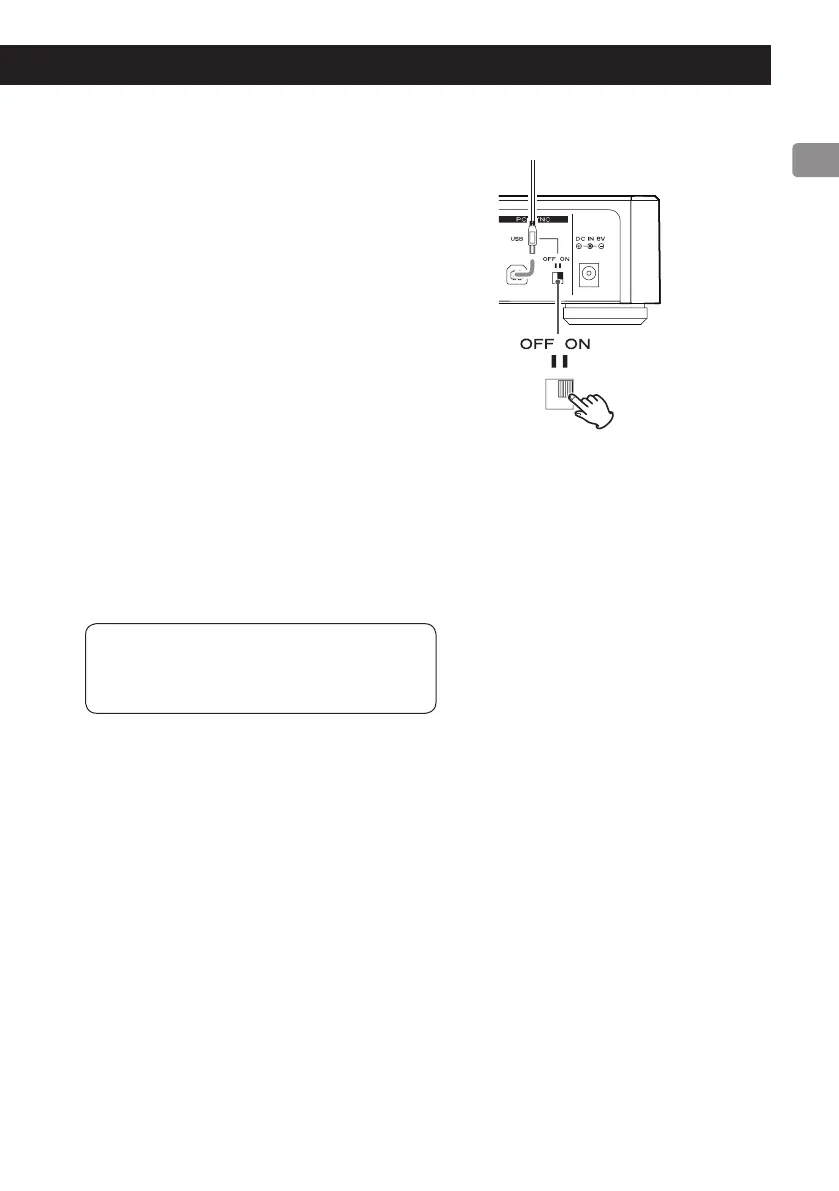
To synchronize an iPod/iPhone/iPad with a computer,
set the rear panel PC SYNC USB switch to ON.
o
When the PC SYNC USB switch is set to ON, no sig-
nals are output from the LINE OUT or DIGITAL OUT
connectors.
o
When connected to a computer that does not sup-
port recharging of an iPod/iPhone/iPad, the con-
nected iPod/iPhone/iPad will not be recharged if
the PC SYNC USB switch is set to ON. In this case,
set the PC SYNC USB switch to OFF to recharge the
connected device.
o
While synchronizing an iPod/iPhone/iPad with a
computer, do not set the PC SYNC USB switch to
OFF. Doing so could cause a device to freeze or
other operation problems.
Operation might differ according to the
iPod/iPhone/iPad model and iOS software
version.
USB cable



 To Next Page