EasyManua.ls Logo

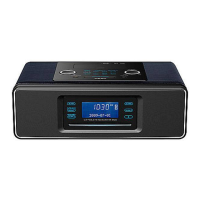
Teac SR-3DAB - User Manual

Teac SR-3DAB
38 pages
Print Icon
To Next Page IconTo Next Page
Loading...
SR-3DAB
Hi-Fi Table Radio / CD for iPod / iPhone
OWNER’S MANUAL
77-20SR00300020
Question and Answer IconNeed help?

Do you have a question about the Teac SR-3DAB and is the answer not in the manual?

Summary

Important Safety Instructions

General Safety Precautions

Read and follow all safety instructions to prevent electric shock, fire, and injury.

Before Using the Unit

Installation and Usage Guidelines

Guidelines on placement, ventilation, cleaning, and avoiding hazards before operation.

Maintenance

Cleaning and Condensation Care

Instructions for cleaning the unit and handling condensation to ensure proper function.

Battery Precautions

Battery Handling and Safety

Properly insert, use, and replace batteries to avoid leaks or damage.

Remote Control Unit

Remote Operation and Battery Installation

How to use the remote control and install its battery for device operation.

Discs

Supported Disc Types and Handling

Information on playable discs (CD, CD-R/RW, MP3) and their proper handling.

MP3 Compatibility Requirements

Specifications for MP3 file names, formats, and disc compatibility.

Connections (1)

Main Unit Connection Ports

Diagram of main unit ports (ANTENNA, VIDEO OUT, AUX IN, PHONES, DC IN) for connectivity.

Connections (2)

Detailed Connection Explanations

Explanation of DC IN, PHONES, AUX IN, VIDEO OUT, Emergency Switch, and DAB/FM antenna.

Identifying the Parts (Main Unit)

Main Unit Controls and Features

Identification and function of buttons and connectors on the SR-3DAB main unit.

Identifying the Parts (Remote Control Unit)

Remote Control Buttons and Functions

Description of all buttons on the remote control and their respective functions.

Setting the Clock

Clock Adjustment Procedure

Step-by-step guide to setting the unit's clock time and date.

Getting started with an iPod or iPhone

iPod;iPhone Docking and Compatibility

Instructions for selecting dock adapters and connecting iPod/iPhone devices.

Basic Operation

Core Functions and Controls

How to turn on, select sources, adjust volume, dim display, mute, and adjust bass/treble.

Listening to CD;MP3

CD and MP3 Disc Playback

Steps to select CD source and play audio CDs or MP3 discs.

Listening to MP3 (USB;SD)

USB;SD Card MP3 Playback

How to select USB/SD source and play MP3 files from memory cards.

MP3 Playback Controls

Displaying MP3 Information

How to display track title, artist, album, and other metadata for MP3 files.

Navigating MP3 Folders and Tracks

Methods for skipping tracks, searching within tracks, and moving between folders.

Programmed Playback

Creating and Managing Playlists

How to program up to 32 tracks or files into a custom playback sequence.

Programmed Playback Management

Managing Programmed Playlists

Instructions for checking order, adding tracks, overwriting, and clearing programmed playlists.

Repeat Playback

Configuring Repeat Modes

How to set repeat playback for one track, all tracks, or tracks within a folder.

Shuffle Playback

Enabling Shuffle Mode

How to activate random playback for songs or albums on discs or memory cards.

Listening to an iPod or iPhone (1)

Docking and Initiating iPod;iPhone Playback

Steps to dock iPod/iPhone, select source, and start audio playback.

Listening to an iPod or iPhone (2)

Navigating iPod;iPhone Content

How to search within tracks, skip to next/previous, and return to previous menus.

iPod;iPhone Playback Modes

iPod;iPhone Repeat and Shuffle Settings

How to set repeat (one/all) and shuffle (song/album) modes on the iPod/iPhone.

Listening to the DAB

Tuning into DAB Stations

How to select DAB source, scan for channels, and tune to desired stations.

Setting the DAB Display

Customizing DAB Information Display

How to choose and view DAB display information like DLS, Programme Type, and Date/Time.

DAB Signal Information

Viewing DAB Signal Details

How to check channel, frequency, bitrate, signal error rate, and signal strength for DAB.

Using the DAB Menu (1)

Station Order Options

How to select the order for listing DAB stations: Favourite, Alphanumeric, Active, Prune.

Using the DAB Menu (2)

Manual and Auto Scan Tuning

Instructions for manual tuning and performing local/full auto scans for DAB channels.

DAB Menu Settings

DRC Value and Software Version

How to adjust Dynamic Range Control (DRC) and view the DAB software version.

Preset Tuning (DAB)

Storing and Selecting DAB Presets

How to save up to 30 DAB channels as presets and select them later.

Listening to the FM Radio

Tuning and Operating FM Radio

How to tune FM stations, use Stereo/Mono modes, and improve reception.

Preset Tuning (FM)

Saving and Selecting FM Presets

How to save up to 30 FM channels as presets and select them later.

RDS (Radio Data System)

Understanding Radio Data System Information

How to view RDS text, programme type, clock time, and frequency for FM broadcasts.

Listening to an External Source

Connecting and Playing External Audio

How to connect external audio devices via the AUX IN jack and play audio.

Sleep Timer

Setting the Sleep Timer

How to set the unit to turn off automatically after a specified time period.

Wake Up Timer (1)

Setting the Wake Up Timer Hour

First step in setting the wake up timer: setting the desired hour.

Wake Up Timer (2)

Setting Wake Up Timer Minutes, Source, and Volume

Completing wake up timer setup: minutes, source, and volume.

Wake Up Timer Operation

Activating, Deactivating, and Snoozing Timer

How to turn timers on/off, check settings, and use the snooze function.

Troubleshooting

General Troubleshooting Tips

Solutions for common issues like no power, no sound, noisy audio, or remote control problems.

Player and Tuner Issue Resolution

Troubleshooting specific problems with iPod/iPhone, DAB, FM, CD, and USB/SD players.

Specifications

Technical Specifications and Accessories

Details on tuner ranges, audio specs, power, dimensions, and included accessories.

Summary

Important Safety Instructions

General Safety Precautions

Read and follow all safety instructions to prevent electric shock, fire, and injury.

Before Using the Unit

Installation and Usage Guidelines

Guidelines on placement, ventilation, cleaning, and avoiding hazards before operation.

Maintenance

Cleaning and Condensation Care

Instructions for cleaning the unit and handling condensation to ensure proper function.

Battery Precautions

Battery Handling and Safety

Properly insert, use, and replace batteries to avoid leaks or damage.

Remote Control Unit

Remote Operation and Battery Installation

How to use the remote control and install its battery for device operation.

Discs

Supported Disc Types and Handling

Information on playable discs (CD, CD-R/RW, MP3) and their proper handling.

MP3 Compatibility Requirements

Specifications for MP3 file names, formats, and disc compatibility.

Connections (1)

Main Unit Connection Ports

Diagram of main unit ports (ANTENNA, VIDEO OUT, AUX IN, PHONES, DC IN) for connectivity.

Connections (2)

Detailed Connection Explanations

Explanation of DC IN, PHONES, AUX IN, VIDEO OUT, Emergency Switch, and DAB/FM antenna.

Identifying the Parts (Main Unit)

Main Unit Controls and Features

Identification and function of buttons and connectors on the SR-3DAB main unit.

Identifying the Parts (Remote Control Unit)

Remote Control Buttons and Functions

Description of all buttons on the remote control and their respective functions.

Setting the Clock

Clock Adjustment Procedure

Step-by-step guide to setting the unit's clock time and date.

Getting started with an iPod or iPhone

iPod;iPhone Docking and Compatibility

Instructions for selecting dock adapters and connecting iPod/iPhone devices.

Basic Operation

Core Functions and Controls

How to turn on, select sources, adjust volume, dim display, mute, and adjust bass/treble.

Listening to CD;MP3

CD and MP3 Disc Playback

Steps to select CD source and play audio CDs or MP3 discs.

Listening to MP3 (USB;SD)

USB;SD Card MP3 Playback

How to select USB/SD source and play MP3 files from memory cards.

MP3 Playback Controls

Displaying MP3 Information

How to display track title, artist, album, and other metadata for MP3 files.

Navigating MP3 Folders and Tracks

Methods for skipping tracks, searching within tracks, and moving between folders.

Programmed Playback

Creating and Managing Playlists

How to program up to 32 tracks or files into a custom playback sequence.

Programmed Playback Management

Managing Programmed Playlists

Instructions for checking order, adding tracks, overwriting, and clearing programmed playlists.

Repeat Playback

Configuring Repeat Modes

How to set repeat playback for one track, all tracks, or tracks within a folder.

Shuffle Playback

Enabling Shuffle Mode

How to activate random playback for songs or albums on discs or memory cards.

Listening to an iPod or iPhone (1)

Docking and Initiating iPod;iPhone Playback

Steps to dock iPod/iPhone, select source, and start audio playback.

Listening to an iPod or iPhone (2)

Navigating iPod;iPhone Content

How to search within tracks, skip to next/previous, and return to previous menus.

iPod;iPhone Playback Modes

iPod;iPhone Repeat and Shuffle Settings

How to set repeat (one/all) and shuffle (song/album) modes on the iPod/iPhone.

Listening to the DAB

Tuning into DAB Stations

How to select DAB source, scan for channels, and tune to desired stations.

Setting the DAB Display

Customizing DAB Information Display

How to choose and view DAB display information like DLS, Programme Type, and Date/Time.

DAB Signal Information

Viewing DAB Signal Details

How to check channel, frequency, bitrate, signal error rate, and signal strength for DAB.

Using the DAB Menu (1)

Station Order Options

How to select the order for listing DAB stations: Favourite, Alphanumeric, Active, Prune.

Using the DAB Menu (2)

Manual and Auto Scan Tuning

Instructions for manual tuning and performing local/full auto scans for DAB channels.

DAB Menu Settings

DRC Value and Software Version

How to adjust Dynamic Range Control (DRC) and view the DAB software version.

Preset Tuning (DAB)

Storing and Selecting DAB Presets

How to save up to 30 DAB channels as presets and select them later.

Listening to the FM Radio

Tuning and Operating FM Radio

How to tune FM stations, use Stereo/Mono modes, and improve reception.

Preset Tuning (FM)

Saving and Selecting FM Presets

How to save up to 30 FM channels as presets and select them later.

RDS (Radio Data System)

Understanding Radio Data System Information

How to view RDS text, programme type, clock time, and frequency for FM broadcasts.

Listening to an External Source

Connecting and Playing External Audio

How to connect external audio devices via the AUX IN jack and play audio.

Sleep Timer

Setting the Sleep Timer

How to set the unit to turn off automatically after a specified time period.

Wake Up Timer (1)

Setting the Wake Up Timer Hour

First step in setting the wake up timer: setting the desired hour.

Wake Up Timer (2)

Setting Wake Up Timer Minutes, Source, and Volume

Completing wake up timer setup: minutes, source, and volume.

Wake Up Timer Operation

Activating, Deactivating, and Snoozing Timer

How to turn timers on/off, check settings, and use the snooze function.

Troubleshooting

General Troubleshooting Tips

Solutions for common issues like no power, no sound, noisy audio, or remote control problems.

Player and Tuner Issue Resolution

Troubleshooting specific problems with iPod/iPhone, DAB, FM, CD, and USB/SD players.

Specifications

Technical Specifications and Accessories

Details on tuner ranges, audio specs, power, dimensions, and included accessories.

Teac SR-3DAB Specifications

General IconGeneral
BrandTEAC
ModelSR-3DAB
BluetoothYes
DisplayLCD
Power Output2 x 10W
CompatibilityiPod
FunctionsRadio
Audio OutputHeadphone Jack
Power SourceAC Adapter

Related product manuals