Listening to MP3(USB/SD)
• Do not use a high-capacity USB (SDHC) hard disc with this
unit.
1
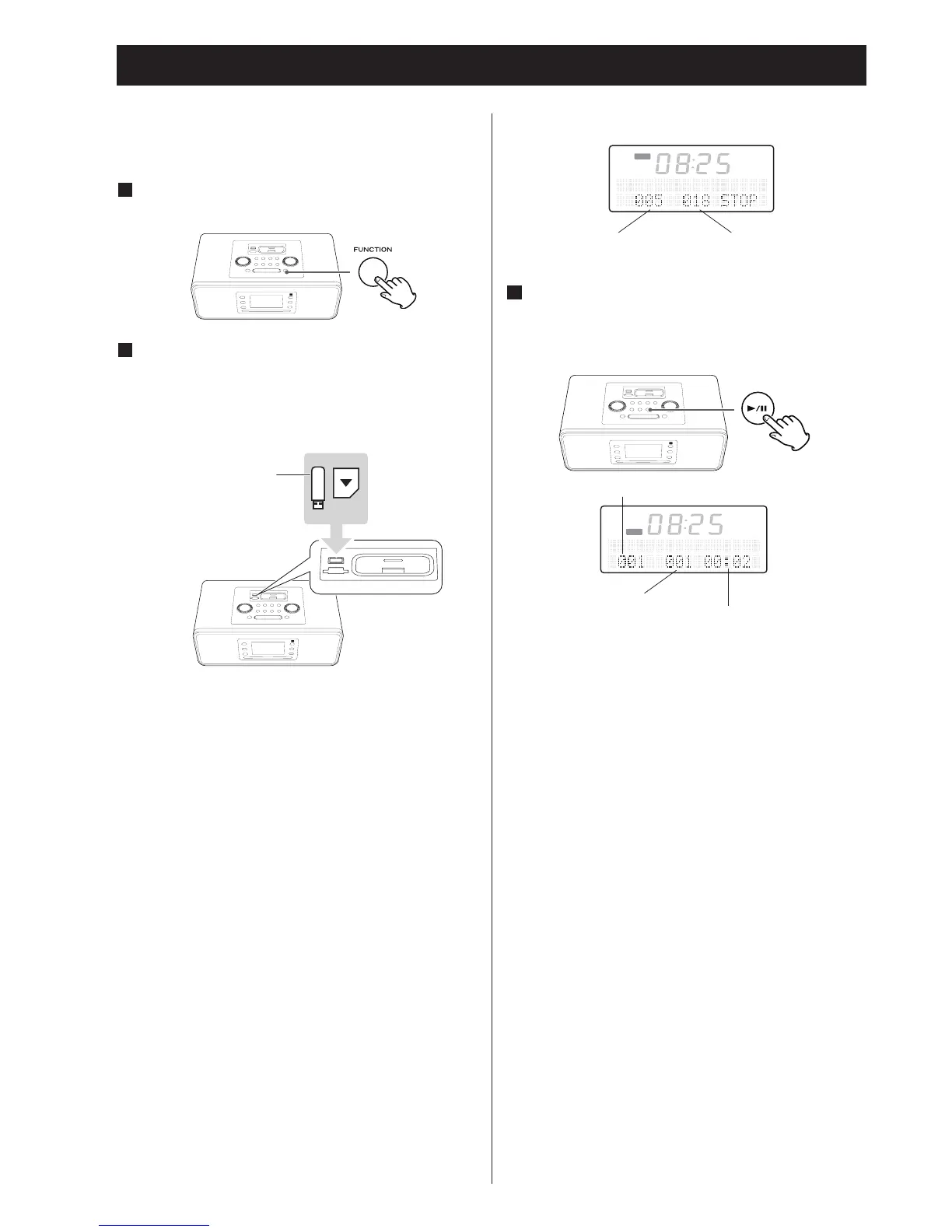
Press the FUNCTION button to select "USB" or
"SD".
2
Plug your USB or SD memory card into the USB
or SD connector.
• Take the SD memory card into the SD connector a slight
“click” is heard indicating SD memory card is mounted
correctly.
•
It takes a few seconds for the unit to load the USB/SD
memory card. No buttons will work during loading. Wait
until the total number of the folders and the total number
of files on the USB/SD memory card are displayed.
•
Do not close the cover if the USB/SD memory card does into
the USB/SD connector.
When a USB/SD memory card is loaded
3
Press the Play/Pause button (y /J) to start
playback.
Playback starts from the first track on the USB/SD memory
card.
• USB/SD files recorded out of folders are automatically put in
the “ROOT” folder, and playback starts from the first file of
the ROOT folder.
•
W
hen the playback of all the tracks/files has finished, the
unit stops automatically.


 To Next Page