13
Listening to CD/MP3
1
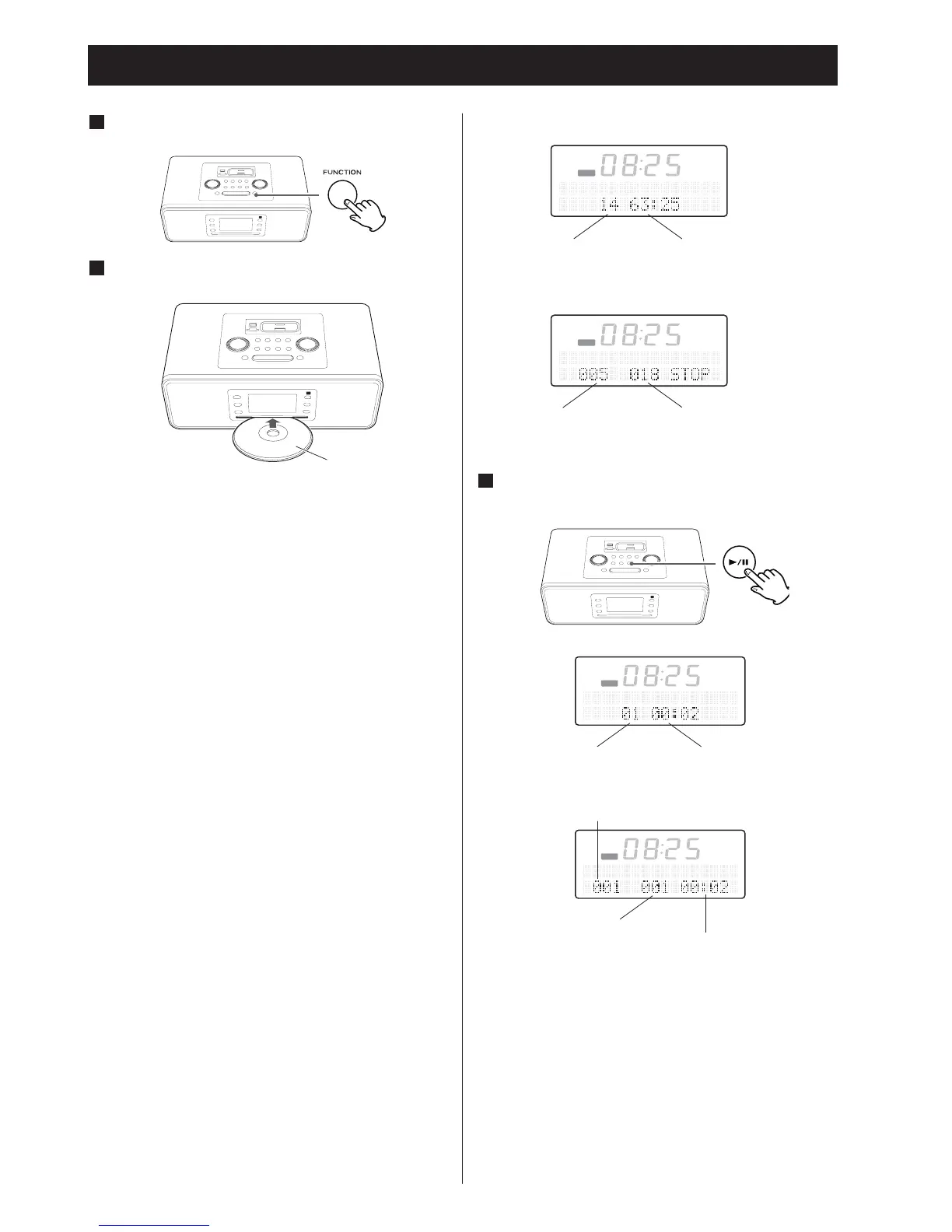
Press the FUNCTION button to select “CD”.
2
Insert a disc with the printed label face up.
When you insert disc in each function, the SR-3DAB
will switch the function to "CD" and starts playback
automatically.
•
Do not push the disc for
cibly.
• Do not insert more than one disc.
• Do not attach adhesive label, etc. to either side of discs, as
doing so may cause malfunction.
• Do not use irr
egular-shaped discs.
• It takes a few seconds for the unit to load the disc. No
buttons will work during loading. Wait until the total
number of the files and the total play time of the disc are
displayed.
• W
hen no disc is loaded in the CD player, “NO DISC” is
displayed.
• When the disc is inserted with playable face forward, "ERR
DISC" is displayed few seconds, and the disc will be ejected.
• Do not insert a CD disc obliquely, but horizontally.
When a CD is loaded
When a MP3 disc is loaded
3
Press the Play/Pause button (y /J) to start
playback.
Playback starts from the first track/file of the disc.
• MP3 files recorded out of folders are automatically put in
the “ROOT” folder, and playback starts from the first file of
the ROOT folder.
• W
hen the playback of all the tracks/files has finished, the
unit stops automatically.
Do not tilt the unit with a disc inserted. It may damage the
disc and cause a malfunction.


 To Next Page