32
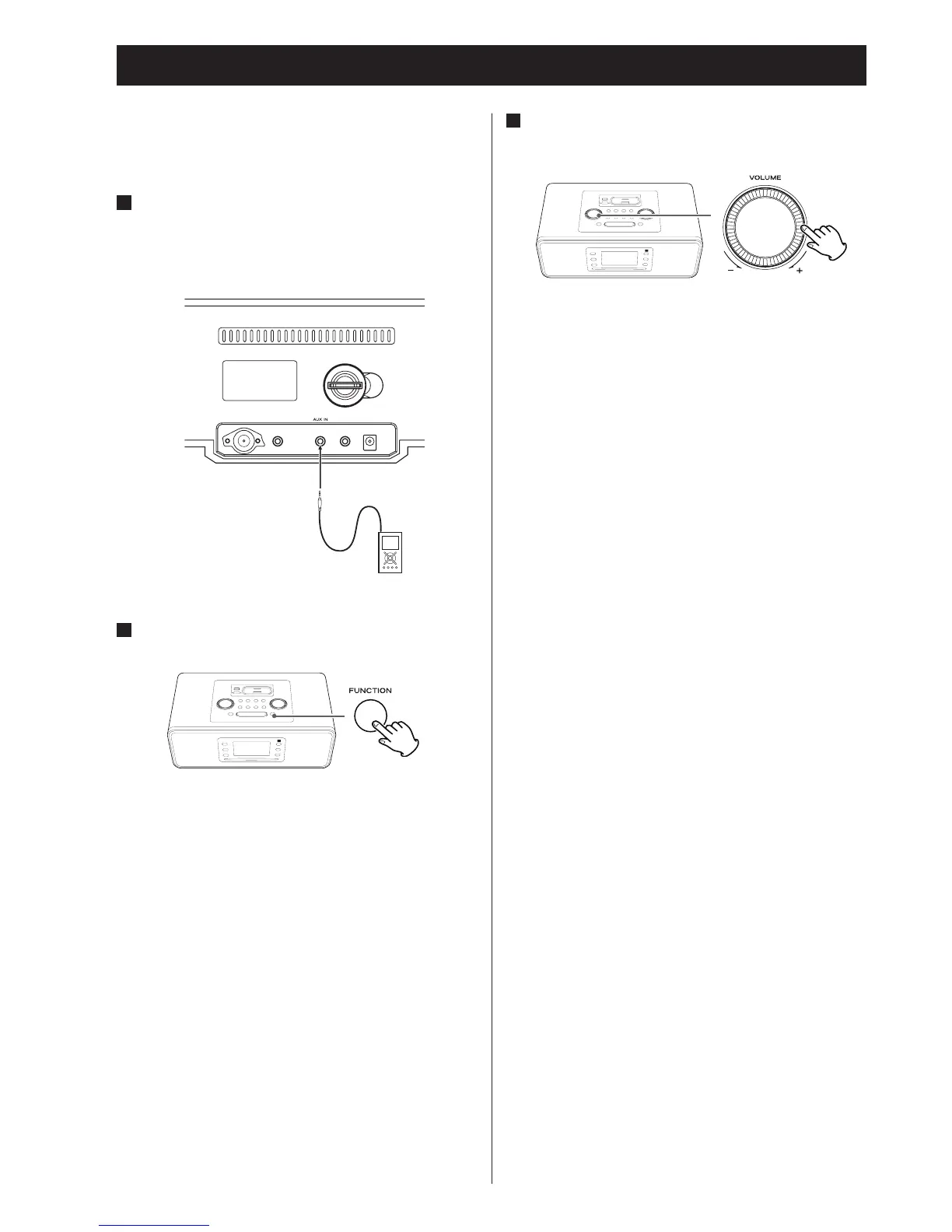
In addition to connecting other audio devices, you can use the
AUX IN to listen to an iPod that has no dock connector or when
an appropriate Dock Adapter is not available.
1
Connect the PHONES jack (audio output jack) of
a portable audio player to the AUX IN jack of
the SR-3DAB using the supplied stereo mini
plug cable.
2
Select “AUX” using the FUNCTION button.
3
Play the source, and adjust the volume of both
the SR-3DAB and the connected audio device.
When using the headphones jack of a device, if you do not
adjust its volume, you might not hear any sound from the
SR-3DAB.
• T
urning the volume of the connected device up too high
might cause the sound from your SR-3DAB to be distorted.
In this case, reduce the volume of the device until the
distortion stops and then adjust the volume level of the
SR-3DAB to a comfortable listening level.
Listening to an External Source


 To Next Page