9
Using an iPod/iPhone/iPad with the Dock
Compatible iPod/iPhone/iPad models
iPod classic
iPod nano (2nd, 3rd, 4th, and 5th generation)
iPod touch (1st, 2nd, 3rd , and 4th generation)
iPhone 4S, iPhone 4, iPhone 3GS, iPhone 3G
iPad 2, iPad
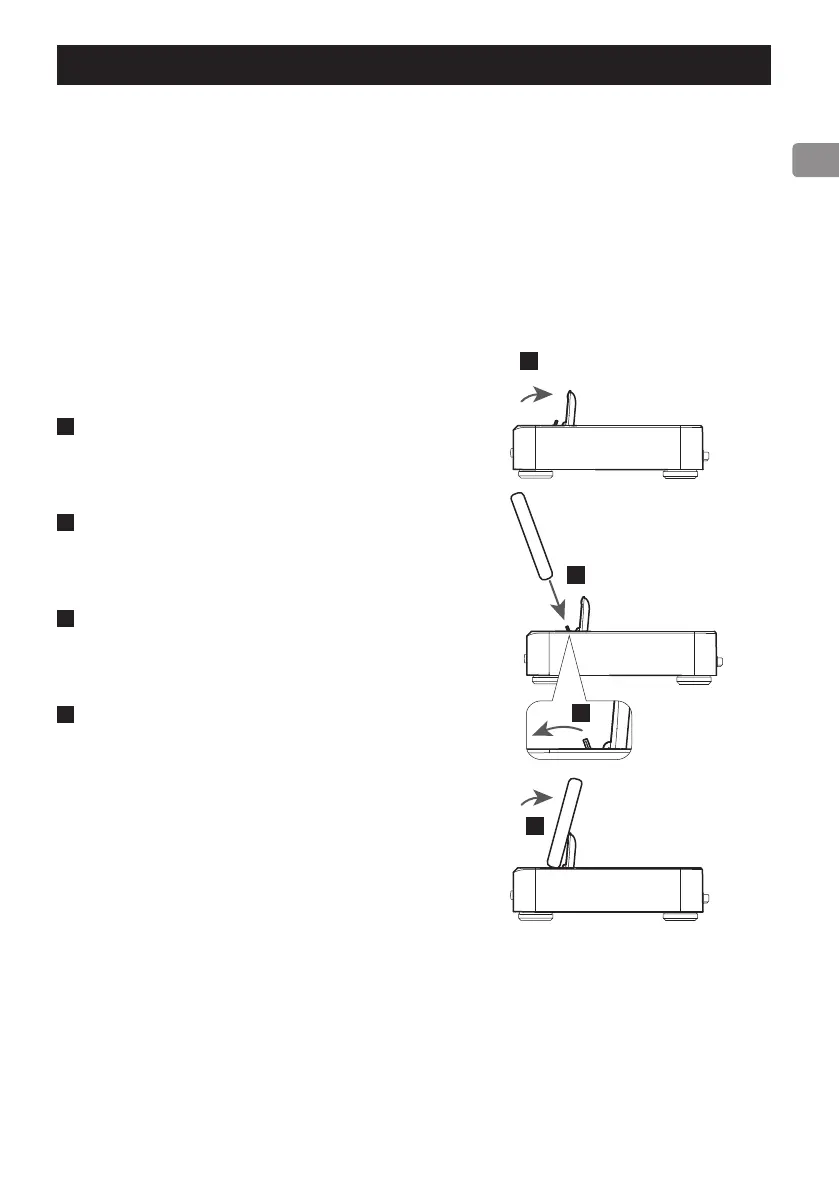
Connecting an iPod/iPhone/iPad
1
Open the dock cover.
2
Fold the dock connector forward.
3
Connect the iPod/iPhone/iPad.
4
Lean the iPod/iPhone/iPad against the dock
cover.
iPod/iPhone/iPad software
If the unit or remote control buttons do not work
properly with your iPod/iPhone/iPad, updating its
software might solve the problem.
Download the latest software for your iPod/iPhone/
iPad from the following Apple website.
http://www.apple.com/downloads/



 To Next Page