
 Need help?
Do you have a question about the Teac DVW-D11 and is the answer not in the manual?
Legal information regarding copyright and trademarks.
Statement on copyright infringement and illegal copying.
Overview of the manual's structure and content.
Lists the items included in the TEAC DVD Duplicator package.
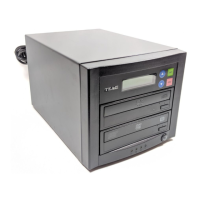
Details the components and controls on the front panel.
Description of the LCD display and navigation buttons.
Explanation of drive trays, LED indicator, and power switch.
Instructions for using drive trays and operating the power switch.
Details the connections and components on the rear panel.
Information on connecting the AC power cable.
Description of the unit's cooling fans.
Steps for unpacking and connecting the DVD Duplicator.
Step-by-step guide for copying from a DVD source drive.
Instructions for using the internal hard disk drive as a source.
Enables copying data from a source to target discs.
Simulates writing to target discs for media compatibility.
Combines test and copy, and verifies written discs.
Compares discs, scans source speed, and shows disc details.
Allows selection of DVD-ROM or HDD as the source.
Functions for loading, deleting, and selecting image files on HDD.
Details on loading, deleting, and selecting image files.
Selects the source drive for loading image files.
Functions for editing and copying audio tracks from CDs.
Editing tracks for CD-R/RW or transferring to HDD.
Uses the source drive as a music CD player.
Details various settings available in the Setup menu.
Configures display language and CD/DVD writing speeds.
Enables automatic start of operations when a disc is inserted.
Settings for startup menu, verification, comparison, and disc ejection.
Controls direct copying from source to target or via HDD.
Settings for burn mode, display, sounds, and system info.
Options for quick and full erasure of DVD-RW discs.
Enables access to advanced system configuration settings.
Settings for buffer protection, overburn, and error skipping.
HDD formatting and verification (factory use only).
Functions for burn-in tests, firmware updates, and hardware diagnostics.
Resetting to defaults and format support settings.
Settings for CD-Text copying and USB mode (not applicable).
Explains messages displayed during normal operation.
Explains messages specific to models with a hard disk drive.
Explains messages related to audio editing functions.
Guidelines for handling discs to prevent damage.
Instructions on how to load and eject discs from the drives.
Details the product warranty terms, coverage, and duration.
Instructions on how to obtain warranty service.
Information on limitations of implied warranties and exclusions of damages.
Contact details for TEAC America Service Center.
 General
| Brand | Teac |
|---|---|
| Model | DVW-D11 |
| Category | Disc Duplicator |
| Language | English |

 To Next Page
