6
Names and functions of parts
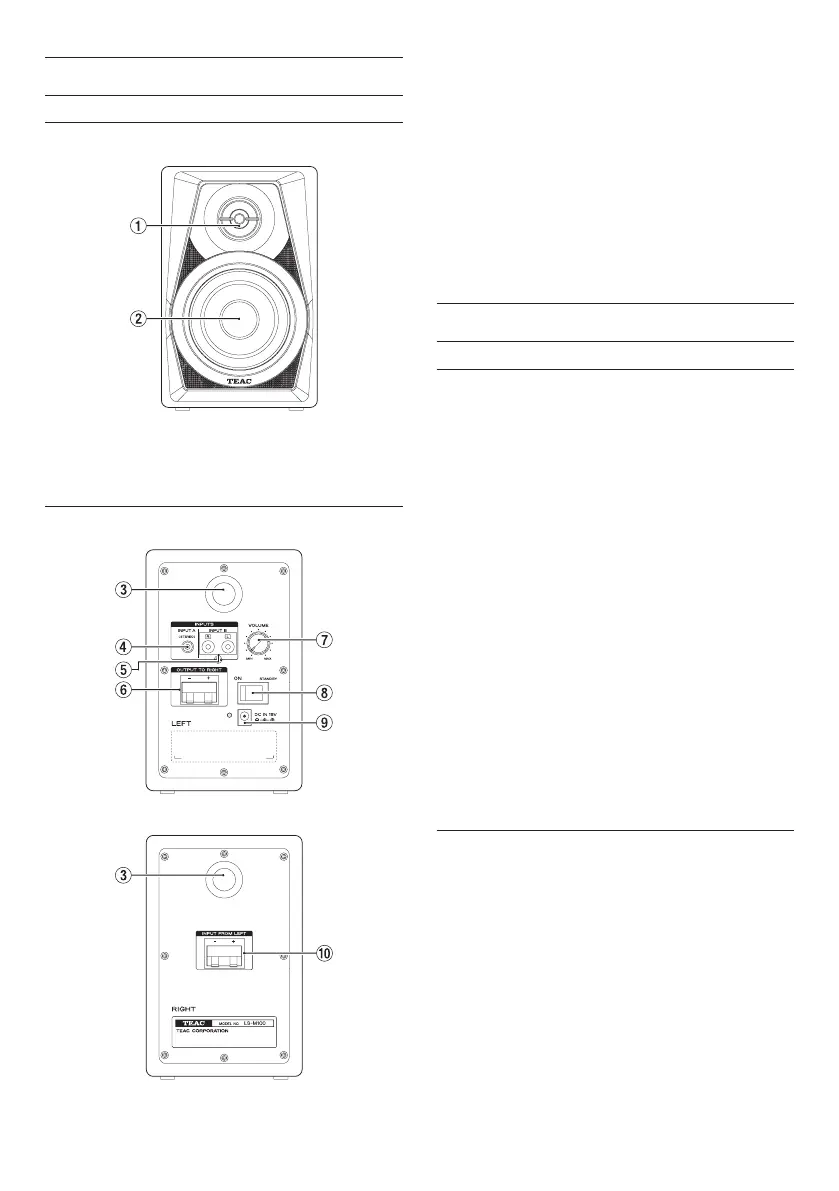
Front panel
Same for both active and passive units
1 Tweeter
2 Woofer
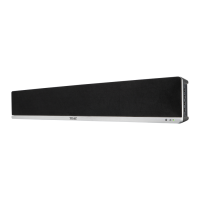
Rear panel
Active unit
Passive unit
3 Bass reflex port
4 Stereo mini input jack
5 RCA pin input jacks
6 Speaker terminal (OUTPUT TO RIGHT)
Connect to passive unit.
7 Output volume knob
8 Standby/On switch/indicator
9 DC IN 15V connector
0 Speaker terminal (INPUT FROM LEFT)
Connect to active unit.
Preparation
Precautions before making connections
• When unpacking the speaker units, do not hold
them by their tweeters or woofers.
• Connect signal cables and power cords so that
they will not become caught on anything.
• Before turning the built-in amplifier on, minimize
the volume of the input signal. Turning it on while
inputting a loud signal could damage the speaker.
• Do not continuously use it for a long time at a loud
volume. Doing so could harm your hearing.
• Use power cords, power outlets, audio signal
cables and connectors that are undamaged and
free of wiring shorts and other defects.
• Set the power switch to OFF before connecting the
power cord.
• Do not input signals other than audio signals.
• Before connecting an audio signal to this unit,
confirm that the level of the input signal is
minimized and the power switch of the built-in
power amplifier is set to OFF.
• Always use the correct polarity.
Connections
1. Set the power switch to OFF.
2. Connect the included AC adapter (PS-P1524E) to
the speaker and then to the power supply.
3. Use a commercially available connection cable to
connect the input jack(s) of the active unit to the
output device.
4. Use the included speaker cable to connect the out-
put terminal of the active unit to the input terminal
of the passive unit.



 To Next Page