12
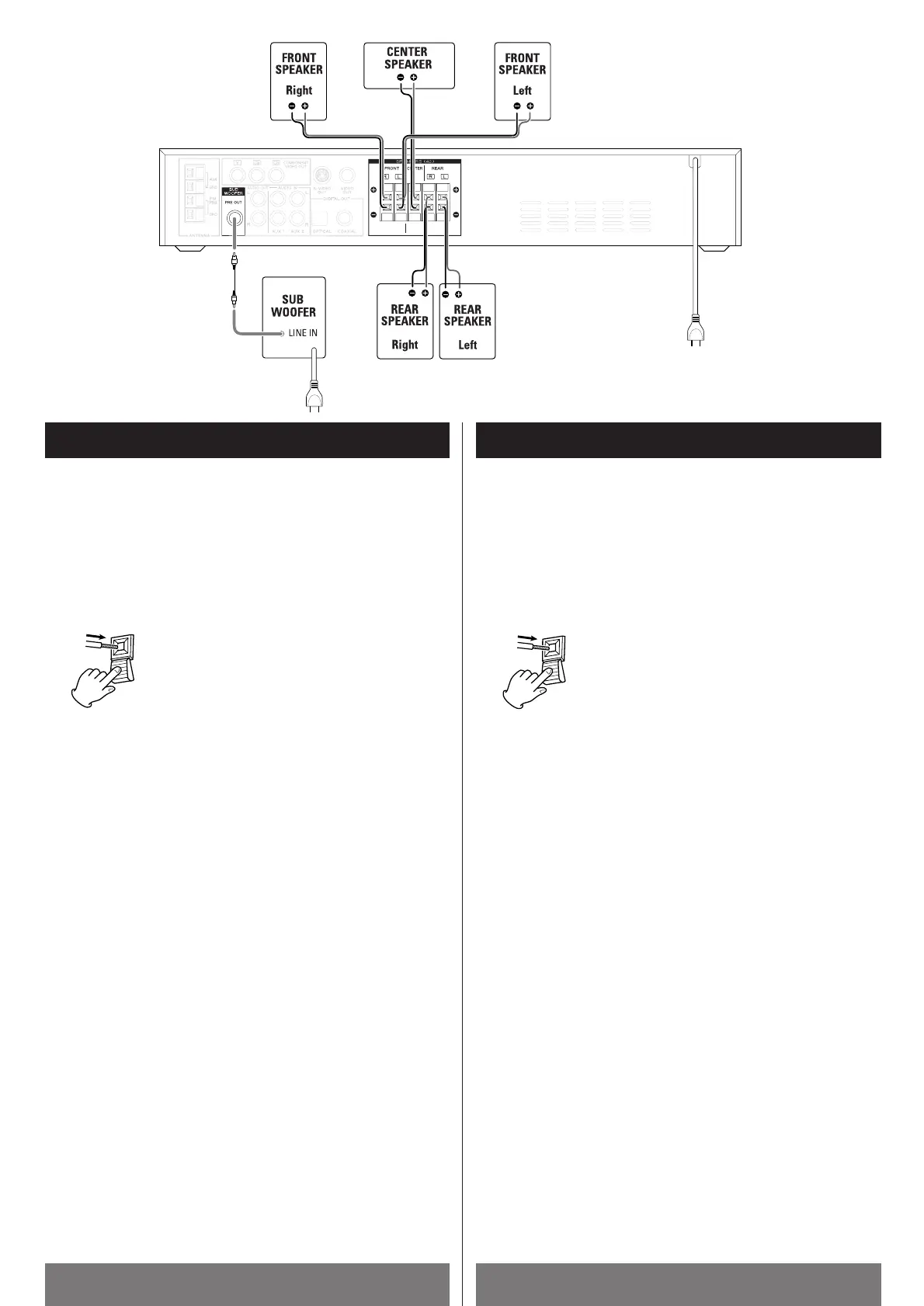
Connection (Speakers) Raccordement (haut-parleurs)
CAUTION
Turn off the power of all the equipment before making connections.
Read instructions of each component you intend to use with this
unit.
Be sure to insert each plug securely. To prevent hum and noise, do
not bundle the connection cords with the power cord or speaker
cord.
How to connect :
Press the lever, insert the stripped and twisted
end of the cord, then release the lever. Make
sure it is fastened securely by pulling the cord
lightly. Make sure none of the plastic insulation
is inserted in the opening.
a SPEAKERS
< Connect the provided speaker cables (or other suitable cables)
from the speaker terminals to the terminals of the amplifier. Be
sure to match the color of the cables with the color of the
terminals.
<
Be sure that the positive + terminal of the speaker is connected
to the corresponding +
terminal of the amplifier, and that
negative _
matches _.
<
When connecting to an amplifier having an output higher than the
maximum rated input of the speaker, be careful not to exceed the
speaker’s maximum input, otherwise it will damage the speaker.
<
Make sure the speakers identified as “Front” and “Center” are
placed near the television. They are magnetically shielded to
avoid TV color distortion. The “Rear” speakers are not
magnetically shielded and may cause this distortion on your TV.
b SUBWOOFER PRE OUT jack
Connect the component with the supplied RCA cable or an
equivilant.
c Power cord
< Be sure to connect the power cord to an AC outlet that supplies
the correct voltage.
<
Hold the power plug when plugging or unplugging the power cord.
< When the cord is plugged in, a small amount of current continues
to flow to the unit, even when the power is turned off. Unplug the
power cord from the AC outlet when the unit isn't in use for some
time.
ATTENTION
Mettre hors tension tous les appareils avant de faire des
branchements. Lire les instructions de chaque appareil que vous
avez l’intention d’utiliser avec cet appareil.
S’assurer d’enfoncer chaque fiche bien à fond. Pour éviter le
renfolement, éloigner les câbles de raccordement du courant
d’alimenation et des câbles des haut-parleurs.
Branchement correct:
Pousser le levier, introduire le bout du câble
dénudé et tressé et relâcher le levier. Tirer un
peu sur le câble pour assurer qu’il est bien tenu
en place. Assurez-vous qu’aucun plastique
pénètre l’ouverture.
a Haut-parleurs
< Au moyen des câbles de haut-parleur fournis (ou d’autres câbles
appropriés), raccorder les bornes des haut-parleurs aux bornes
de l’amplificateur. Identifier les câbles par leurs couleurs.
<
S’assurer de brancher la borne positive des haut-parleurs sur les
bornes positives de l’amplificateur; et les bornes négatives sur les
bornes négatives.
<
Si la sortie de votre amplificateur est plus puissante que l’entrée
prévue des haut-parleurs, faire attention à ne pas alimenter les
haut-parleurs en dépassant leur entrée maximale admissible.
Sinon, ils en seront endommagés.
<
Assurez-vous que les haut-parleurs marqués “Front” et “Center”
sont placés près du téléviseur. Ils ont un blindage magnétique
pour prévenir la distortion des couleurs. Les haut-parleurs
arrières ne sont plas blindés et peuvent causer de la distortion
des couleurs de votre téléviseur.
b Prise SUBWOOFER PRE OUT
On n’y branche le subwoofer au moyen d’un câble muni d’une
prise RCA on son équivalent.
c Cordon d’alimentation
< S’assurer de raccorder le cordon d’alimentation sur une prise de
courant qui fournit la tension correcte.
<
Tenir la fiche d’alimentation en branchant ou débranchant le
cordon d’alimentation. Ne pas tirer sur le cordon lui-même.
<
Quand le cordon d’alimentation se trouve branché, un faible
courant continue à entrer dans cet appareil même si celui-ci est
mis hors tension. Débrancher le cordon d’alimentation quand
vous avez l’intention de ne pas utiliser cet appareil longtemps.
ENGLISH FRANÇAIS
a
b
c



 To Next Page