ENGLISH FRANÇAIS
31
Basic Setup (9) Réglage de base (9)
Presetting Radio Stations
You can preset 40 stations for FM and AM
randomly. Before tuning, make sure that you
have turned down the volume to a minimum
listening level.
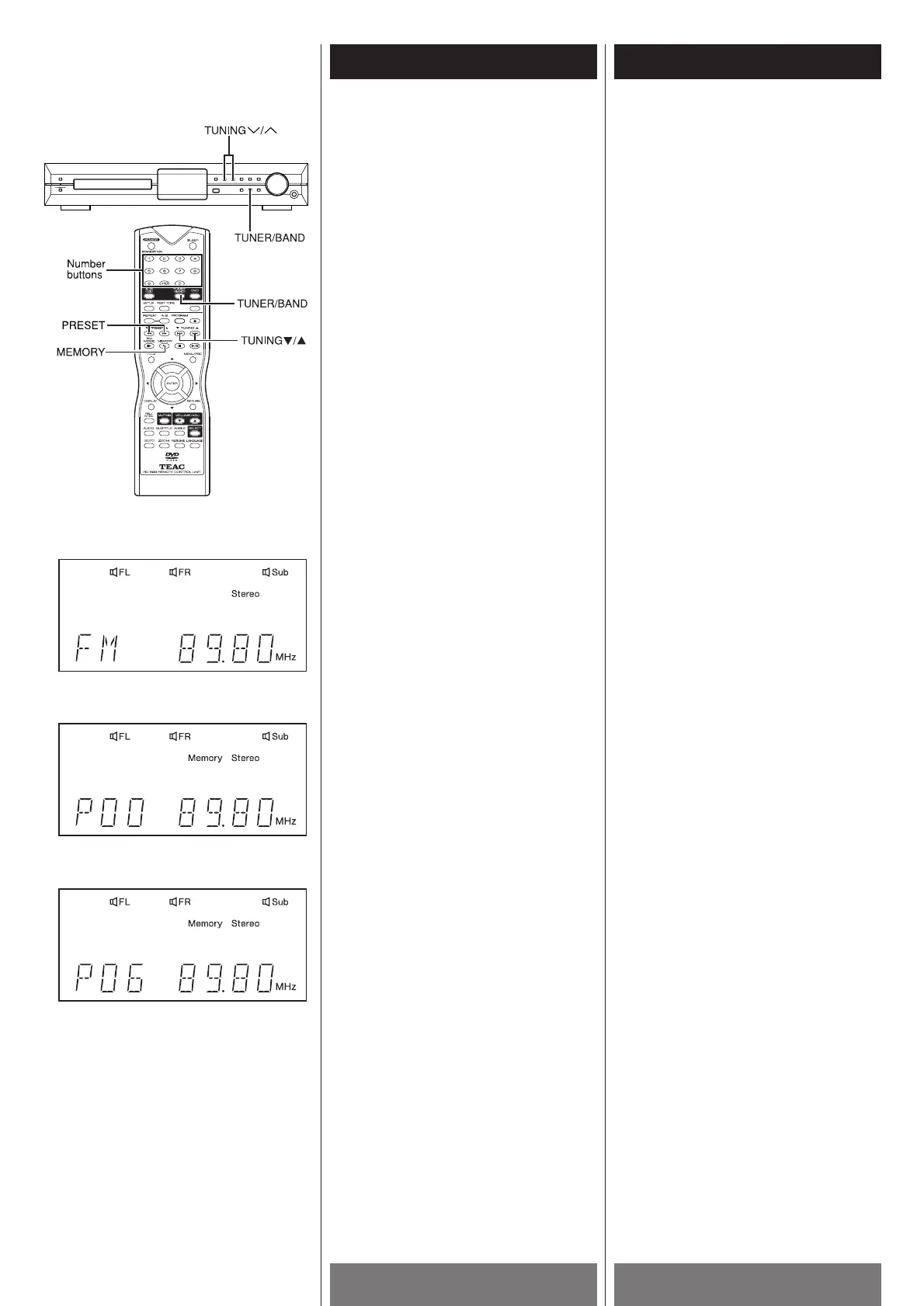
1 Press the TUNER/BAND button on the
remote control to select Tuner function.
2 In TUNER mode, press the TUNER/BAND
button to select desired FM or AM band.
3 Press and hold the TUNING(b /5 )
buttons until the frequency indicator
starts to change automatically, then
release the button.
Scanning stops when the system tunes in
a station.
4 Press the MEMORY button.
A preset number “P00” and “Memory”
indicator appear on the front panel
display.
5 Press the PRESET(b/5) buttons on the
remote control to select a preset number
you want.
You can use the number buttons (0~9 /
+10) on the remote control to key in a
preset number directly.
6 Press the MEMORY button again to store
the station.
If you do not press this button in 5
seconds or you press any other buttons,
the station won’t be stored in the system.
The preset number and “Memory”
indicator disappear.
7 Repeat Step 2 to 6 to store other stations.
To tune in a station with a weak signal
Press the TUNING(b/5) buttons repeatedly
in Step 3 to tune in the station manually.
Pré-réglage des postes de
radio
Vous pouvez aléatoirement pré-réglés 40
postes FM et AM. Avant de syntoniser,
assurez-vous de baisser le volume au
minimum.
1 Appuyer sur la touche TUNER/BAND
pour engendrer la fonction Tuner
directement.
2 En mode TUNER, appuyer sur la touche
TUNER/BAND pour engendrer la bande
désirée FM ou AM
3 Appuyer et retenir les touches
TUNING(b
/5 ) jusqu’à temps que
l’afficheur de fréquence commence à
changer automatiquement, ensuite
relacher la touche.
Le balayage s’arrête quand le système
syntonise un poste.
4 Appuyer sur la touche MEMORY
Un numéro pré-réglé “P00” et “Memory”
sont affichés sur le panneau avant.
5 Appuyer sur les touches PRESET(b/5)
de la télécommande pour choisir le
numéro pré-réglé désiré.
Vous pouvez utilisés les touches
numériques (0-9/+10) de la
télécommande pour entrer un numéro
pré-réglé directement.
6 Appuyer sur la touche MEMORY de
nouveau pour entreposer le poste. Si
vous n’appuyez pas cette touche en
dedans de 5 secondes ou vous appuyez
sur n’importe quel autre touche, le poste
ne sera pas entreposer dans le système.
Le numéro pré-réglé et “Memory”
disparraissent
7 Répéter les étaches 2 à 6 pour
entreposer d’autre postes.
Pour syntoniser un poste ayant un signal
faible
Appuyer sur les touches TUNING(b/5 )
répététivement à l’étape 3 pour syntoniser le
poste manuellement.
3
4
5



 To Next Page